Skip to content
View in the app

A better way to browse. Learn more.

LCPDFR.com

A full-screen app on your home screen with push notifications, badges and more.

To install this app on iOS and iPadOS
  1. Tap the Share icon in Safari
  2. Scroll the menu and tap Add to Home Screen.
  3. Tap Add in the top-right corner.
To install this app on Android
  1. Tap the 3-dot menu (⋮) in the top-right corner of the browser.
  2. Tap Add to Home screen or Install app.
  3. Confirm by tapping Install.

PagMan

Members
  • Joined

  • Last visited

Everything posted by PagMan

  1. Haha now i feel stupid i know one was for 32bit and then i was like oh then the other is something else, so i forgot to install one. Haha thanks it works now.
  2. Dont that still says im missing it.
  3. I even reinstalled it just to see if something went wrong and as you can see in the picture I have it inslatted and i still get the error.
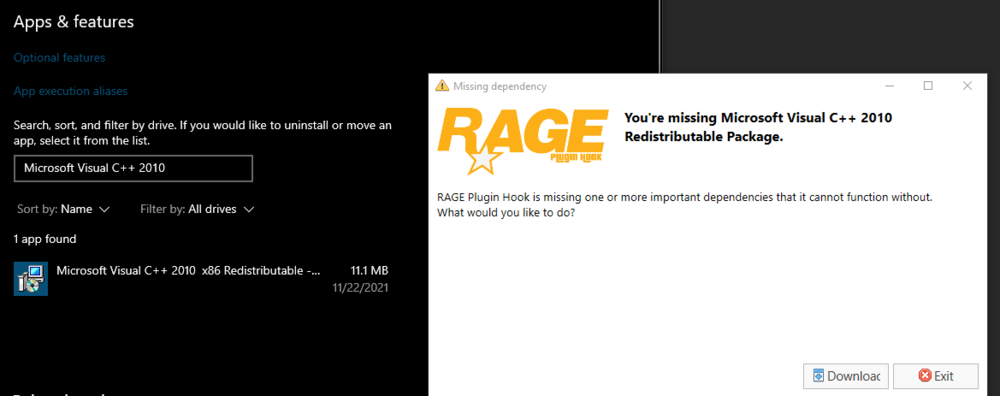
  4. So I downloaded and installed LSPDFR and now when i try and start it with rage hook plugin it keep saying im missing microsoft C++ 2010 package, but i have downloaded it and installed it. What should i do?

Account

Navigation

Search

Search

Configure browser push notifications

Chrome (Android)
  1. Tap the lock icon next to the address bar.
  2. Tap Permissions → Notifications.
  3. Adjust your preference.
Chrome (Desktop)
  1. Click the padlock icon in the address bar.
  2. Select Site settings.
  3. Find Notifications and adjust your preference.