


SlimInAZ
Insiders
-
Joined
-
Last visited
Everything posted by SlimInAZ
-
 Does your Person Carrying A Weapon callout include someone (not the original subject) stealing the officer's police car? Or was that just a coincidence? I was on that call - arrived on scene and the subject with the weapon was walking with another individual. After a gun battle, the subject was down; I turn around and the other AI jumps into my patrol unit and drives away.
 -
 Just ran my first callout (from Unsafe Callouts where I heard about this mod) using this mod and what a difference. I made a stupid tactical decision and paid for it with my life (very realistic - close range shot). Looking forward to incorporating tactical improvements in my gameplay.
- 625 comments
- 55 reviews
-
-

- 1
-
-
Is the free Visual Studio Community version sufficient for doing this kind of work? It's been a few years since I've written C++; would you say C# is close enough to C++ that it wouldn't be starting from scratch to get up to speed sufficient to write callouts? Thanks for starting this.
-
 Great pack and perfect for me as I generally prefer playing as state police. Only thing I've noticed so far was the ped uniform issue. I was able to specify my state police vehicle in the config file (and it correctly was used at the callout scene) but the peds were wearing park service uniforms. It's also great to see callouts that specifically warrant using traffic manager. Thanks again!
- 160 comments
- 20 reviews
-
-
- 1
-
-
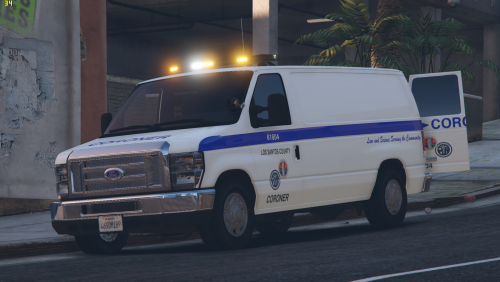 I already have other modifications to my vehicles.meta file and will lose those if I replace it with your file. Would you specify the specific lines and changes that need to be made to use your van? So far it seems the LODs at lines 16467–16472 (using Notepad++) are the only differences between the default Pony and your Pony values. The handling IDs are the same. Thanks.
 -
 Just installed it, works great, no crashes and I have a lot of mods running. Only suggestion is to rename the tickets issued by the officer to citations and anything that allows you to park to a permit. It was confusing that both things were called tickets. It would clear that up to use different words for the different items. So I'd check for a valid permit, and if none is present then I issue a citation. Great mod, adds more options than just always towing illegally parked vehicles. Thanks for the work.
- 95 comments
- 16 reviews
-
-
- 1
-
-
 Perhaps above the distance box or below the description box (at the bottom of the MDT screen).
- 447 comments
- 46 reviews
-
Just installed and used it for about an hour, worked like a charm - thanks! Only thing I'd like to see is a line (perhaps smaller text) indicating which callout pack the callout is triggering from. That would help troubleshoot if a particular pack is causing issues or just not working as described.
- 447 comments
- 46 reviews
-
-
-

- 3
-
-
 Tap [spacebar] while pressing S ; then tap [spacebar] while pressing W to shift back into 1st gear.
- 329 comments
- 24 reviews
-
 ADAM BOY CHARLES DAVID EDWARD FRANK GEORGE HENRY IDA JOHN KING LINCOLN MARY NORA OCEAN PAUL QUEEN ROBERT SAM TOM UNION VICTOR WILLIAM XRAY YOUNG ZEBRA
- 1,351 comments
- 82 reviews
-
This solves several problems I was having, thanks for that! I'm still tweaking the settings to get it where I can control the vehicle at all speeds. The only thing I'd recommend is a setting that deactivates the cruise control when the brake is applied. Basically simulating a real cruise that deactivates when the brake is applied, but reactivates at the set speed when resume is pressed. This mod has been great for highway patrol duty. Great work!
- 329 comments
- 24 reviews

