


.png.54ecd2cecbdbad94930ad7746eb96dac.png.e081ea7d323261a5381466b0ae81b9de.png)

q57
Members
-
Joined
-
Last visited
Everything posted by q57
-
Alt+T, pressing t twice does nothing
-
^ it wont be removed from the game, it shouldnt and it wasnt when i used the method, if the taser was removed, you installed lcpdfr incorrectly
-
you need to stand directly infront of the stolen car to call insurance on it, otherwise it'll take whatever other car you're near
-
is a GTA 5 issue, try verifying game data in steam/epic games wherever you downloaded it from
-
1. dont use aCompleteEditionHook 2. use LCPDFR V1.1 NON LEGACY VERSION[SCROLL DOWN, IT SHOULD BE ABOVE 1.0] 3. use [Non Legacy] LCPDFR V1.1 Scripthook and advancedhook 4. launch the game [dont use steam]
-
it might be your .net frameworks or some other system file, not gta 5
-
if the audio fix didnt work then something else is corrupted, some file is corrupted, but it just isnt the audio
-
1. no one said to delete slimdx 2. you may need to reinstall your .net frameworks
-
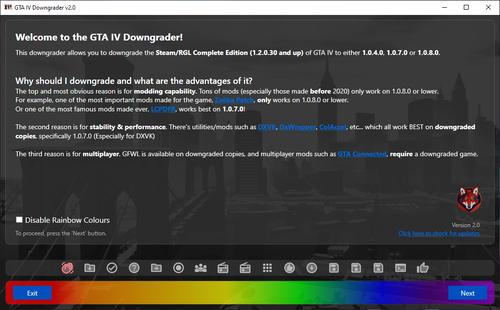 alternative downgrader for people with errors and stuff: https://zolika1351.pages.dev/mods/ivmenu/downgrading
- 7 comments
- 1 review
-
do you have the correct version of LCPDFR? LCPDFR version 1.1 legacy wont work with 1070
-
Yes this is definitely the problem, in the log file, it states that something went wrong when trying to "stream" an audio file, and then the game crashed reinstall GTA5\lspdfr\audio and run the game, it should be fixed it most likely was a sound mod, like for example realistic radio tones or realistic handcuff sfx, and the audio file wasnt converted properly the problem most likey was that when you accepted a callout, the dispatcher audio files tried to play, but they were corrupted and couldnt play, so the game crashed
-
commandline.txt in your mainn directory
-
we need the WHOLE log, not a small snippet, post that please
-
with how many plugins you have, i'm not suprised the game crashes like said above, alot of them are outdated so update them also, this doesnt really relate to the crash, but your commandline.txt is messed up, this is in your commandline: -ignoredifferentvideocard-disablecustomloadingscreen -ignoredifferentvideocard-disablecustomloadingscreen they are specified twice and are merged together, space them out and delete one of both
-
on 1.0.7.0 you cant have dsound.dll, it will break the game delete it and run the game
-
are you using a downgraded version or complete edition?
-
your audio files are corrupted , simple fix, reinstall the lspdfr/audio folder you do not have to do all this complicated stuff that was said above, just reinstall Grand Theft Auto V/lspdfr/audio this happened to me before and this fixed it, if it still doesnt work then do the above message
-
complete edition [the newest gta 4 version] is incompatible with 92% of every mod made for GTA, so if you use the complete edition version, it will crash downgrade to use this mod and ELS, etc etc downgrader here if you need the link: https://zolika1351.pages.dev/mods/ivpatch/downgrading if the link gets removed for "copyright" then just go to zolika1351.pages.dev and search around there
- 97 comments
- 67 reviews
-
I also use one, so i never see any ads, i just thought they appear off on the side, not like that
-
1. Steam auto-updates my game while another game is downloading (of course it does that) 2. My RPH says the new update doesnt work and is not supported 3. RPH also says i have a backup that i can revert to the last version 4. I click yes, then RPH "reverts" the version and says it should work again 5. I launch the game, The game does not start and i get the classic "Could not start game, error code 7002.1" Why does RPH lie to me about reverting the game? In fact, it broke my game instead of fixing it I need some help here.
-
I have the old calloutsPlus LCPDFR plugin that was deleted off the website, but i cant post it again without permission from whoever it was that created it
-
As everyone knows, advertisements plague websites. You clicked on a malicious ad, and by confirmation bias, you blamed bejoljo.
-
I found out what the problem was and fixed it, if anyone else is having this problem just ask me and i'll tell you how i did it
-
So i have modded replace vehicles, in all police slots listed below Police Police2 Police3 Police4 FBI FBI2 Sheriff Sheriff2 FBI and FBI2 look completely fine when away, but whenever i walk towards it all cars except FBI and FBI2 are working completely normal, any help?

-
Grand Theft Auto V\lspdfr\data\agency.xml



