


.png.54ecd2cecbdbad94930ad7746eb96dac.png.e081ea7d323261a5381466b0ae81b9de.png)

q57
Members
-
Joined
-
Last visited
Everything posted by q57
-
try thinking did you install anything in the mods folder recently? if it's nothing out of the ordinary, try renaming your mods folder to _mods and try again.
-
It doesn't have it anymore, but personally i wouldn't trust a developer that thought that was acceptable. the picture below explains it, it basically has a piece of code that attempts to delete your entire PC try NVR, its free and is compatible with LSPDFR Although since quantV is just an asi and not anything in the mods folder, try thinking did you install anything in the mods folder recently?
-
I'd rather not use quantV... it's... how should i put this... malware? quantV is malware, delete that please. and do an AV scan after that.
-
install 1.9.2 and try again https://github.com/alexguirre/RAGENativeUI/releases if it's not that, System.AccessViolationException error most likely related to the mods folder. usually NVE's fault if you have it, do you have a graphics mod?
-
why is it a zip?
-
is there a RageNativeUI.xml in your game directory?
-
Delete dsound immediately and never install it again... dsound is the bane of my existence...... and the complete edition downgraded is compatible with files just made for EFLC, use them and try again.
-
what file is it flagging?
-
RagePluginHook.exe is not a virus and appears as a false-positive, this is because it injects itself into GTA5.exe to run plugins which windows detects as a virus and rightfully so because this is a way many viruses run. If you have any antivirus, try excluding the whole gta 5 folder from being detected by it, and try going to the GTAV folder properties, and tick off read-only if it's on, and apply attributes to all subfolders, sometimes this is the issue and it fixed it for me before.
-
I'm pretty sure custo's mod already does this? it might be a mod confliction thats causing it if you have both.
-
what game version are you on? Also do you have dsound.dll and xlive.dll in the same folder?
-
from the log the problem isnt a script issue and instead a ped issue, it could be a bad ped mod or even a bad car mod, can you send the files for lcpdfr.log, advancedhook.log, advancedhookinit log, and asi loader log/asilog?
-
https://www.lcpdfr.com/forums/topic/141841-update-roundup-and-summary-for-gta-patch-v3258
-
yes sirensettinglimitadjuster i believe is outdated with the new version and will crash. this might be a confliction with the new els update or something? im not sure.
-
yes sirensettinglimitadjuster i believe is outdated with the new version and will crash.
-
The error code it sent out is very generic and doesnt tell anything about what actually happened but an issue might be that ELS isn't up-to-date, update it and try again IF you have it [download the advancedhook file] Also is LSPDFR, ScripthookV, and scripthookvdotnet all up to date? the new update rockstar put out made these mods all broken, but theyre now updated so you need to download them again, these might be the cause Also, if you are using the update.rpf from the previous gta 5 version in your /mods folder, you need to delete that and readd it aswell as all the mods that were in that rpf, it doesnt work if you have an outdated update.rpf.
-
-
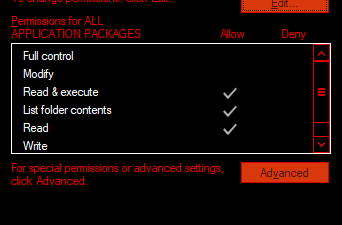
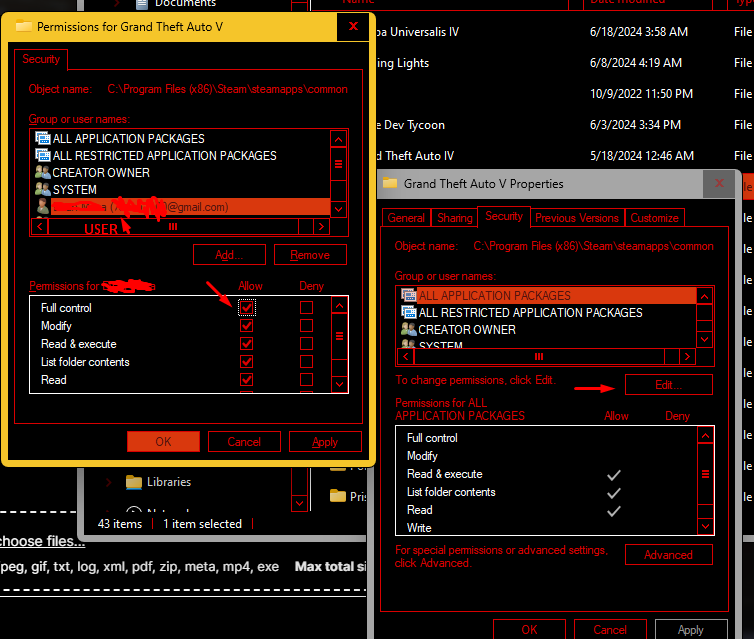
Sorry i've just never seen rgl route to that before, either way following up on unknown's, to do this you can also click on advanced and change the owner of the folder, and in the name field that opens either type your user account name or "Administrators" and it should work if you also apply attributes to subfolders, which should make you able to have access or you could do this to your user account security settings on the gta 5 folder properties, make sure to only do this to the main Grand Theft Auto V folder


-
-
Any mods requiring scripthookV you cannot use as it will crash, all others should be fine. just delete scripthookv and you can keep dinput. LSPDFR.com should tell you when scripthookv is updated. come here every day or so. And yes i did mean to reinstall all the mods in update.rpf, for some reason rockstar programmed it in a way that it breaks every update.
-
uninstall scripthookv for the time being as it is outdated. Dinput8.dll will load scripthookV automatically, and scriphookv will crash your game.
-
Do you have ScripthookV installed?
-
why is your gta 5 in a c:/games folder first of all? are you using a crack or pirated version?
-
the problem is that you are on the wrong game version, please update if you need to play on an old version, use the old rph and lspdfr and dont update them.
-
Unfortunately, if you have a /mods folder, after a title update, your game will not work. This is due to a conflict with your update.rpf, so if you have an update.rpf in your mods folder, you will have to delete it and readd all your mods in that rpf again. just the way rockstar programmed it.




