Skip to content
View in the app

A better way to browse. Learn more.

LCPDFR.com

A full-screen app on your home screen with push notifications, badges and more.

To install this app on iOS and iPadOS
  1. Tap the Share icon in Safari
  2. Scroll the menu and tap Add to Home Screen.
  3. Tap Add in the top-right corner.
To install this app on Android
  1. Tap the 3-dot menu (⋮) in the top-right corner of the browser.
  2. Tap Add to Home screen or Install app.
  3. Confirm by tapping Install.

Levinrin

Members
  • Joined

  • Last visited

Everything posted by Levinrin

  1. Im just curious what stops the community to add the new police light bars from online to existing vanilla police cars so we can get rid of the crappy dull police lights???? if there is a mod that already does this can someone link it been looking since the first police cars were added to online
  2. sorry ignore this as i found out the problem and yh sorry for wasting time
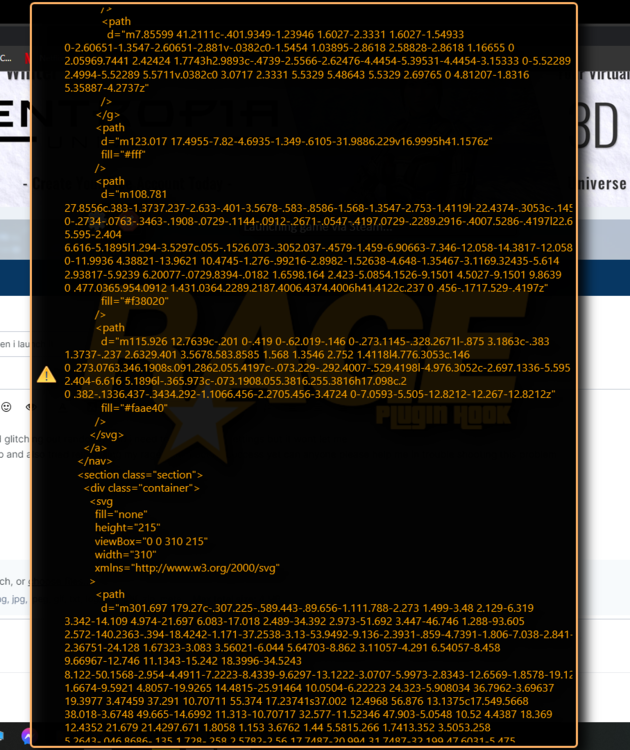
  3. my rage plugin hook started glitching out randomly and I need to get into the settings but it wont let me i have tried using my backup and also tried reinstalling my rage plugin but no success yet can anyone please help me in trouble shooting this problem The screenshot is when i launch it normally and it does the same thing when i go into the settings any help would be much appreciated thanks
Account

Navigation

Search

Search

Configure browser push notifications

Chrome (Android)
  1. Tap the lock icon next to the address bar.
  2. Tap Permissions → Notifications.
  3. Adjust your preference.
Chrome (Desktop)
  1. Click the padlock icon in the address bar.
  2. Select Site settings.
  3. Find Notifications and adjust your preference.