



austinblue27
Members
-
Joined
-
Last visited
Everything posted by austinblue27
-
Update: I went and removed all plugins and installed them all one by one. I left out Regular Callouts, and it worked without any issues and no crashes during gameplay. I think Regular Callouts was the issue, along with Traffic Policer. Thank you for all your help and suggestions, it seems so far that I'm able to finally play again!
-
Ok, so I removed Traffic Policer and it worked on next startup like no problem. Was playing for awhile and LSPDFR crashed, assuming a conflict between scripts caused it, I handled a callout a different way than how the callout itself wanted me to and used another script for EMS and it crashed. I was stupid to not look at the log afterwards to confirm that was the case. Anyway, I went in and removed Police Smart Radio since it wasn't working without Traffic Policer and was useless at that point and I'm back to the frozen loading screen when attempting to go on duty. No crash errors in the log at all that I can see. RagePluginHook.log
-
I'll give that a shot. don't know when I will get the chance to try today, but I'll let you know if that solves it!
-
I'll go mod by mod and see if when anything is taken out, if it works. I know cars are all on their latest release. Plugins I have are Regular Callouts, Leroy Callouts, Ultimate backup, BetterEMS, Stop the Ped, Traffic Policer, Computer+, EUP and Police Smart Radio. All are on the latest versions as well except EUP, that may need updating. If that doesn't work, I don't know what to do. It's so weird that it worked flawlessly without problems for a few days and then just suddenly stopped.
-
Decided to rebuild the mods folder from scratch, it worked on the first start up but then froze twice and crashed once.
-
That worked! However, none of my modded vehicles, sirens and sounds are there after renaming my mods folder. It just goes to a regular colored folder instead of a purple folder that it was originally in OpenIV. How would I go about fixing that?
-
Ok, I'll give that a shot and see what happens.
-
As of today, I am unable to play LSPDFR with any plugins. I also have found that EUP menu will now not load either. Though LSPDFR will load if it's simply stock LSPDFR and nothing else. Yesterday, the game worked without any problems, and I didn't change anything between yesterday and today. Any suggestions? RagePluginHook.log
-
This is a first for me, LSPDFR freezes when I go on duty. It worked just fine last night, so I'm not sure what the issue could be today. I did have a crash due to an error with a callout, not sure if that may have had a hand in the issue today? I don't know if the callout was from a pack or a default callout within LSPDFR. Any help would be greatly appreciated, thank you! Edit: This freezes the game , I should mention. I get no crash to desktop or error message from anything, like it's stuck in perpetual loading. If there is music playing like in the downtown precinct locker room, the music continues to play but everything else freezes. Edit 2: I decided to remove all added callout packs and it now works. The issue was a callout pack, which one I don't know, that was causing the freeze.
-
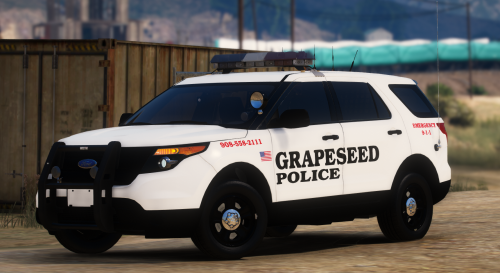 This looks awesome! Excited to see the full pack you're working on!
 -
 I absolutely love this pack! Been using it for State in may game for awhile now. I love the amount of lights on the cars, it fits that high visibility that State Police cars should have in my opinion and it just looks fantastic in game! The cars themselves are fantastic as well, great job on such a fine pack!
- 260 comments
- 37 reviews
-
Thanks! I'll give that a shot!
-
This will be my first time adding extra slots such as police5, police6, sheriff3 and so on. I have all the correct gameconfig files and extras needed to so as I have addon packs already in game and working. I was hoping someone could help me out in what to add into the vehicles.meta (assuming this is the correct spot) file for them to work. I just want to make sure I get it done right the first time and don't break the game in the process and have to re-mod it again. Thanks!
-
The ASI Method worked, thank you! That's a new method for me as well, I'll keep that in mind for next time it has problems.
-
I'll give that shot, I think I'm down to trying the ASI loader method left. Thanks!
-
I took a vacation over the weekend and was happy to jump back into GTA, except now, my ELS cars don't work. By that, I mean the audio ques are there and siren/horn work, but visually, nothing flashes except the taillights. What's more odd, is prior to my vacation, everything was working flawlessly. I've tried deleting and reinstalling ELS and the AdvancedHookV.dll, tried changing the cars, double checked to make sure the VCFs were correct which they were, and nothing. Is there anything else I could try to fix the problem?
-
Probably lol. I don't ever remember hitting that key at all, but I must have.
-
I honestly can't answer that question, because when I went in to check, it's back to working again. So I have no idea what happened.
-
I played GTA 5 about week or so ago, and ELS had been working just fine for months, everything is installed correctly, xmls are where they should be, I had no problems for a long time. Today, just a few minutes ago from posting, I jump on to find ELS now not working. Takedowns and cruise lights work just fine and show up as they should, but when going into the main ELS mode, the lights don't flash, not even on the ELS config panel when hitting ctrl+p. Only thing flashing is the tail lights. I hadn't done any mod changes of anything since I last played, so I'm not sure what could have happened. Any ideas and possible solutions? I tried uninstalling and reinstalling ELS but it didn't solve anything.
-
I was having the exact same issue as you were, and your fix worked for me! Thank you!
-
I've been having the same problem as you, maybe slightly different. I had installed a clean version of GTA V and the latest Ragehook and game launched correctly, loading LSPDFR as it should after install. Quit because I forgot to add a radiance mod in, launched game via Ragehook again and the game launches as if it were vanilla instead of through Ragehook. I can't even open the Ragehook command screen with the set keybinding for it. *EDIT*: I seemed to have fixed my problem and have everything working again by setting RPH to "forced window mode" and "borderless window". Now everything loads correctly. Maybe that'll help? Either or, good luck!
-
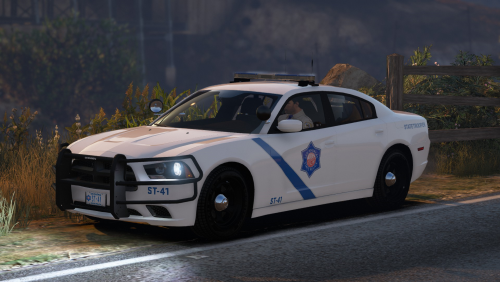 This is an amazing pack! I really like how you kept it simplistic. The lightbar is one of my favorites, and the fact you made the solar panel an extra so I'm not forced to have it on is so awesome for someone like me who hated seeing them on the top of the bar! I also like the fact you aren't forcing players to have the wrap around ram bars if we prefer them off. Well done on a great pack!
- 19 comments
- 16 reviews
-
-

- 1
-
-
That too. Why now, after all this time? Like Deputy Rourke mentioned, I don't think they are nitwits, but there has to be more than to what is being told. I just don't know. We may never know what really happened.
-
I don't like how any of this is playing out. I mean, the only thing I have heard is what GooD-NTS has said on the forum. Not to mention the quote on the grammatical errors. It's especially odd, when a PC Gaming news site picks up the story and reaches out to GooD-NTS, Take 2, and Rockstar all for comment, and hears nothing back. How do we know this isn't some loser trying to get back at the modding community? How do we know this isn't just GooD-NTS wanting to quit working on OpenIV, but doesn't want to right out say it? For me, there isn't enough on the matter to form any feelings towards it. I'm very skeptical at the moment, and I hope more comes to light so we really know what's going on.
-
 That engine is looking really good! Nice work so far!

