Skip to content
View in the app

A better way to browse. Learn more.

LCPDFR.com

A full-screen app on your home screen with push notifications, badges and more.

To install this app on iOS and iPadOS
  1. Tap the Share icon in Safari
  2. Scroll the menu and tap Add to Home Screen.
  3. Tap Add in the top-right corner.
To install this app on Android
  1. Tap the 3-dot menu (⋮) in the top-right corner of the browser.
  2. Tap Add to Home screen or Install app.
  3. Confirm by tapping Install.

steven1351

Members
  • Joined

  • Last visited

Everything posted by steven1351

  1. Attaching the crash log. Any help is greatly appreciated, was really looking forward to playing 😕 RagePluginHookLauncher.log
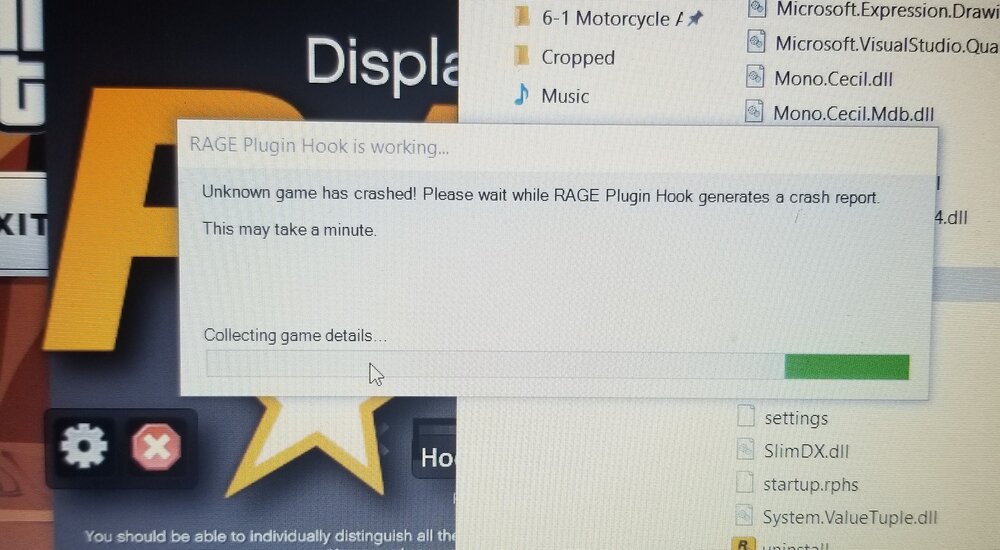
  2. Hi, I have installed LSPDFR exactly according to the install video and when I run RagePluginHook while GTAV is loading (also while the game is already up I tried that already) GTAV suddenly crashes and I get this message (photo attached). There was another tread similar to this but that person's game was crashing after he was already playing it. I did try to increase the timeout duration and disabled LSPDFR mod to load in the RagePluginHook settings per that thread and this has not worked. Also, I just installed GTAV so it should be the most recent version. Any assistance is greatly appreciated!
Account

Navigation

Search

Search

Configure browser push notifications

Chrome (Android)
  1. Tap the lock icon next to the address bar.
  2. Tap Permissions → Notifications.
  3. Adjust your preference.
Chrome (Desktop)
  1. Click the padlock icon in the address bar.
  2. Select Site settings.
  3. Find Notifications and adjust your preference.