
CorsoMaxima
Members
-
Joined
-
Last visited
Everything posted by CorsoMaxima
-
1) I've said before, the LCPDFR has outdated coding, meaning it does not work properly with the ScriptHook. 2) You either messed something up or the downgrader is not working properly.
-
1) You cannot pull people over -> because as I said, the outdated LCPDFR conflicts with the updated Scripthook. 2)
-
Make sure that you installed everything from LCPDFR Installer, otherwise it might not work.
-
Are you using GTA 4 Complete Edition?
-
Welcome to the community.
-
1) there is no log file attached 2) reinstall LCPDFR
-
https://www.lcpdfr.com/forums/topic/67492-lcpdfr-keeps-crashing/
-
https://www.lcpdfr.com/forums/topic/126487-cant-pull-over-cars-gta4/?do=findComment&comment=733297
-
Are you using the latest version? If so, that's because the outdated LCPDFR is conflicing with the ScriptHook/AdvancedHook.
-
try without downgrading it
-
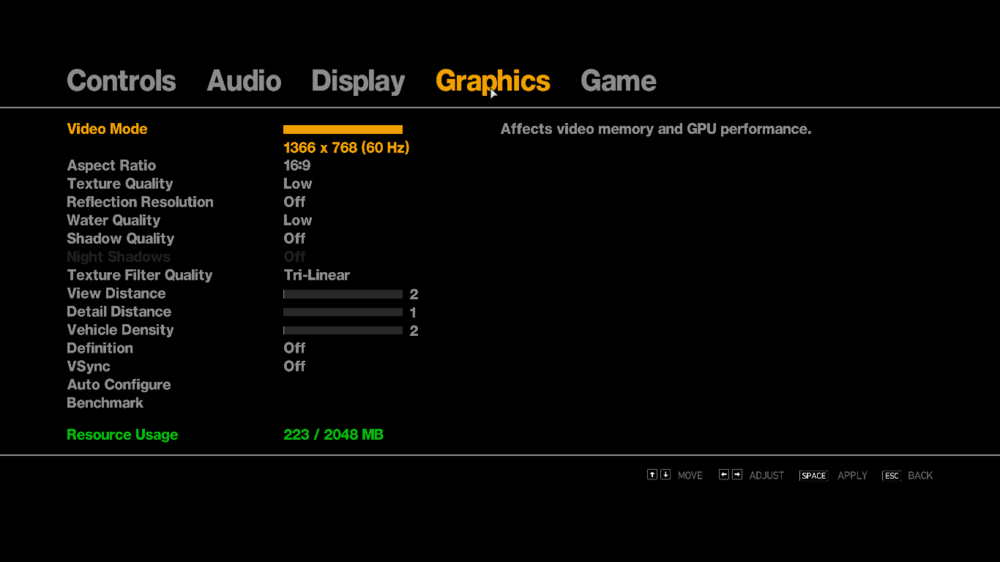
1) Sorry, the complete edition fix* [mentioned above] 2) In GTA 4, click on options and head to graphics menu where you can change your settings, and make it to a lower amount
-
What we can try is to install LCPDFR into the game root folder, then put the competitive fix into the game root folder, then without any mods (downgroade mod too!) and making the graphics lower (no shadows, low textures, etc), test it.
-
LCPDFR is out-dated for Complete Edition. Check the LCPDFR.ini file for any invalid car/weapon models, also you don't have to care about API for now.
-
Do you have this installed?
-
Is there any plugins that you have add on?
-
try this
-
try this
-
Did you put everything in the correct place? Which version of GTA 4 are you using?
-
Is/Are the car/cars, that you use, ELS-compatible?
-
That's dedication.
-
let's say it is aged
-
Alright, thank you
-
It's a great video! What kind of plugins/mods do you use with LCPDFR?