


Jkempindy
Members
-
Joined
-
Last visited
Everything posted by Jkempindy
-
Solved! Found out that for some reason when opening the file with 7zip, no matter what I did, whenever I moved it something would change and the file would no longer work. Even after deleting the xml file it seems it wanted to do this any time I tried moving it with 7zip, so when I used WinRAR it worked flawlessly. Long story short, try WinRAR, I guess?
-
Out of seemingly nowhere, having changed nothing between the last time I played LSPDFR and when the error started occurring, I'm experiencing an odd error whenever I try to go on duty. Whether I use ForceDuty or try to go on duty at any station, the error is thrown and I only lose one plugin. It seems that there's an issue with Ultimate Backup, however I've already uninstalled and reinstalled it and all of the XML files that were related to it. Given the relatively vague log data I got it seems as if there's a misplaced character somewhere, but going off of the Line and Column data, I couldn't find anything. Any help would be much appreciated. RagePluginHook.log
-
Update: Remigrated my mods folder, everything works fine now. Simple update... wonder why it didn't work in the first place.
-
Yeah, I updated and migrated... I'll try to migrate again, probably the issue. It's odd because I have migrated before and I haven't had this issue. I'll see if this works. Thanks.
-
First contains lines 1-57, Second contains lines 58-83
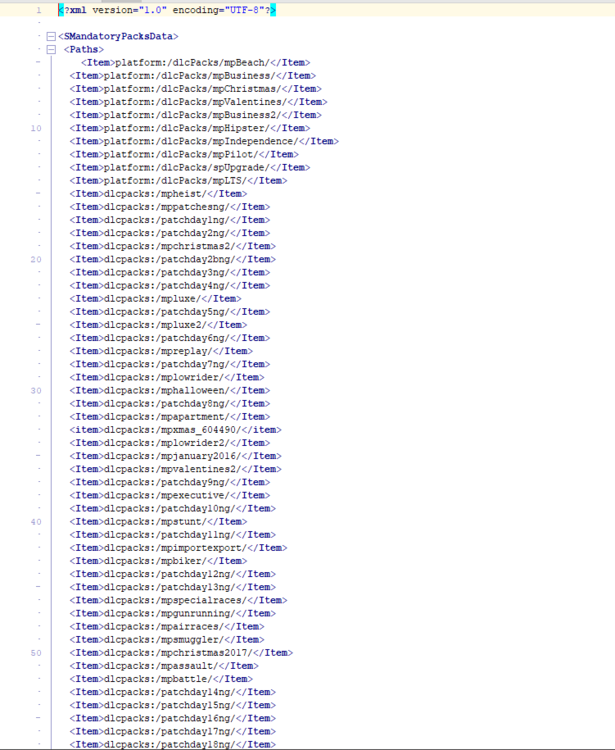
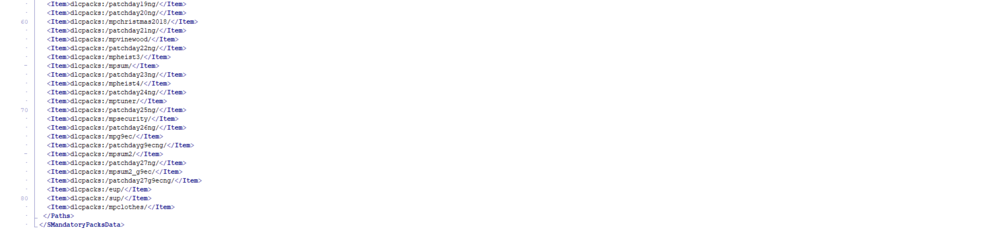
-
Ignore all of the enbseries. I use that for FiveM and I play with it uninstalled.
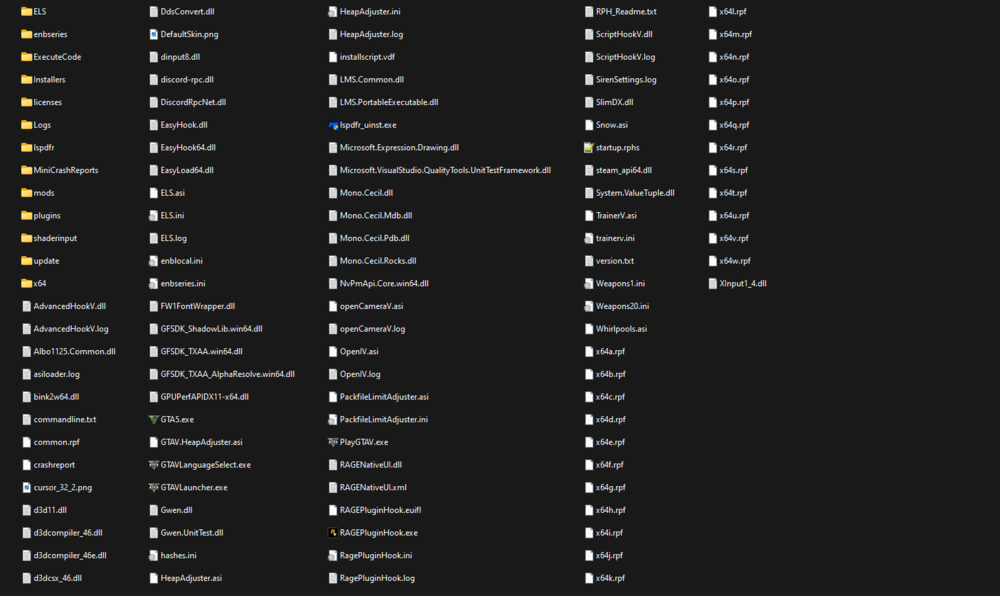
-
This does not work. I've tried both moving to Patchday9ecng and reinstalling the ASI Loader and OpenIV.asi to no avail.
-
I recently got back into LSPDFR after a break and decided to install some new cars. I know how to replace cars and I have done it many times before, but now when I try to replace anything I come up with a recurring issue. Any vehicle that I have replaced, this includes police, police2, police3, police4, sheriff, and sheriff2 all spawn as their vanilla vehicles. Everything works correctly, including the ELS functionality. I have already tried to delete and update my mods folder to no avail. I have also tried uninstalling and reinstalling the API loaders after reading other reports of the same issue. I have also tried moving my mods from patchday22ng to patchday26ng, the ones that I have used previously, as well as trying to move to patchday28ng. None of these have worked. I'm stumped and a solution or steps towards one would be much appreciated. Thanks!
-
Fixed! Turns out my update.rpf folders were out of date and I totally forgot! I used a tutorial found here to rebuild these folders, all I had to do was replace a gameconfig.xml and that was it. DarkVypr Thank you for the help!
-
It's currently 2:30 AM and I have things to do tomorrow, I'm going to sit on this and get back to you. Thank you for the help.
-
Update: Re-enabled the mods folder with everything and I am now back to that same issue. I wonder if it could be a GTAV update that came in recently?
-
That's so weird. I've been able to have a stable 60 FPS with minimal issues with about 10-20 of those cars all there at once.
-
I've thrown much more than that at GTA V and it worked fine ;-;
-
I will see if Heap Adjuster and another gameconfig will change the experience, I';ll get back to you.
-
Yes, 312k, and both my old and new computers have been able to handle them for qutite a while.
-
I want to mention another thing just in case this might contribute, I am using packfile limit adjuster to allow me to be able to run GTA V after installing NVE, I kept running into fil_pack_1 errors but they stopped with PFLA installed
-
Well yeah, but I'm asking about the number of polygons that should be concerning. For example, I have a charger model with 312,536 polygons that I've used for months and have had no issues with, even on my old computer that was total crap.
-
As far as I know, no. I am totally clueless to what would be considered too high of a polygon count. Could you tell me?
-
I have had a vehicle pack for the longest time and have had no issues. I would assume that a new GTA update has changed something? I only use replace vehicles.
-
That fixes it. Now I have to find a way to rebuild my mods folder and I sure as hell am gonna break something trying to do that. Thank you!
-
I have done 10000 all the way to 60000 and it hasn't changed anything. I have also always unticked LSDPFR to load at startup, all I load is RPH. I have tried the opposite and it just crashed my game. Whenever I do do loadplugin LSPD First Response.dll I get stuck on the blurred loading screen.
-
I have been trying to play LSPDFR for the past few days, but have not been able to. Every time I try to load the plugin LSPDFR, the game goes into an infinite loading screen where I am able to hear myself walk around, shoot guns, and do other things. Eventually if I click around the loading screen goes from "Loading LSPDFR" to "Loading Online" and everything freezes. When I try to load RPH before GTAV the entire thing just closes. I have some replace vehicles installed in the mods folder, and I have NVE for GTA V, but NVE hasn't been causing problems ever since I've gotten it. Help would be much appreciated, thank you! RagePluginHook.log
-
Hi! From what I can understand of this, you're asking to install a replace vehicle. If you want multiple addon packs, you just have to install the pack, it shouldn't overwrite the originals if it's something with a custom name. All you need to do is install it normally then add it to your dlclist.xml and it will work fine.
-
 Okay! Thank you, I'm a bit new to using OpenIV and things but hey, I'll figure it out some way or another
- 89 comments
- 11 reviews
-
No, However I did get a different gun pack and figured it out, maybe I'll work on getting this sometime soon.
- 89 comments
- 11 reviews



