SackettMods
Members
-
Joined
-
Last visited
Everything posted by SackettMods
-
-
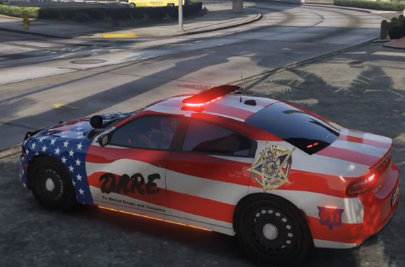 This is a vehicle skin I made for a 2018 D.A.R.E. Blaine County Sheriff Dodge Charger. It's a beautiful car. The car was made by uniFORM12oh2 and he referenced credit to (2018 Dodge Charger - Matt with parts from FH3 and Gamemodels) in his download. I have included a link to the download here. *** The video quality sucks.. It's GTA V!!! The vehicle is amazing in game though ***
- 2 comments
- 1 review
-
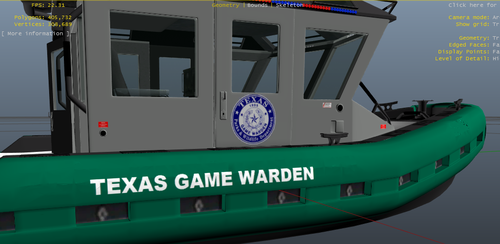 There are 2 separate files in here. You got a skin for the TX Game Warden boat with the Coast Guard stripe on the side. You also have a skin for a Texas Game Warden boat without the Coast Guard stripe on the side. The boat model is provided by TopCop72 and I have linked his download below.
 -
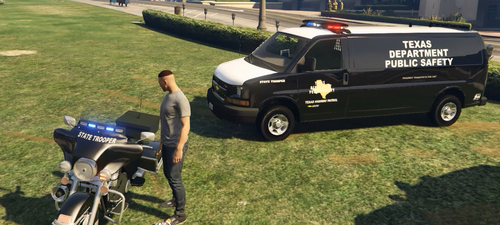 You get the skins for a (ELS) Texas State Trooper Prisoner Transport Van (model provided by SoCal Thero), You also get a skin for a (ELS) Texas State Trooper Harley Davidson Motorcycle Unit (model provided by Pusasaurus). The TX Game Warden Vehicles in this video is in a separate file to download.
 -
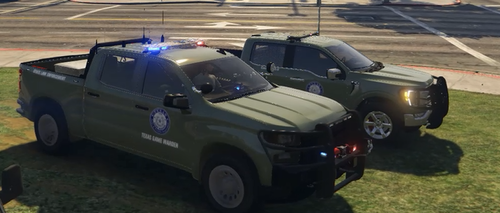 I have created the skins for the TX Game Wardens. You get a TX Game Warden skin for a 2020 Chevy Silverado (model provided by Ripple). You also get a TX Game Warden K9 Unit 2021 Ford F150 XLT (model provided by FireLion). The Texas State Trooper skins in the video will be in a different file.