


Seth019
Members
-
Joined
-
Last visited
Everything posted by Seth019
-
I have attached the Localization.INI into the path as can be seen in the screenshot. However, I have attached the log because LSPDFR crashed when I attempted to prime my game for Sync and so I went On-Duty and then it crashed. RagePluginHook.log

-
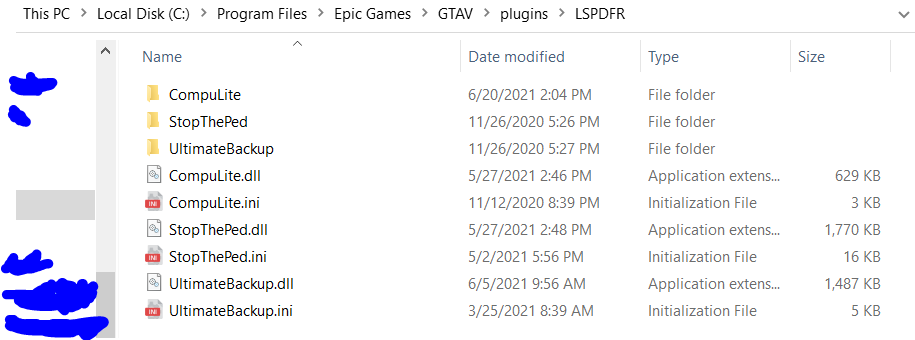
I have now moved the .INI files for all the plugins into the folder. You can see what it looks like with screenshot one. However, while it says Compulite loaded when I click Go On Duty, LSPDFR immediately crashed after a short freeze. I will also be attaching the log from my latest playthrough incase any errors may come from the console. For previous purposes, the .INI and .DLL files were found within the plugs/LSPDFR folder pertaining to whatever folder I went into. RagePluginHook.log
-
I have deleted the requested folders. However, I am unsure of what I am missing. I have followed the installation steps provided to me by the plugin and the only other items I were given were the items in the folders. If you could elaborate more on section 2 that would be greatly appreciated. Nonetheless, thanks for your help so far.
-
I have followed your instructions. However not knowing what to do with the other folders it now looks something like this:


-
I have gotten LSPDFR again and as per request here is the screenshot of C:\Program Files\Epic Games\GTAV\plugins I will also enclose a screenshot showing C:\Program Files\Epic Games\GTAV\plugins\lspdfr this is where the plugins are found


-
I have tried restructuring it by completely reinstalling LSPDFR. I have placed the reinstall into C:\Program Files\Epic Games\GTAV\plugins I did this because previously I had no natural LSPDFR folder inside of Plugins but now the folder is there. However, Rage Plugin now doesn't detect LSPDFR and so I cannot get it to load up.
-
I have tried everything. I have placed the plugins into both the GTAV Main Folder and the Plugins folder on LSPDFR and I have also placed it into the regular Plugins Folder not located within the LSPDFR folder. Currently the location(s) I have placed LSPDFR and the plugins are: C:\Program Files\Epic Games\GTAV\lspdfr C:\Program Files\Epic Games\GTAV\lspdfr\Plugins C:\Program Files\Epic Games\GTAV\lspdfr\Plugins\LSPDFR C:\Program Files\Epic Games\GTAV\lspdfr\GTA V Main Folder C:\Program Files\Epic Games\GTAV\lspdfr\GTA V Main Folder\Plugins C:\Program Files\Epic Games\GTAV\lspdfr\GTA V Main Folder\Plugins\LSPDFR C:\Program Files\Epic Games\GTAV C:\Program Files\Epic Games\GTAV\plugins\lspdfr C:\Program Files\Epic Games\GTAV\plugins\lspdfr\Plugins C:\Program Files\Epic Games\GTAV\plugins\lspdfr\Plugins\LSPDFR C:\Program Files\Epic Games\GTAV\plugins\lspdfr\GTA V Main Folder C:\Program Files\Epic Games\GTAV\plugins\lspdfr\GTA V Main Folder\Plugins C:\Program Files\Epic Games\GTAV\plugins\lspdfr\GTA V Main Folder\Plugins\LSPDFR These are all the folders, I have checked the console in-game and I don't see any error messages. However if need be I can provide it.


