


Duvall
Members
-
Joined
-
Last visited
Everything posted by Duvall
-
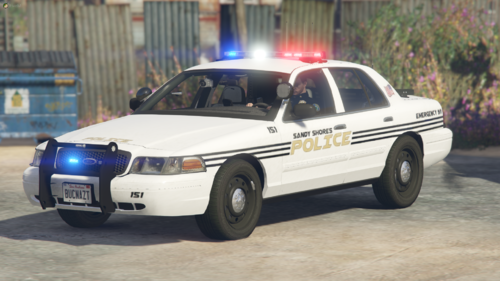 Lights didn't work for me. any suggestions? Really excited to get this vehicle in my game!
- 1 comment
- 1 review
-
Hey everyone, I know that this may be one of a thousand questions, however, I'm just at a complete loss and I have spent a LONG time browsing the forums, downloading/uninstalling packs, staring at OpenIv until my head was pounding, etc. All trying to understand the issue that I am having with the vehicles I'm trying to install. I've mastered the art of getting them to spawn into my garage, and some I have even got to work perfectly. Although, that's about a 3/10 success rate. My problem is that the lights usually don't work. Either at all or some blues will work while some reds won't. Or vice versa. This happens even with the packs. I have also literally pulled up a YouTube video and followed along step by step to try and install the CHP megapack. And only 1 of those cars worked right. Now, I am installing everything in PatchDay22 because that is where the video I watched did. And that's where they spawn in. But is that my problem? Do I need to use specific PatchDays based on the mods themselves? I thought with packs, all of that was automatic with the installer? I'm still new to modding in general, however, I've conquered the plugin side of things, but man, I am lost with these vehicles. Any help would be greatly appreciated!
-
Hey everyone, I hope all is well with you! >Insert generic 'I'm new to using mods and LSPDFR' sentences here< With that out of the way, I recently tried to install Kilroy's Blaine County Pack last night and originally got the vehicles to show up, however, no lights would work and the sirens sounded off. So, I tried to delete the files, thinking I had messed up, and then noticed that the ingame Sheriff vehicles were glitching and the textures were all wrong. Same for the uncover buffalo and granger. I then attempted to reinstall the files (after realizing the my original issue was with my install of ELS itself) in order to remedy the issue. Now, my game crashes on start up. Any ideas and/or input? Also, I'm willing to allow remote access at this point. (I've seen that offered in other threads). I'm just at a loss, and spent 4 hours at a friend's house downloading GTA 5, so I'm trying to avoid that if possible. I put the crash report here, sorry if I attached it wrong. This is also my first ever gaming PC, so I'm still getting used to the ettiquette of it all also. Thank you all in advance!
