Skip to content
View in the app

A better way to browse. Learn more.

LCPDFR.com

A full-screen app on your home screen with push notifications, badges and more.

To install this app on iOS and iPadOS
  1. Tap the Share icon in Safari
  2. Scroll the menu and tap Add to Home Screen.
  3. Tap Add in the top-right corner.
To install this app on Android
  1. Tap the 3-dot menu (⋮) in the top-right corner of the browser.
  2. Tap Add to Home screen or Install app.
  3. Confirm by tapping Install.

minicar10

Members
  • Joined

  • Last visited

Everything posted by minicar10

  1. Update: I actually got it to work. After scrolling through the RPH log, turns out a file from Ultimate Backup was missing so I reinstalled it, and it works.
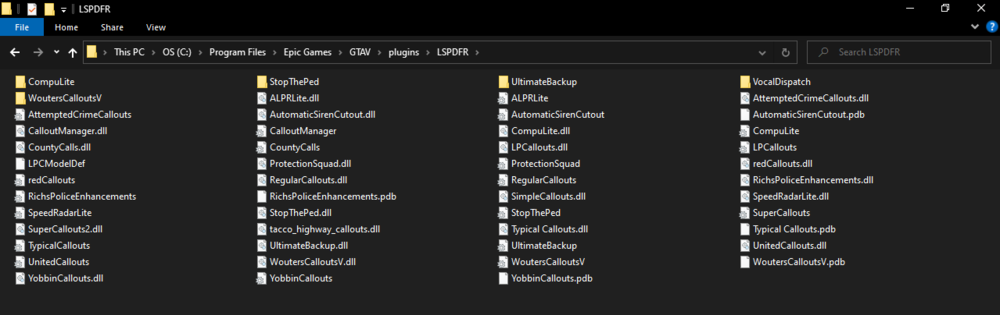
  2. The title says it all. After the new LS Tuners update, LSPDFR crashed, so I went ahead and downloaded all of the latest updates from LSPDFR, RPH, Script Hook V, and any other plugin/mod I could find that needed to update. However, after updating everything, LSPDFR still crashes. I also tried removing some plugins/mods, but there's no luck to the crashing error. Attached is my RPH log and my current plugins. RagePluginHook.log Any and all help to crack this case will be deeply appreciated.

Account

Navigation

Search

Search

Configure browser push notifications

Chrome (Android)
  1. Tap the lock icon next to the address bar.
  2. Tap Permissions → Notifications.
  3. Adjust your preference.
Chrome (Desktop)
  1. Click the padlock icon in the address bar.
  2. Select Site settings.
  3. Find Notifications and adjust your preference.