


DaaammnDaniel
Members
-
Joined
-
Last visited
Everything posted by DaaammnDaniel
-
All appears to be working well! Thanks!
-
Is this the entire log? Because with a quick look i can't find anything that would make the game crash, since there are no crashes apperent in your log... try attatching the log in your post, that way you can't forget anything 🙂
-
Hi, I've been expierenching some random LSPDFR crashes, GTA V keeps running, and im able to reload LSPDFR through the rage console. I thought it was the ambient events from Chill Callouts, disabeld it, but it still keeps crashing. Log is attached, any help would be greatly appreciated! Cheers! RagePluginHook.log
-
Yeah i did, but i got tired of it not working so i changed from gta from epic games to steam and all works well! Appreciate the help tho!
-
My bad, had them installed there but put the wrong path down.... game starts and runs, but it simply wont spawn my DLC vehicles (doesnt find them in the rage console)...
-
Hi all, I've been experiencing some difficulties with LSPDFR. I reinstalled the entire game today because I thought it might help, but no luck. None of my installed DLC vehicles work (installed through mods, update, update.rpf, dlc_patch. Also added to the dlclist.xml). I also installed heap adjusters and gameconfig. I am truly lost to why it isnt working. Right now i only have lspdfr installed, 2 add-on vehicle packs and an EUP pack. I haven't botherd with checking the EUP pack or doing a patrol since i dont want to drive around in the stock vehicles. A sollution would be greatly appreciated. If you need to see any files or screenshots please let me now. Thanks! DaaammnDaniel
-
Hi all, I recently finally got off my ass to reinstall my LSPDFR and start playing again, after some small problems which i managed to fix myself i was finally ready to play, or so i thought. My GTA crashes on startup... (I do have add-on cars installed, but i also have a heap adjuster and custom gameconfig). I truly have no clue where the problem lies. Any help would be greatly appreciated 🙂 Thanks! RagePluginHook.log
-
Hi all, I've just updated all LSPDFR and ScriptHookV to be compatible with the latest update of GTA. However when i go to start the game, the launcher pops up, I load for like a minute, and then it disappears and I simply don't get a game window. Anyone know what the problem is and if there's a solution? Thanks! *Note, i have 2 copy's of GTA installed, one for LSPDFR and one for online. My LSPDFR version runs through Epic Games, and through there I launch the game. I can't launch it through my desktop shortcut, since my PC then get's confused as to what copy it should launch, vanilla or LSPDFR. My vanilla version runs through Steam.
-
Hi all! Is it possible to change the way the police bike handles and change it's motor? I've been wanting to do bike patrols, since forever, but hated the standard police bike, and the way it looks. I recently found a nice looking replacment bike, but since it's a replacement it only gets rid of thr rubbish looks, and not the engine and handling that i also want to change. I know in games like F1 2020 it's possible to swap engines and chasis in cars, with different ones in the game, is this also possible in GTA V? And if so, how do i do this? Thanks! DaaammnDaniel
-
Kinda had that idea, saw some people on the forums saying it was unstable, seems to be ambient events, since it doens't crash when callouts are started or in callout events.... I'll disable it and try again! Thanks!
-
Hi all, I've recently been experiencing some random crashes by Rage. Attatched is the crash report, any ideas on how to solve this? Thanks 🙂 RagePluginHook.log
-
There seems to be a problem with your kernelbase.dll in your windows system folder.... unfortunately that's something I have zero experience with, whatsoever, so i can't help you with that unfortunately. I'd suggest starting another topic, to get someone elses help. Sorry I couldn't help you mate!
-
Sorry, been away from my PC a few days. Try booting the game without any car packs, (replacement vehicles are fine) with the stock gameconfig (attatched). If it then works again, try installing the links I send before and then the DLC vehicles... If it then doesn't work, please respond again, and send the crashreport as an attatched file, makes it easier for me to read it 🙂 Good luck! gameconfig.xml
-
I think you need these 2 files.... then it should work! If not, try the manual install with these 2 files and then try to boot again. https://www.gta5-mods.com/misc/gta-5-gameconfig-300-cars https://www.gta5-mods.com/tools/heapadjuster
-
What type of mod is it? replacement or add-on? 🙂
-
Hi everyone, I wanted to customize my LSPDFR experience, and decided to add some real cars for the AI to drive (e.g. Audi Q7, Ford Raptor, etc.). These were installed via OpenIV through a .OIV file.... After some twists and turns, I got it to work, and it let me spawn the cars, but the AI aren't driving the new cars, just the vanilla GTA cars. I checked online, and it recommended I'd use AddedTraffic, however this didn't change anything, even when I put the chance of spawning up to 100% and roaming around the areas they were supposed to spawn for 10 minutes. My question, is there anyone here who knows how to make the AI drive the new add-on cars? Thanks!
-
Thanks! Installed all, and it works now! Thank you!
-
That wasn't in the tutorial i followed, and I also have absolutely no clue how to do that.... so if you could explain to me how I could do it or link a tutorial that would be really appreciated! 🙂
-
Hi everyone, After being to lazy to install DLC vehicles for a while, i got sick of having limited replacement slots and looking at the default GTA cars, so I decided to change it up and add add-on vehicles. After I added a LSPD pack, I went to boot up GTA but it crashed.... (crash report attached). I added the line to the dlclist.xml... I reinstalled everything but it still crashed, any ideas on what I did wrong? Appreciate the help! 🙂 RagePluginHook.log
-
Did not know that.... Thanks 😄
-
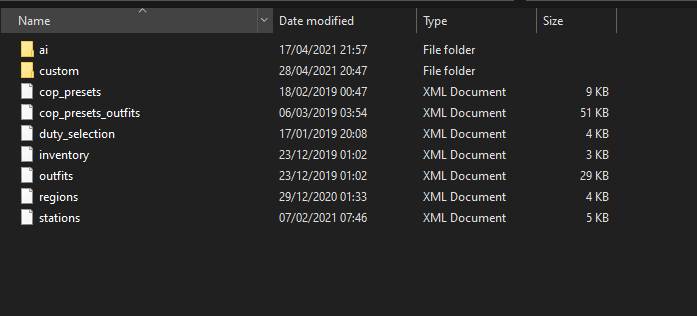
Hi everyone, is there anyone here that could help me get the vanilla .xml files I'm missing? I accidentally installed the EUP vehicle .xml's, which I don't want since I'm running custom replacement cars.... The .xml's can be found under GTA V > lspdr > data Thanks 🙂 (The missing .xml's are in the screenshot)
-
Aaaah great! Will do, thanks!
-
Here's the rage log from the main directory 🙂 (quickly went in game, called back-up and crashed again, this time the weird sound from the radio was gone so there's that) RagePluginHook.log
-
Hi everyone, I got an issue I can't seem to fix myself so I thought I'd take it to the forums. For some reason, my LSPDFR crashes every time I call non-local backup (so state patrol and up). Any suggestions on how to fix it? The Rage log should be attached. Thanks 🙂 RagePluginHook_28042021_184824.log Also, whenever it does crash I get a super weird radio static sound. (The sound you get before the start of a radio message and right as it ends.... the kggg sound I guess)


