DylanMonrency
Members
-
Joined
-
Last visited
Everything posted by DylanMonrency
-
Hi, I'v problem, when I launch LSPDFR there is crash on GTA 5 loading, then i deactivate the auto launch dll, well when i'm in game there crash when i launch it on Rage console. I give you my log to Rage Plugin. I check all update for Rage, Script Hook, and my other plugins are BejoIjo and all is update. RagePluginHook_18092021_135716.log
-
C'est bon en fait, j'avais mal installer LSPDFR, je l'ai installer dans le mauvais répertoire
-
Je te remerci mais même avec ton astuce sa ne marche toujours pas.
-
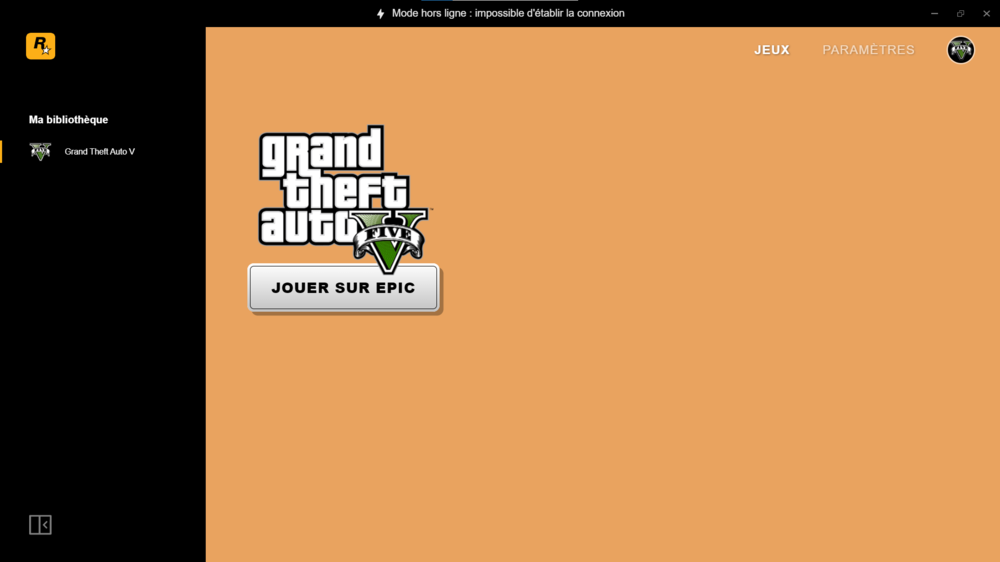
Bonjours, donc voilà, je n'arrive pas à lancé LSPDFR a cause de RagePlugins, lorsque je lance le jeu sans passer par Rage tout va bien mon Rockstar Games Launcher se lance, ect..., mais quand je lance le Rage il me renvoie sur le Rockstar Games Launcher mais celui ci en mode hors ligne et de ce fait je ne peut pas jouer a LSPDFR car mon jeu est en mode hors ligne ainsi que le Rockstar Games Launcher, le plugins ne se lance pas. J'ai déjà désinstaller RagePlugins et le réinstaller sur le site officiel, désinstaller et réinstaller le Rockstar Launcher, désinstaller et réinstaller le plugins LSPDFR, mais ça ne marche toujours pas. Si quelqu'un aurait une solution à mo problème je suis preneur. Merci d'avance pour tout personne qui me répond.