wizard8575
Members
-
Joined
-
Last visited
Everything posted by wizard8575
-
No more suggestions?
-
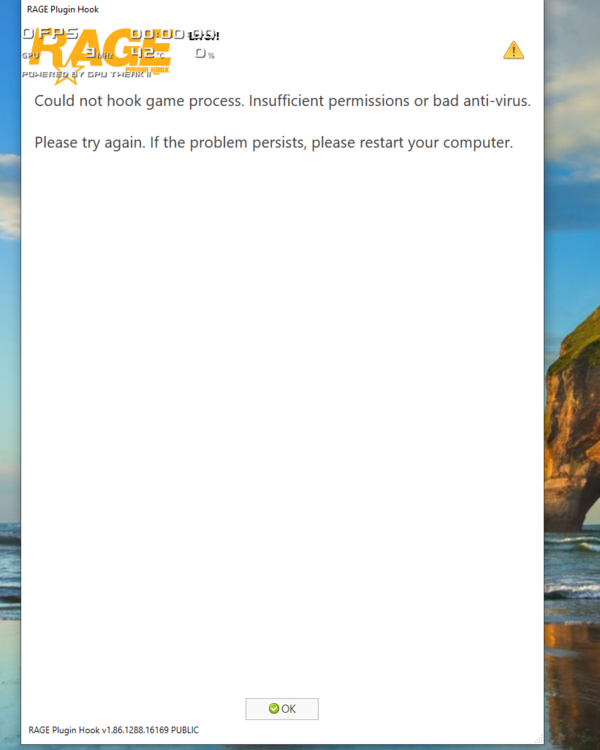
GTA RUNS ALONE. I increased the timeout but it didnt make a difference as GTA crashes while RAGE tries to hook GTA.
-
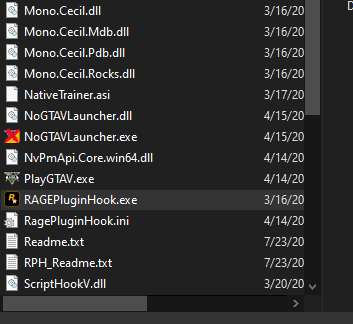
I already added the whole GTA folder to the exceptions for the Virus scanner and even tried completely disabling the virus scanner. GTA does work on its own I have played several hours in story mode. I don't have any mods installed other than LSDPFR. Here is a screenshot of my files there is not a log file.
-
I am a first time user for LCPDFR mod. I followed the video on how to install exactly multiple times with a clean install of GTA. Rage plugin runs but GTA crashes while it loads. Rage does say something about creating a log but I cant seem to locate it. Windows is completely updated and current. GTA is updated and installed with rockstar launcher. I did try using the NoGTALauncher and it did not make a difference. I have tried disabling Windows defender and firewall still same results. Any suggestions?