damnwhitee
Members
-
Joined
-
Last visited
Everything posted by damnwhitee
-
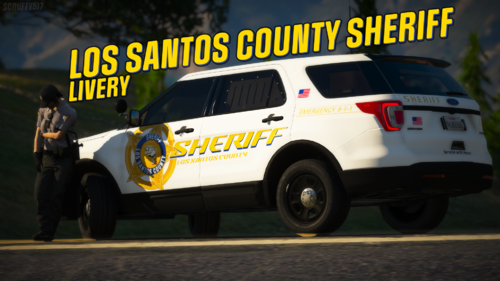 This livery isn't necessarily based off of any real life departments, but did take inspiration from a few other packs here on the site! Planning on expanding off of this and making it somewhat of pack, maybe doing a few different liveries for a few different vehicles for every department in the State of San Andreas (SAFD, SAHP, LSPD, BCSO, LSCSO) including district liveries (Sandy Shores, Paleto Bay, Grapeseed, Port Authority) possibly may even add some Fort Zancudo MP liveries in the future. 2016 Ford Explorer: Every other vehicle:
 -
Hi all! I'm looking for at least one person to take some screenshots to show off one of my first liveries (on this platform at least, I've done plenty of liveries on other platforms) The only requirement is for you not to have complete potato graphics and to take some good looking screenshots for me to use to show off the pack! DM me on Discord @ alex.#6700 if you are interested. Thanks!
-
Hi all! I'm looking for at least one person to take some screenshots to show off one of my first liveries (on this platform at least, I've done plenty of liveries on other platforms) The only requirement is for you not to have complete potato graphics and to take some good looking screenshots for me to use to show off the pack! DM me on Discord @ alex.#6700 if you are interested. Thanks!