


JorM
Members
-
Joined
-
Last visited
Everything posted by JorM
-
Hi Guys, I've been playing the game for some months now, but had an error while launching RagePluginHook.exe today. After the error (Windows-based error, but can't remember the content of the error exactly) the .exe-file just disappeared from the folder. I just couldn't find it anymore, it's not there. I've tried to unpack the whole RagePluginHook ZIP-file into my folder but that doesn't work either. It seems like the file is not unzipping and appearing in my main folder. Any thoughts? Kind regards, Jor
-
Looks like that causes the crash indeed, thank you very much Charlie! I have been able to play for a few days now, problem solved.
-
Hi guys, I've posted my problem before and it looked like I fixed it by running PluginHook as an administrator. Unfortunately, I haven't solved the problem. I'm using the StopThePed, CompuLite, UltimateBackup and SimpleCallouts, all from Bejoijo. I've just installed the newest plugins (STP and UB). I'm using a recent version of RageNative UI. Have tried to uninstall all the plugins, it runs smoothly without. It cannot be traced back to one plugin, unfortunately. Have already tried that as well by adding one after another. Game crashes when going on duty. I've attached the most recent RagePluginHook file. The strange part is that it works every now and then. Sometimes after loading it for the first time that day, sometimes after restarting the PluginHook for more than 5 times. It isn't blocked by the firewall or the AV. Loading the game without any plugins makes the game crash when going on duty. Loading the game with all plugins causes an immediate crash after loading LSPDFR. I haven't been able to play it to its full potential for over a month now, It's really frustrating. Cannot seem to get the right solution. Hopefully you guys can help me out! Thanks in advance. RagePluginHook.log
-
Seems like I finally got it running by launching RagePluginHook as administrator.
-
Hi Dominik, thanks for your help! I've checked the anti-virus program and excluded the GTA V folder. I had already set the Threshold to 60000. Unfortunately, the game still crashes when loading the plugin. Any other options to make it work?
-
I have added an updated log file. Game crashes even earlier now when a plugin is added. When the mod is loaded, you see some flashes from where you are spawned. It crashes on the last flash. RagePluginHook.log
-
Restarting my pc doesn't fix the problem unfortunately. I work with an organization-managed device, so I can't turn off my antivirus. Could be the Achilles' heel, but wouldn't that make more sense when the plugins don't work at all? I've got them running perfectly for a while, without interruptions. I've had the old Albo-plugins running for days but decided to delete them because of FPS drops. To me it should be somewhere in these Bejoijo-plugins..
-
Sure, attached. RagePluginHook.log
-
Could this mean anything? LSPD First Response: [WARN] Path without extension: lspdfr/data/custom
-
Yep, several times.. Tried to tick all of the available boxes once to see whether it makes any difference, but it does not.
-
Thank you for your reply. I have already tried reinstallig the plugins one by one. A couple of days ago I tried it for the last time and it seemed to work perfectly. All the plugins loaded succesfully and I was able to play without interruptions. When loading it a day later, it crashed when I tried to go on duty. I launched it a few times more and was able to play once with all the plugins, but it crashed again the next time I launched the game. Intel i7 1065 @ 1.30GHz, 16GB RAM, 256 GB SSD, Intel Iris Plus Graphics. I've installed the game and LSPDFR on an external WD Black Game Drive (512 GB).
-
Game crashes when: - Going On duty via Police Station - ForceDuty - ReloadAllPlugins No crash report, screen freezes and GTA quits automatically. Any ideas guys? If you require additional info please let me know. Already tried un-installing the plugins, LSPDFR runs smoothly without the plug-ins.
-
After playing for a while and restarting, same problem. Crashes when going on duty. No crash reports or signals, it just closes the game. Added the log. RagePluginHook.log
-
Looks like I fixed it by installing UB first, then STP and CompuLite. Played for some minutes after installing each plugin. Now it loads succesfully.
-
Seems like adding a random plugin causes the crash. It doesn't matter whether I start with STP, CompuLite or UltimateBackup. I just had UltimateBackup running, added STP and it crashed again. Could something be wrong with my directory (wrong path)? Please check.
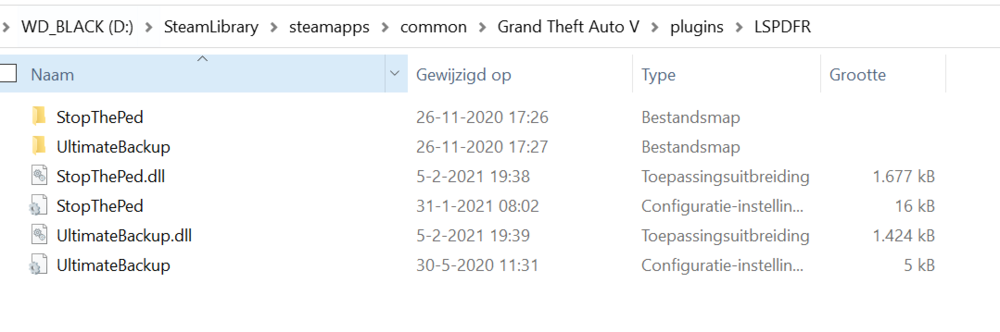
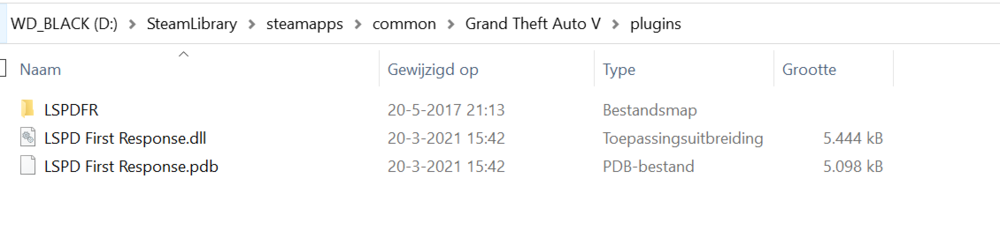
-
After adding CompuLite the whole thing crashed again. Deleted all plugins, added StopThePed only: didn't work. Added UltimateBackUp only: didn't work either. Any alternatives?
-
Seems like the problem is solved by first installing UltimateBackup and then adding StopThePed (and probably also CompuLite but haven't checked that yet). Your help is very appreciated, many thanks for helping me with this issue!
-
I'll try to add STP into the plugin folder and will start the game. I'll post the log afterwards.
-
Yup, I've unzipped and reloaded the file into the directory multiple times.
-
Seems like only UltimateBackup is working properly. Tested each plugin seperately, both StopThePed and CompuLite are giving problems. Any idea whether StopThePed and/or CompuLite require additional mods to be installed in order to work properly?
-
Of course, here it is. RagePluginHook_24032021_145245.log
-
Then we can ignore this as a possible solution, unfortunately. Some more details: it crashes right after the moment the message pops up when the mod has been succesfully loaded. I don't get an error screen, GTA freezes or completely shut down.
-
Hi Cyan and Gaara, Thanks for helping me out. Do you mean change the LSPDFR-folder or the Plugin-folder (see screenshot attached)?
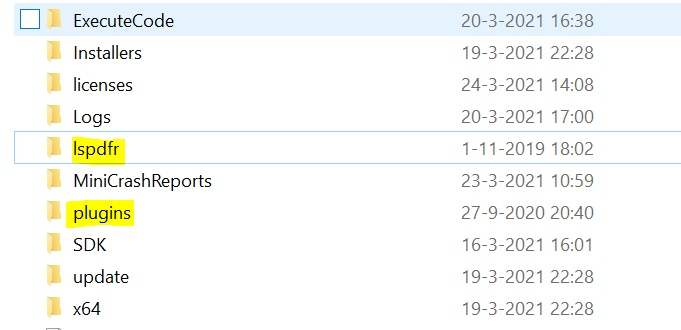
-
Hi Gaara, Thanks for your help. I've deleted all previously installed plugins earlier today and updated LSPDFR to the version that was released last saturday. Everything running smooth so far. The problem occurs when I add the plugins. Any possibility you could find out which plugin causes the game to crash based on the logfile? Next step for me would be to add one plugin after another and see if I can find out which one is causing the problem.
-
Hi guys, LSPDFR is crashing everytime I go on duty (either by entering the police station or by ForceDuty). It works perfectly when installed LSPDFR only (installed the newest version an hour ago), but after adding mods it crashes when going on duty. I've played it for some hours without mods, but I'd really like to add some. I've already deleted the old Albo-mods and have installed: - Ultimate Back up (latest version) by Bejoijo - Stop the ped (latest version) by Bejoijo - Compulited (latest version) by Bejoijo I've already updated the RageNativeUI to 7.0. I've attached the logfile. Could you please help me to find out what causes the crash? Kind regards, Jor RagePluginHook_24032021_132254.log



