TraumaPak
Members
-
Joined
-
Last visited
Files posted by TraumaPak
-
GTA IV Diesel Engine Sound Mod.
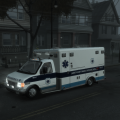
The sound file in the download it meant for the ambulance.
If you want to use these sounds on a vehicle other than the ambulance, you will need the GTA IV .ivaud editor and will need to export the sounds in the file provided in the download and replace them in the file of your chosen car. (Example : Box_Van_3
Useful link for finding what sound belongs with what car in GTA IV.
http://www.gtaforums...howtopic=503904
- 792 Downloads
- 5 Comments
Updated -
Please note-
This model is a BETA. The model is now 100% stable ingame and is ready to be tested among the other users. There are a few minor things I'm still working towards fixing such as collision files and dirt visuals. I've decided to let the general public give it a run. Any problems you may come across, please PM me and I'll work to fixing whatever it may be to ensure quality in this model.
Enjoy !
>>>>>>>>>>>>>>>>>>>>>>>>>>>>>>>>>>>>>>>>>>>>>>>>>>>>>>>>>>>>THE FILE HAS BE RE UPLOADED <<<<<<<<<<<<<<<<<<<<<<<<<<<<<<<<<<<<<<<<<<<<<<<<<<<<<<<<<<<<<<<<<<<<<<<<<<
FINAL VERSION HAS BEEN RELEASED >>AMBU V2.0B<<
Please note - The file is larger , However that is NOT the entire model. Its 2 ambulances and a whole bunch of other stuff.
Model is 6.08MB
Minor collision problem has been spotted.The issue will be resolved shortly.
Note to all users- The ambulance will currently stay locked. However, I will soon be releasing parts off the ambulance such as lights,lightbars etc for public use.
- 4,703 Downloads
- 35 Comments
Updated