Skip to content
View in the app

A better way to browse. Learn more.

LCPDFR.com

A full-screen app on your home screen with push notifications, badges and more.

To install this app on iOS and iPadOS
  1. Tap the Share icon in Safari
  2. Scroll the menu and tap Add to Home Screen.
  3. Tap Add in the top-right corner.
To install this app on Android
  1. Tap the 3-dot menu (⋮) in the top-right corner of the browser.
  2. Tap Add to Home screen or Install app.
  3. Confirm by tapping Install.

JeromeM

Members
  • Joined

  • Last visited

Files posted by JeromeM

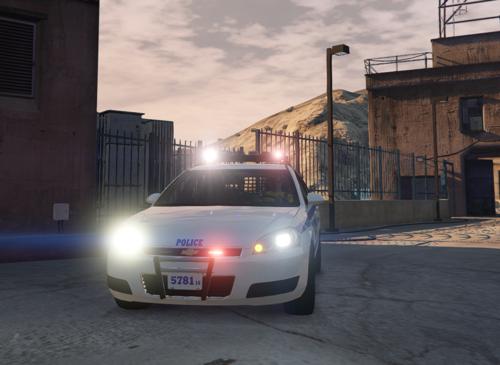
  1. Alpha Release of a NYPD 14 Chevy Impala
     
     
    -- Known Issues --
    Keyboard is the wrong one.
    Siren Controller & Message Board Controller is wireless atm.
    Microphone has magical powers (wireless & floating)
    Tablet is also magical (dock doesn't have any wires)
    Texture is wrong, this is NOT a 2016 which the texture reflects. (was just copied from another vehicle and I didn't care to have it changed atm)
     
    -- Future Updates -- 
    Fix all above issues
    Add flood lights
    Add ballistic Panel in window
     
    Other criticism and recommended equipment is welcome!
    • 659 Downloads
    • 9 Comments
    Submitted

Account

Navigation

Search

Search

Configure browser push notifications

Chrome (Android)
  1. Tap the lock icon next to the address bar.
  2. Tap Permissions → Notifications.
  3. Adjust your preference.
Chrome (Desktop)
  1. Click the padlock icon in the address bar.
  2. Select Site settings.
  3. Find Notifications and adjust your preference.