
Templipouet
Members
-
Joined
-
Last visited
Everything posted by Templipouet
-
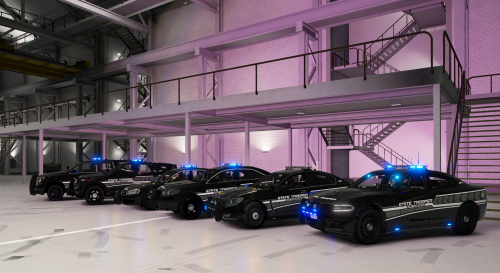 First : The positive points. This pack looks very good, I love the stealthy black design. The ELS patterns are also really good imo. The cars are also under 25Mb which is rare enough to be worth mentioning. Indeed, beyond that 25Mb treshold, you will see texture loss. Some lighter textures would have been appreciated so that some cars don't exceed 20Mb, which is the sweetspot for quality and performance. Second : The negative points. The add-on installation is just broken. Some files miss characters, others miss entire lines ! A user found a workaround in the comments but for the average inexperienced LSPDFR user, it's just too hard to fix. Also, for some reason, the add-on cars spawn with some lights that are always on, which is dealbreaker. Replace cars don't seem to have this issue. But I really wanted to use this pack as an add-on so that I could use the cars along with my LSPD, BCSO and LSSD cars. These inconveniences are worth 2 stars because they are just too annoying to deal with and that should not happen. I will gladly reconsider this pack once it gets updated. in conclusion, if you don't mind tinkering with some files etc, then go for it, this pack is really nice. But if you're inexperienced and don't feel confident enough to edit some files, then you're stuck with the replace cars unfortunately. At least, they work...
- 102 comments
- 5 reviews
-