




KT567
Members
-
Joined
-
Last visited
Everything posted by KT567
-
When I get a chance I will play without AAIC to see if the crash happens. Sometimes I don't get it that often but earlier I was getting it within like 5 mins between each crash
-
Hello, I've recently been getting the crash 'Processing Cache while it's still in use - one or more subcalls may have caused the thread to yield' while playing. I'm not sure what may be causing it. Below I've attached my log. Not sure what it means when it says 'at D:\ GTA V' as my game is installed in my C drive, don't know if that's even relevant or not? RagePluginHook.log
-
I actually fixed it by doing the opposite which was installing the files into the weapons.rpf in the NVE folder instead of deleting it. Thank you for the help though! Maybe anyone else with the issue will see these solutions and fix their game.
-
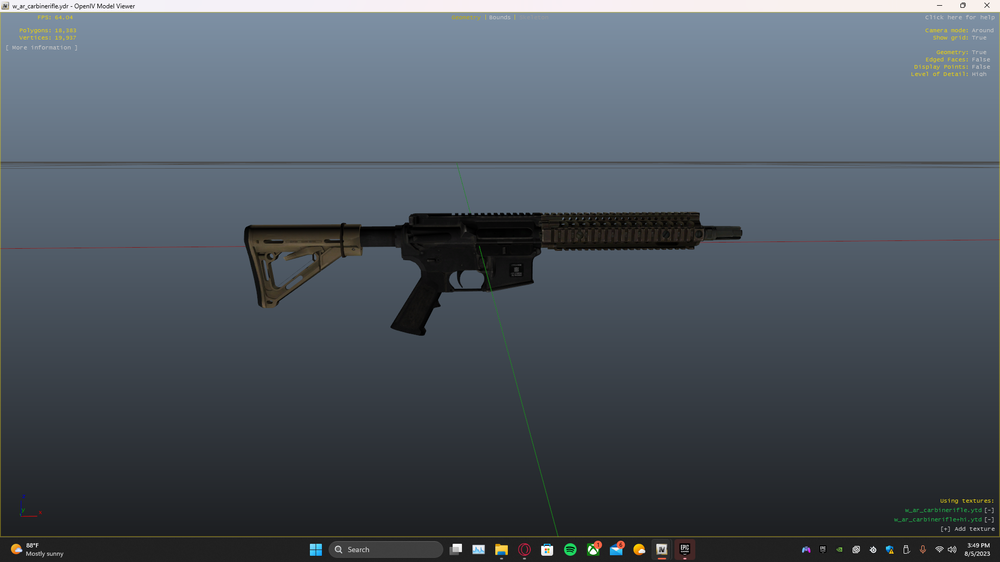
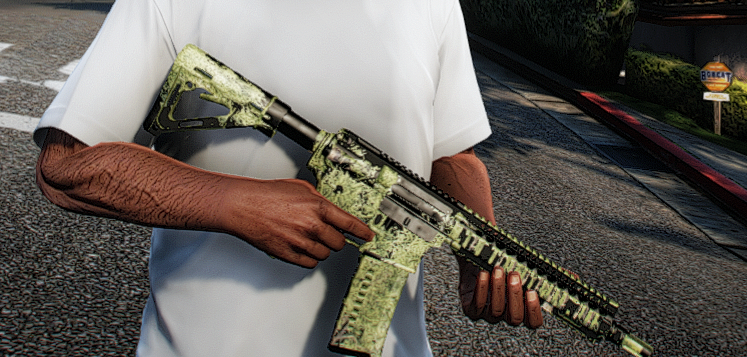
I recently remodded gta from scratch and installed a weapon model to replace the carbine rifle, however the textures are buggy in game but look fine in openiv. Any help is appreciated.
-
 Really good patch mod. I dont get any texture loss issues now with this so i suggest downloading it.
- 107 comments
- 33 reviews
-
-

-

- 2
-
-
-
Photos from LSPDFR
-
From the album: LSPDFR
-
I fixed my game as of now. All I needed to do was update RageNativeUI, which was on an older update as I had used the one from Stop The Ped. If anyone else may be having this type of issue, try updating your RNUI.
-
I tried their solution and it didn't work for me.
-
I originally posted this in the wrong forum, so apologies there, however as stated in the title, my LSPDFR plugin crashes whenever i go on duty. Below i have attached my RPH log. RagePluginHook.log
-
i installed LSPDFR again today and when i go on duty, LSPDFR crashes. Below is my RPH log. RagePluginHook.log
-
Well after a few more pack installs, it seems like this only happens on random packs. Kinda annoying, however open to any fixes that anyone may have. I still have a pack installed that has this issue, just very small and blocks a few lights on the rambar.

-
I think this is the right forum, but I have installed some Police car packs into GTA V, and for reference I am using QuantV for a graphics mod, and am using their version of bright emergency lights to make the car Lights brighter, however as seen in the picture, there black around the light bar, could this be because of the graphics mod itself? I was using Radiance V but the white lights on the cars were extremely bright and deformed as it looked like a actual star from space was used on the lights. If anyone knows of a possible fix, I would greatly appreciate it. 🙂
-
Found a fix, i just reinstalled LSPDFR, and now everything works 🙂
-
i took a call of a shooting and when i got there, the peds werent shooting, just aiming, and the npc cops were just standing. I dont think its my callouts, as its happened it various calls from different packs. Although i would appreciate assistance with this issue.
-
just got it fixed. my custom regions wasnt set up right
-
Everytime i use forceduty command, half of my plugins load but then it says, "Unhandled Exception in "forceDuty" command. Here is my RAGE log. Hope someone can help. Think it is something with UB. Im using NotAJ's customized defaultregions.xml in order to use my eup outfits in UB Peds. RagePluginHook.log
-
.thumb.png.ba16264072b928b7dbcc04451084b822.png) this pack looks really great! It looks very similar to my home county haha! great work!
this pack looks really great! It looks very similar to my home county haha! great work!- 24 comments
- 7 reviews
-
big up to you guys. this is some real good stuff to hear.
-
Yeah lol but hey i appreciate the help anyway.
-
Correct. I did delete the .ini files to see if it helped and it did. Deleting my .ini files in the EUP folder fixed, i just have to recreate all of my outfits now lol
-
I'm very sure the files are in the correct place. RAGENativeUI is in the beginning of the directory, and EUPMenu.dll is in my plugins folder. I also have all of the .ini's for EUP in the EUP folder. It was fine the day before but now it just crashes when loaded in RPH.
-
Every time i try loading EUP in RPH it immediately crashes. I've reinstalled EUP Menu and it still does it. Need help i don't know what to do. Support will be appreciated. I created a text doc with the log from RPH showing what is says. EUP Crash Log.txt
-


.thumb.png.ba16264072b928b7dbcc04451084b822.png)