




deaconV
Members
-
Joined
-
Last visited
Everything posted by deaconV
-
Is there anything i can try?
-
Sorry, i verified and tried but didn't work
-
Yup, i installed them again but nothing, and i dont have the vfs 😞
-
I had a packfile adjuster and a heapadjuster but i deleted them the first time i saw the error
-
RagePluginHook.log
-
Yes, that happened to me yesterday. I can run it in vanilla and then open RPH but when loading LSPDFR it crashes when going on duty. As i said, its weird because i have no mods at all.
-
Yes. Here it is RagePluginHook.log
-
Hello, it's been 1 year since i played LSPDFR for the last time, and i want to play it again. I was good at modding but now steam asks me to authorize a modded launch, and RPH is crashing all the time. I disabled BattleEye and i've just installed LSPDFR and ScripthookV, when it enters the game it just wont run but crashes all the time. I don't know if anything changed since enchanced came out but i hope someone helps me. Btw, the install was completely virgin with no mods until i installed LSPDFR.
-
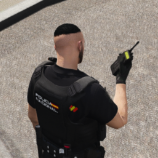
 can it be used as a badge not to be in the uniform but as a badge to show to other players?
 -
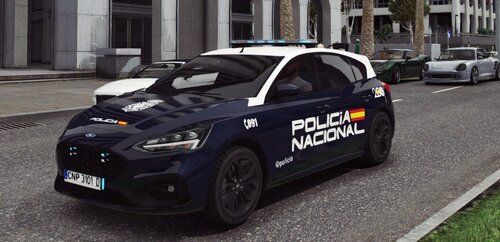 ------ENGLISH------ Hello! This is my first handmade texture and I hope you like it. IMPORTANT* YOU MUST DOWNLOAD THE ORIGINAL VEHICLE THROUGH THIS LINK: https://es.gta5-mods.com/vehicles/2019-2020-police-ford-focus-st-els-enabled-pack-replace-els In the rar folder you will see a notepad with the credits and you must follow the installation path of the original file, but just in case I leave it here: Grand Theft Auto V/Mods/Update/Update.rpf/x64/dlcpacks/patchday21ng/dlc.rpf/x64/levels/gta5/vehicles.rpf ------DO NOT UPLOAD THIS MOD TO ANOTHER WEBSITE WITHOUT MY PERMISSION------- ------ESPAÑOL------ Hola! Esta es mi primera textura hecha a mano y espero que os guste. IMPORTANTE* DEBÉIS DESCARGAR EL VEHÍCULO ORIGINAL A TRAVÉS DE ESTE LINK: https://es.gta5-mods.com/vehicles/2019-2020-police-ford-focus-st-els-enabled-pack-replace-els En el archivo veréis un bloc de notas con los créditos y deberéis seguir la ruta de instalación del archivo original, pero por si acaso os la dejo por aquí: Grand Theft Auto V/Mods/Update/Update.rpf/x64/dlcpacks/patchday21ng/dlc.rpf/x64/levels/gta5/vehicles.rpf ------NO SUBIR ESTE MOD A OTRA WEB SIN MI PERMISO------- CRÉDITOS -Textura: @deacon (gta5mods) & @deaconV (LCPDFR) - Model - Squir - Model Bought - Christopher Rognskaug & Sebastian - Model Lowered & Fixed Up - James Radley(RaddzModding) - Converted to GTAV - BritishGamer88 - Material's - BritishGamer88 - Template - BritishGamer88 - Skin - BritishGamer88 - Numberplates BritishGamer88 - Whelen Justice - James Radley(RaddzModding) - Antanna's - BritishGamer88 - Grill Lights - James Radley(RaddzModding) & ObsidianGames - Window Template - BritishGamer88 - ANPR Camera - DoubleDoppler & BritishGamer88 - ELS Light Textures - Matthew Cammack(ObsidianGames) & James Radley(RaddzModding)
 -
.thumb.png.3d2a05e6aca90c3b5861b8e9760a96aa.png) ENGLISH With this mod you can replace the boring radio sounds of LSPDFR and stop the ped with real sounds from the radio used by the Spanish National Police Corps IMPORTANT*: READ INSTALLATION INSTRUCTIONS TO AVOID FAILURES ---------DO NOT REUPLOAD TO ANOTHER WEBSITE WITHOUT MY PERMISSION---------- In case of a bug or question, ask me on discord: __deacon_ ESPAÑOL Con este mod podréis sustituir los aburridos sonidos de radio de LSPDFR y stop the ped por sonidos reales de la radio empleada por el Cuerpo Nacional de Policía Español IMPORTANTE*: LEER INSTRUCCIONES DE INSTALACIÓN PARA EVITAR FALLAS ---------NO RESUBIR A OTRA WEB SIN MI PERMISO---------- En caso de bug o duda preguntadme en discord: __deacon_
ENGLISH With this mod you can replace the boring radio sounds of LSPDFR and stop the ped with real sounds from the radio used by the Spanish National Police Corps IMPORTANT*: READ INSTALLATION INSTRUCTIONS TO AVOID FAILURES ---------DO NOT REUPLOAD TO ANOTHER WEBSITE WITHOUT MY PERMISSION---------- In case of a bug or question, ask me on discord: __deacon_ ESPAÑOL Con este mod podréis sustituir los aburridos sonidos de radio de LSPDFR y stop the ped por sonidos reales de la radio empleada por el Cuerpo Nacional de Policía Español IMPORTANTE*: LEER INSTRUCCIONES DE INSTALACIÓN PARA EVITAR FALLAS ---------NO RESUBIR A OTRA WEB SIN MI PERMISO---------- En caso de bug o duda preguntadme en discord: __deacon_
.thumb.png.3d2a05e6aca90c3b5861b8e9760a96aa.png)