Skip to content
View in the app

A better way to browse. Learn more.

LCPDFR.com

A full-screen app on your home screen with push notifications, badges and more.

To install this app on iOS and iPadOS
  1. Tap the Share icon in Safari
  2. Scroll the menu and tap Add to Home Screen.
  3. Tap Add in the top-right corner.
To install this app on Android
  1. Tap the 3-dot menu (⋮) in the top-right corner of the browser.
  2. Tap Add to Home screen or Install app.
  3. Confirm by tapping Install.

Mike Hawk

Members
  • Joined

  • Last visited

Everything posted by Mike Hawk

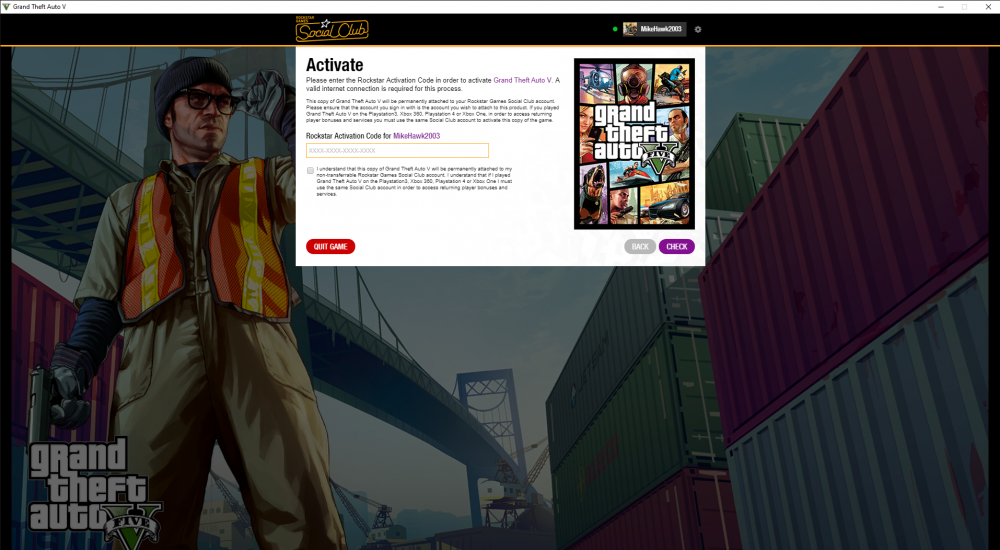
  1. Last night I was downloading my first mod for lcpdfr because I was tired of default lcpdfr. I had to download it through open iv, so I correctly followed the steps of installing it and setting it up for mod use and once everything is going perfect, it is time to check and see if the mod is going to be in lcpdfr, but the problem is whenever I start gta, with or without rage plugin, halfway through loading social club asks me for an activation code or quit the game. I've tried starting the game without internet. Ive contacted rockstar support and keep telling me that they don't support 3rd party support and tells me to clean boot gta 5. I am afraid to do that because I don't want to loose lcpdfr what should I do?
Account

Navigation

Search

Search

Configure browser push notifications

Chrome (Android)
  1. Tap the lock icon next to the address bar.
  2. Tap Permissions → Notifications.
  3. Adjust your preference.
Chrome (Desktop)
  1. Click the padlock icon in the address bar.
  2. Select Site settings.
  3. Find Notifications and adjust your preference.