
CatoCensor
Members
-
Joined
-
Last visited
Everything posted by CatoCensor
-
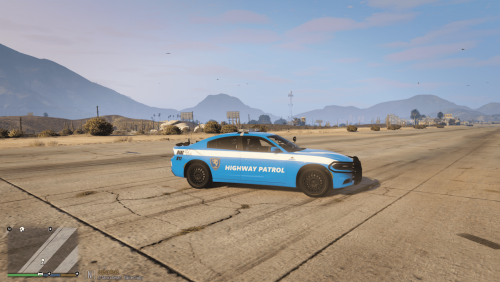 This is my first texture so don't be too harsh on me 😅 I attempted to "americanize" the livery of the italian "Polizia Stradale" and applied it on a 2018 Dodge Charger.This livery is obviously not intended to be accurate in any manner and it is just intended to loosely resemble the "Polizia Stradale" livery.I'm posting this to see the reaction of the public to my first work.If this gets some recognition by the community i will go ahead and perfect it even more and maybe even create a pack.If you want you are free to modify the skin for your own personal use,but please keep the result for yourself and do not spread the skin taking credit for it. Here is the vehicle pack which contains the model i used:
 -
Hello everyone I'm posting this after numerous attempts to fix this problem and 3 clean reinstalls of lspdfr.Even though all my plugins and rage-related essentials are up-to-date,my game keeps randomly crashing after 15-20 minutes in game.At first i tought it was a CHP addon pack i installed,but after a clean reinstall the problem is still there without the addon vehicles,i also removed some callout packs like AmbientAI,which,even if up to date impact certain mechanics and may conflict with lspdfr,i really can't figure out what's the problem.Any help would be appreciated. RagePluginHook.log