
lushchak
-
Joined
-
Last visited
Everything posted by lushchak
-
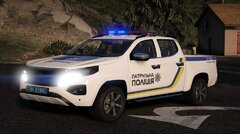
From the album: Ukrainian Modifications Community
Автомобіль Peugeot Landtrek 2023 патрульної поліції України© Ukrainian Modifications Community
-
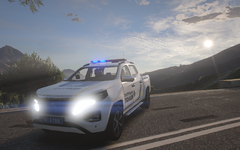
From the album: Ukrainian Modifications Community
Автомобіль Peugeot Landtrek 2023 патрульної поліції України© Ukrainian Modifications Community
-
 Виправлено (ТІЛЬКИ НА REPLACE ВЕРСІЇ)🙂 Виправлена проблема із дверима, багажником та іншими елементами, що працювали некоректно. *ТІЛЬКИ НА REPLACE ВЕРСІЇ* Проблема із не розпізнаванням авто, як поліцейського в Add-On версії буде виправлена у наступній версії оновлення. Раджу підписатися на файл зверху сторінки для сповіщень про оновлення.
 -
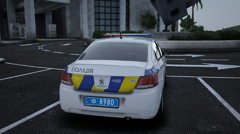
From the album: Ukrainian Modifications Community
Автомобіль Peugeot 301 патрульної поліції України© Ukrainian Modifications Community
-
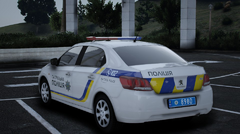
From the album: Ukrainian Modifications Community
Автомобіль Peugeot 301 патрульної поліції України© Ukrainian Modifications Community
-
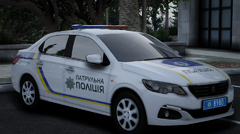
From the album: Ukrainian Modifications Community
Автомобіль Peugeot 301 патрульної поліції України© Ukrainian Modifications Community
-
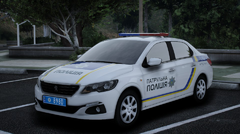
From the album: Ukrainian Modifications Community
Автомобіль Peugeot 301 патрульної поліції України© Ukrainian Modifications Community
-
Переглянув відео, попросив ще одну людину глянути авто в грі. Все працює нормально. Не знаю, чому в тебе такі проблеми. Можу порадити в такому випадку поміняти на ванільний слот, до прикладу, на police. Поки ти перший, хто повідомив про такий баг з дверима, у всіх решта працює. Стосовно нерозпізнавання авто як поліцейського, я виправлю.
-
Привіт, дякую за твоє повідомлення! 1. Виявив причину, в найближчий час виправлю і оновлю файл на LCPDFR.com. Вельми вдячний! 2. Наскільки мені сказали, це може бути, якщо некоректно встановити машину на Replace версію (до прикладу, на авто з DLC (поліцейські авто, додані в оновленнях GTA V від Rockstar Games). Перевірив це і не виявив жодних проблем. Перевіряв версію Add-On, саме цю я рекомендую до встановлення. Хотів би ще раз наголосити, що .oiv (автоматичне встановлення), як я писав в "[UKR] Інструкція по встановленню", не замінює ванільний слот і спрощує інсталяцію автомобіля. Це корисно тим, хто вперше встановлює авто, або якщо виникають будь-які баги на Replace-версії. 3. Ручний спосіб встановлення є в архіві (Replace). Хоч я рекомендую встановлювати Add-On версію, Replace версія повинна працювати без проблем, якщо поміняти на ванільні слоти поліцейських авто (окрім DLC), а саме: police, police2, police3, police4, sheriff.
-
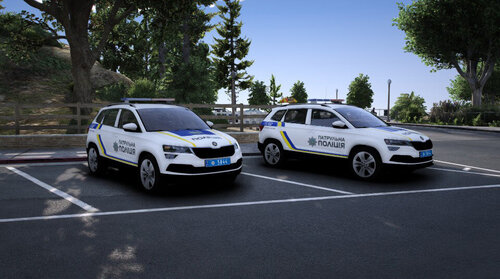
🇺🇦 [ELS] [Reflective] [Replace] [Add-On] 2023 Skoda Karoq – Патрульної поліції України 🔹 Опис До першої річниці спільноти Ukrainian Modifications Community ми раді представити безкоштовну модифікацію – 2023 Skoda Karoq у лівреї Патрульної поліції України для GTA V. Модель підтримує ELS, доступна у двох варіантах встановлення: Replace – заміна стандартного поліцейського транспорту. Add-On – додавання окремого транспортного засобу з автоматичною установкою через .OIV інсталятор. 🔧 Особливості Високоякісна 3D-модель з детальним інтер'єром. Кольорографічна схема патрульної поліції із функціональними у грі світловідбиваючими елементами. Реалістичне освітлення та текстури. Підтримка ELS для світлоакустичної панелі. Два варіанти встановлення: Replace та Add-On. 📦 Встановлення Replace: Відкрийте OpenIV та увімкніть режим редагування (Edit Mde). Перейдіть за шляхом: update\x64\dlcpacks\patchday[ОСТАННІЙ]\dlc.rpf\x64\levels\gta5\vehicles.rpf - "Копіювати в mods" Замініть відповідні файли з папки "replace". Add-On: Запустіть OpenIV. Перетягніть файл karoqslim.oiv у вікно OpenIV. Після встановлення використовуйте spawn name: karoqlim. Для RagePluginHook: натисніть F4 та введіть spawn karoqsim. 📌 Важливо Це не фінальна версія модифікації. Якщо ви виявили помилки або маєте пропозиції, будь ласка, повідомте нас через наш Discord-сервер. Модифікація призначена лише для некомерційного використання. Заборонено вилучати або змінювати будь-які частини моделі (наприклад, файли .yft). 💙 З найкращими побажаннями, Ukrainian Modifications Community ❤️ 🇬🇧 [ELS] [Reflective] [Replace] [Add-On] 2023 Skoda Karoq – Patrol Police of Ukraine 🔹 Description To celebrate the first anniversary of the Ukrainian Modifications Community, we are pleased to present a free modification: the 2023 Skoda Karoq in the livery of the Patrol Police of Ukraine for GTA V The model supports ELS and is available in two installation options. Replace – replaces the standard police vehicle. Add-On – adds the vehicle as a separate entity with automatic installation via a .oiv installer. 🔧 Features High-quality 3D model with detailed interor. Realistic lighting and textues. ELS support for the lightbar. Two installation methods: Replace and Add-On. 📦 Installation Replace: Open OpenIV and enable Edit ode. Navigate to: update\x64\dlcpacks\patchday[latest]\dlc.rpf\x64\levels\gta5\vehicles.rpf (Copy to Mods folder if prompted). Replace the existing files with those from the "replace" folder. Add-On: Launch OpenIV. Drag and drop the karoqslim.oiv file into the OpenIV windows. After installation, use the spawn name: karoqsim. For RagePluginHook: press F4 and enter spawn karoqsim. 📌 Importat This is not the final version of the modification. If you encounter any issues or have suggestions, please let us know via our Discord server. This modification is intended for non-commercial useonly. It is prohibited to extract or modify any parts of the model (e.g., .yft fles). 💙 Best regards, Ukrainian Modifications Community ❤️
-
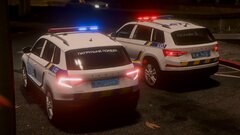
From the album: Ukrainian Modifications Community
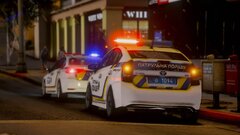
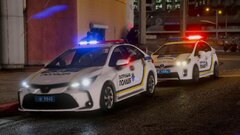
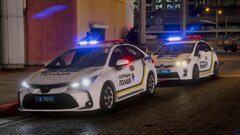
Автомобілі патрульної поліції 2023 Skoda Kodiaq і 2023 Skoda Karoq, вночі, з світлоповертаючими елементам та світлоакустичними панелями (САП) Стріла "Ultra Slim" 200R.© Ukrainian Modifications Community
-
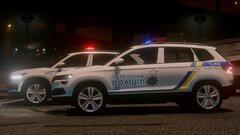
From the album: Ukrainian Modifications Community
Автомобілі патрульної поліції 2023 Skoda Kodiaq і 2023 Skoda Karoq, вночі, з світлоповертаючими елементам та світлоакустичними панелями (САП) Стріла "Ultra Slim" 200R.© Ukrainian Modifications Community
-
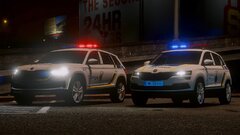
From the album: Ukrainian Modifications Community
Автомобілі патрульної поліції 2023 Skoda Kodiaq і 2023 Skoda Karoq, вночі, з світлоповертаючими елементам та світлоакустичними панелями (САП) Стріла "Ultra Slim" 200R.© Ukrainian Modifications Community
-
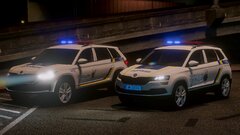
From the album: Ukrainian Modifications Community
Автомобілі патрульної поліції 2023 Skoda Kodiaq і 2023 Skoda Karoq, вночі, з світлоповертаючими елементам та світлоакустичними панелями (САП) Стріла "Ultra Slim" 200R.© Ukrainian Modifications Community
-
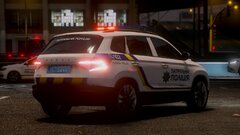
From the album: Ukrainian Modifications Community
Автомобіль патрульної поліції України 2023 Skoda Karoq, вночі, з світлоповертаючими елементам та світлоакустичною панеллю (САП) Стріла "Ultra Slim" 200R.© Ukrainian Modifications Community
-
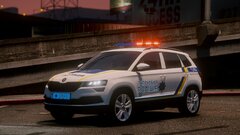
From the album: Ukrainian Modifications Community
Автомобіль патрульної поліції України 2023 Skoda Karoq, вночі, з світлоповертаючими елементам та світлоакустичною панеллю (САП) Стріла "Ultra Slim" 200R.© Ukrainian Modifications Community
-
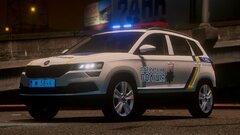
From the album: Ukrainian Modifications Community
Автомобіль патрульної поліції України 2023 Skoda Karoq, вночі, з світлоповертаючими елементам та світлоакустичною панеллю (САП) Стріла "Ultra Slim" 200R.© Ukrainian Modifications Community
-
-
-
-
You are experiencing a crash caused by Section136Callouts. Please confirm it is installed correctly & if the issue persists, report it to the Developer. Also, Rich's Police Enhancements [Plugin has been discontinued and may not work as intended.]
-
These plugins are outdated and not updated for recent LSPDFR versions. When plugins aren't updated for the latest versions of LSPDFR, they may begin to cause issues. For the smoothest experience, we recommend their removal. Arrest Manager [Available alternative: Stop The Ped] Assorted Callouts LSPDFR+ [Available alternative: Stop The Ped] Officer Status Plugin [Available alternative: GrammarPolice] Police Smart Radio [Available alternative: GrammarPolice] Traffic Policer [Available alternative: Stop The Ped]
-
Enter the command "LoadPlugin" in RagePluginHook menu (F4) and it will select LSPD First Response.dll from the suggested list (start typing the name of the mod and it will prompt you)
-
Try delete Automatic Siren Cutout [Plugin has been discontinued and may not work as intended.] And, a string (piece of text) was in the wrong format. You may've incorrectly edited a .ini / .xml file & these changes should be undone. But first try to remove this outdated mod (Automatic Siren Cutout).
-
Grand Theft Auto V\lspdfr (this way to files, if anything) If they are still not there and you were on the right location files, install LSPDFR manually (in the mod downloads, select the file "lspdfr_manual" and transfer all files from this archive to the root of GTA 5 (with replacement if required).