baconboidev
Members
-
Joined
-
Last visited
Everything posted by baconboidev
-
Do you have the ELS mod installed?
-
Hey guys I've already done the solutions that I know of, LSPDFR keeps crashing and taking the game with it when I load into the game. It gets stuck on the black loading screen and from there it crashes itself and after a few seconds, takes the game with it. I've tried disabling plugins. I'm lost beyond that But I did see something about it saying RageNativeUI didnt load - not sure what that is though heres the crash report crashreport_782023rph.txt
-
Rebuild it in what way?
-
When I load into gta with rage plugin hook, there's an infinite loading screen. I changed the name of my mods folder in openiv to _mods instead. It works. But nothing is modded anymore, I still have plugins, but no custom cars, sounds ,etc, because it doesn't read _mods folder as the real mods folder. Any fix for this?
-
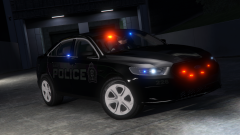 bro please make it for sale thats hot af
 -
-
-