Skip to content
View in the app

A better way to browse. Learn more.

LCPDFR.com

A full-screen app on your home screen with push notifications, badges and more.

To install this app on iOS and iPadOS
  1. Tap the Share icon in Safari
  2. Scroll the menu and tap Add to Home Screen.
  3. Tap Add in the top-right corner.
To install this app on Android
  1. Tap the 3-dot menu (⋮) in the top-right corner of the browser.
  2. Tap Add to Home screen or Install app.
  3. Confirm by tapping Install.

JarOpener321

Members
  • Joined

  • Last visited

Everything posted by JarOpener321

  1. Eup is crashing after I press f11 i swapped the keybind to f3 and it still isnt working
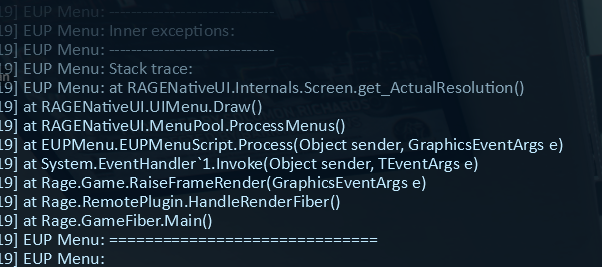
  2. Attached is same issue, after removing spotlight plugin, I also went to station instead of "forceduty" RagePluginHook.log
  3. Hello, I run at as Admin, as it fixed crashes upon startup, but now a new issue has come up. When I "forceduty" or go to the station, it loads plugins then lspdfr crashes I have bejojos plugins aswell as replaced ELS vehicles (newest patch day) I also have the license plate randomizer. I prob have a few other things but this is the bulk of it. Thanks in advance. RagePluginHook.log

Account

Navigation

Search

Search

Configure browser push notifications

Chrome (Android)
  1. Tap the lock icon next to the address bar.
  2. Tap Permissions → Notifications.
  3. Adjust your preference.
Chrome (Desktop)
  1. Click the padlock icon in the address bar.
  2. Select Site settings.
  3. Find Notifications and adjust your preference.