


Ac416
Members
-
Joined
-
Last visited
Everything posted by Ac416
-
The keyboard driver is up to date, and i didnt misstype those keys. I am going to borrow my friend's keyboard to test if it were my keyboard causing the problem
-
thank you for replying , i'll search it out
-
i tried that and the problem still hasn't gone, maybe it's because my keyboard i guess. Sometime my keyboard doesn't do properly
-
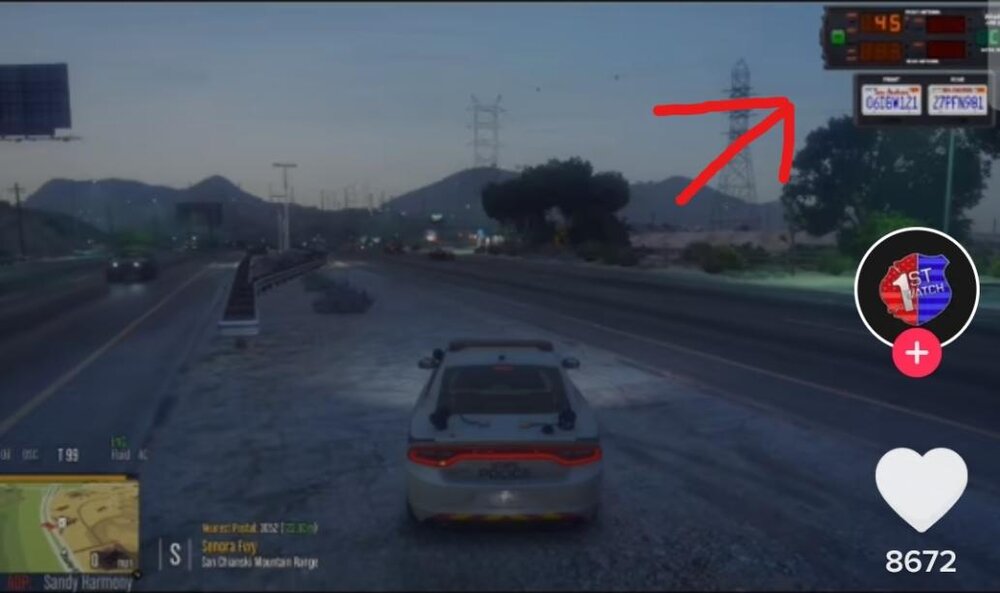
could anyone tell me where I can get this speed and plate checker? I want it so much
-
No. I don't load anything on startup. I load LSPD First Response and EUPMenu manually through the console after i get into the game
-
Hi, i have a problem with my lspdfr. The Y, Q and E keys don't work, i can't accept callout, can't access the computer and even can't freeze the suspect. If i went to work normally (you spawn and go to the police station, enter it, choose agency, choose your car and stuff), it would be imposible to press those keys. But if i force duty through the console, those keys work just fine. I can't figure out why, pls help
-
i updated rph to the newest version. It said it only supports gta v version 2189 so i updated my gta v version too. Now lspdfr works just fine. Thank you for your quick responde
-
hi i recently upgrade my lspdfr versRagePluginHook.logion to 0.4.8. But when i load plugin in rph it stops for a second and say lspdfr has crashed. Here is me rph log
-
I recently installed lspdfr 0.4.8 but there are so may bugs and errors so i want to get back 0.4.7 which is very stable. But i cant find 0.4.7 on the main page and anywhere else, so if you have one plz give me a link
