


CaffeineAddict
Members
-
Joined
-
Last visited
Everything posted by CaffeineAddict
-
 Is there a way to distinguish between code 2 and code 3 backup? I'd love having the police equip body armor when shtf (code 3), but only wear their regular uniform w/o armor on other occasions like code 2 backup. The base game has a functionality like that, if you get a wanted level of 3 stars or higher, patrol cops will roll in with their vest equipped. Could be that it's a totally different ped model then, tho... So let's say basic cop outfit is without vest, but if backup type is code 3, they wear body armor on top.
- 366 comments
- 17 reviews
-
Thanks, I had two different units designated to the same zones. Wantet to delete the Rockford Hills PD and assign their jurisdiction to generic lspd. Did the latter, but forgot deleting the RHPD unit 😄
-
Here you go. Thanks for the reminder. Should've attached it in the first place... RagePluginHook.log
-
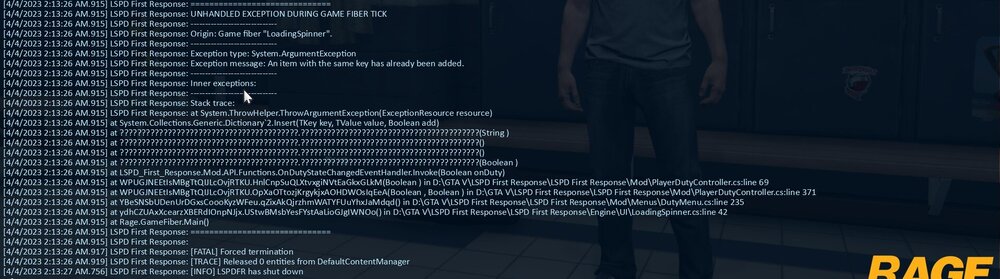
Hey folks, all of a sudden my lspdfr crashes when going on duty. It worked perfectly fine an hour ago, now I get some sort of error message in the console that I've never seen before. I don't think it's with one of my addon plugins, cause usually when I mess up my xml files (like in UB) it gives me some sort of hint which line/column is causing the issue. It says something similiar here, but I've never seen let alone edited a file that has something to do with it, at least not that I know..... Seems to be one of the core lspdfr files that has something to do with the player's status being on duty or not, console log is attached... Thank y'all very much! 🙂
-
 Awesome pack, has always been one of my essentials all the way back since I started playing LSPDFR. It's great when you have a top notch dev whose content is always a no brainer, just download, install and don't worry about stability, performance, etc. One strange thing happened to me, though: The Mafia 3 callout (at the port) is incredible difficult up to the point where I just can't complete it, as the suspects seem to have aimbot accuracy and always kill me instantly with their first shot, even if I just slightly detach from cover. I'm using a custom weapon config (ChrisPy's Realistic Weapon Play), dunno if that's a factor
- 1,024 comments
- 63 reviews
-
 Hey man, great plugin! Really brings immersion to a whole new level! I just have one issue with it: I cant get the AI accuracy modifier to work... Even with it all the way down to 5 the peds still have aimbot... Most of the times I'm down before even getting my gun out of the holster, despite having body armor and a partner engaging the ped... Any idea what might be the issue? I'm using "better AI cops combat behavior" by Payn and I installed this AFTER I installed Deadly Weapons. Could that be messing with the ped's accuracy and somehow overwrite the settings in the Deadly Weapons .ini? Thank you for your help and this awesome plugin!
- 633 comments
- 56 reviews
-
 Awesome! That’s exactly what I need! You’re a lifesaver! Do the numbers correspond? For example, would the body armor #12345 in EUP Menu be Comp ID 9 #12345 as well?
- 263 comments
- 20 reviews
-
I don’t know if the item/texture numbers are the same, but I guess choosing the item category works differently in UB, just as I mentioned in my initial post. In the UB DefaultRegions.xml, there is no such thing as an “ID 1, 2, 3...“ etc. The items are defined by the tags behind the specific items, prop_glasses=„X“ would be glasses, comp_shirtoverlay=„X“ would be the top, etc. That’s why I‘m struggling with the ID in the outfits.xml file. I don’t know what ID number corresponds with lets say comp_pants in UB. (Or all the other comp/prop tags...)
- 263 comments
- 20 reviews
-
UB is quite simple. There’s a really great tutorial video about that. That’s how I did it and I think you can get the item/texture number from your wardrobe.ini file, or you just take the info from your in game EUPMenu like in the video.
- 263 comments
- 20 reviews
-
-

- 2
-
-
Hey everyone, I need a little help with the setup of the outfits. Using the EUPMenu’s wardrobe section, I created custom uniforms and I want the officers in lspdfr to wear these outfits instead of the default ones. I also use UltimateBackup and I got the backup peds to wear my outfits by editing the DefaultRegions.xml. However, the randomly spawning peds still wear the default uniforms and that bothers me. While changing the outfits in UltimateBackup works somehow like <ped ...... comp_example=“X” tex_example=“X” ......>mp_m_freemode_01<...... with “example” being shirt, pants, etc. and “X” being the number, setting up the .xml files in the lspdfr -> data folder really drives me crazy... My idea was to edit the agency.xml so that the peds in a specific region can only wear 2-3 outfits and I would define these outfits to look like my wardrobe outfits from EUPMenu, just like I did in the UltimateBackup DefaultRegions.xml But how do I do that? Looking at the outfits.xml, I see stuff like <component> Id=“1” , etc... How can I save my custom outfits in there so I can make the random peds wear them? Thank you 🙂
- 263 comments
- 20 reviews
-
 Hey, great work with these callouts! Just one minor issue for me: I changed the .ini file to have custom vehicles as limo and backup vehicles and the option to mute the sirens seems to affect the backup vehicles only. If you have a vehicle with a siren as your limo, the driver will automatically turn it on, while the rest of the convoy only has the lights flashing, without the siren. Any idea how to fix this? Cruising around with the limo's sirens on is a bit annoying. I don't use ELS, by the way. Otherwise the mod is outstanding!
 -
THANK YOU SO MUCH! As you assumed, Stop the Ped was causing the issue. Works just fine now!
-
Hey guys, this is driving me nuts: Every time I go on duty with my custom character (none of the preset ones) I only get a standard pistol and a taser, no matter what inventory I choose. I already edited the inventories.xml in the lspdfr folder and narrowed it down to my two favorites ("Patrol_Stun" and "SWAT"), but when going on duty lspdfr automatically equips the "Random" inventory, only with a pistol and a taser. "Random" isn't even listed in the .xml file….. I also can't equip any other weapon with the F4 console or the trainer while on duty, since lspdfr seems to automatically detect and remove any weapon that doesn't belong to the selected inventory... I'd really appreciate if anyone could tell me how to make lspdfr actually use the modified inventories from the .xml file. Thank you!

