


crgmu
Members
-
Joined
-
Last visited
Everything posted by crgmu
-
 Was just about to start working on my own, thanks for saving me the time with this great pack!
- 4 comments
- 1 review
-
-

- 1
-
-
Still didn't have an effect, guessing there's something with the game causing this
-
Reinstalled again, still the same issue. LSPDFR crashes after choosing character, character can't be customized (doesnt recognize settings it seems). Will try a manual installation, if that doesn't work then thinking restoring the base game.
-
Sure thing RagePluginHook.log
-
Will always take progress! Changed from 10000 to 60000. Didn't crash, but player model is frozen (can't move with controller or keyboard) and can't view lspdfr settings in the menu (tab appears but nothing accompanying it).
-
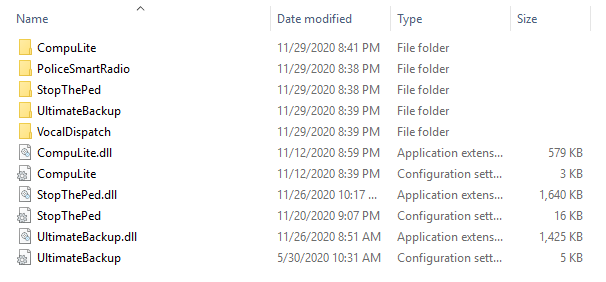
Was able to load lspdfr, crashed after saving character. Here's the log and a screenshot from plugins folder, only readded ones that were installed when game ran fine. RagePluginHook.log
-
Reinstalled it, bare copy works. Will try to trace what the issue was, probably a plugin or script
-
No cigar unfortunately, even with the admin trick. Here's the updated log. TT is correct now RagePluginHook.log
-
I checked the RPH settings and it shows 60000 but looking at the logs (I had tried a couple more tips from other threads and still got a crash) it still shows F4. Would reinstalling RPH help possibly?
-
Set up LSPDFR last night, have been able to successfully run it. Loaded in some plugins and vehicles, and removed another plugin (smart radio). Launch RPH and would start to load, then while loading LSPDFR the .dll would crash. Not familiar with troubleshooting this, have followed a couple of suggestions in other threads (set timeout threshold to 60000, set ambient events to 0). Here's the RPH log: RagePluginHook.log
