


OfficerVinnie
Members
-
Joined
-
Last visited
Everything posted by OfficerVinnie
-
When I try to load in with the mods folder renamed, the game just crashes. I presume this is because I'm playing on an older version of the game since ScriptHookV hasn't updated yet. I will try again once I update my game.
-
So for a while now, I've had an issue with certain vehicle slots not working, namely sheriff2 and fbi2. What will happen is I spawn the vehicle in using RPH just fine, but I can't ever get in the vehicle. I press f near the door and nothing, my character just starts jogging over to a car nearby. I'm not sure what I could have done to cause this, but it would be great to get these slots back. I know it isn't the car I'm replacing since the same car works in different slots, it only appears to be happening with those two slots. I've tried reverting my vehicles.meta entry for those slots to the game's default, but that hasn't worked. Any help is appreciated!
-
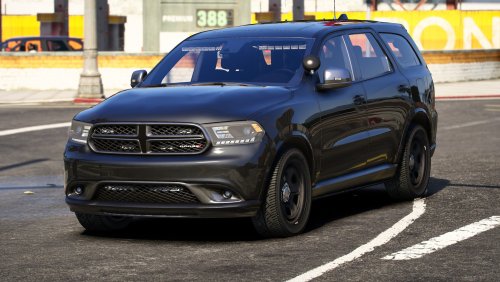 Looks great but I can't enter the vehicle to drive it... Pressing F does nothing.
 -
So I figured out that an addon vehicle pack corrupted my mods folder, which is why I received the error. Completely deleting the mods folder and starting from scratch (although it's a pain) fixed the issue. I loaded in and everything was normal. Hopefully this helps anyone else experiencing this issue!
-
Ok so, I was playing LSPDFR normally earlier today and got off. Before I got back on, I installed some new mods, (Simple Trainer and some vehicle replacements). Now when I try to boot up the game, I get this weird error I've never seen before. When I boot the game without the mods folder, it loads fine, so I deleted my modded update.rpf and put a clean vanilla one in there. Still didn't fix the problem. I then moved my x64 folder out of the mods folder and still the same problem. I'm so lost. Any help is appreciated! I've attached my latest RPH log, however, I doubt it'll be of any use. RagePluginHook.log
-
I actually found out that it was my LML that was causing the game to infinitely load. I reinstalled that since I had forgotten to and the glitch returned. So I uninstalled it and the game seemed to work fine. Not sure what the problem was, maybe support for the new update hasn't been released yet.
-
Awesome, It's working! Thanks so much!
-
Ok, I've seemed to fix the loading screen issue, I'll reinstall everything and let you know if it still crashes. And thanks so much for your help by the way!
-
Oh dear. Well, I do have a vanilla copy of the game I use to play online, so it's really not a big deal. I'll just need to reinstall everything.
-
-
Alright, will do. Doesn't that come with RAGE though?
-
I did already. That was one of the first things I did. I feel like it's something with the update.rpf file, but I've added that to the mods folder and the one in the main directory is up to date. I haven't changed it since I updated the game. Except for one setting I changed in visualsettings. All I did was increase the brightness of the police lights.
-
I tried that already, same issue.
-
Just tryed it and it still wont load.... I'm really trying to avoid having to reinstall the game. As you can probably tell now, I didn't want to install this new update because everytime I update something, something else goes wrong. I'll attach the new RAGE log as well. RagePluginHook.log
-
Yeah! I'll attach the RPH and Launcher logs again launcher.logRagePluginHook.log
-
Ok, so I've installed updates for Rage, ScripthookV, and GTA, and now I get an infinite loading screen.... I've updated the Mods folder with the updated update.rpf file and nothing. I've allowed everything through my firewall, I've disabled my virus protection, I've verified the game files, I deleted my profile saved on my hard drive and nothing. I swear I spend more time trying to fix this game rather than playing it
-
Alright, I'll try installing that and the new Rage and ScriptHookV updates tonight.
-
I'm not? I haven't upgraded to that version yet.
-
Nope, still crashed 😞 I'll attach the new RPH log along with the crash report. RagePluginHook.log RAGE Crash Log.txt
-
Interesting, let me see if I can install an updated version of those plugins. If not, I'll uninstall em. Alright, I've ended up removing them and I will test it now.
-
RagePluginHook.logThere you go! It's also worth noting that I havent updated to the recent GTA5 update just yet. If that's any help.
-
So I haven't played my modded GTA5 in quite some time, and going back to it now, I noticed that about every 30 minutes, the game crashes. I took a peek at the launcher logs and found this error code: 0xffffffff. I'm not sure what it means. I've attached the launcher.log file to this post. Any help would be appreciated! launcher.log
