Skip to content
View in the app

A better way to browse. Learn more.

LCPDFR.com

A full-screen app on your home screen with push notifications, badges and more.

To install this app on iOS and iPadOS
  1. Tap the Share icon in Safari
  2. Scroll the menu and tap Add to Home Screen.
  3. Tap Add in the top-right corner.
To install this app on Android
  1. Tap the 3-dot menu (⋮) in the top-right corner of the browser.
  2. Tap Add to Home screen or Install app.
  3. Confirm by tapping Install.

JustTom

Members
  • Joined

  • Last visited

Everything posted by JustTom

  1. Is this the cause? And If I install will this fix it?
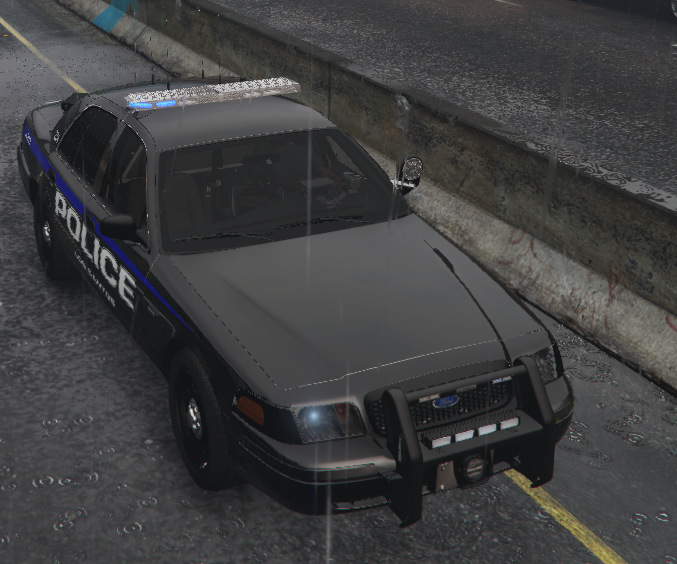
  2. Tysm for replying, and hopefully you guys will be able to help. The lights are stuck, they dont move, just stay the same. Please find attached my asiloader.log asiloader.log
  3. Hi, I'm new to LSPDFR, I've managed to install plugins, all went well. Now I tried installing these, I followed Benzo's tutorial, and It looked like I followed it well, the livery etc all good. Now the lightbar, it's pretty weird from the photo. I cant get it to work, I dont know what to do. Any help? It only stays as it is, doesn't move, really annoying....
Account

Navigation

Search

Search

Configure browser push notifications

Chrome (Android)
  1. Tap the lock icon next to the address bar.
  2. Tap Permissions → Notifications.
  3. Adjust your preference.
Chrome (Desktop)
  1. Click the padlock icon in the address bar.
  2. Select Site settings.
  3. Find Notifications and adjust your preference.