


thota
Members
-
Joined
-
Last visited
Everything posted by thota
-
RPH works perfectly fine with the current version of GTA V Just use the lspdfr manual install it already comes with the latest version of RPH
-
Remove keepcalm from plugins/lspdfr. And stealthcommon.dll from your GTA v folder
-
Update RageNativeUI You can find the latest version here: https://github.com/alexguirre/RAGENativeUI/releases And remove callout manager
-
Please send your RagePluginHook log This is a text file called RagePluginHook. If you can see file extensions, it has a .log one.
-
Can you try going on duty without Arrest manager installed?
-
Remove LSPDFR+ as its outdated
-
7002.1 is the error code for reverted game version Update Your GTAV (you can do this by verifying your game files.) then use the manual installation of LSPDFR which comes with the latest version of RPH.
-
As far as that issue goes make sure that you install the configs(Both for default and Ultimate backup) for EUP. but if you are keen on uninstalling EUP: go to GTAV/mods/update/update.rpf/Common/data>Open the dlclist.xml in edit mode>and remove the line for EUP and SUP(If you installed Serve and rescue) additionally you can also delete the folders for EUP and SUP from GTAV>mods>update>x64>dlcpacks.
-
Download the manual install zip Extract the contents to an empty folder Drag and drop all the files and folders except readme and licenses.
-
Do you have ScriptHookV installed? if so please send your ELS.log and ScripthookV.log
-
Please send your RagePluginHook log This is a text file called RagePluginHook. If you can see file extensions, it has a .log one. It is in your main GTA V folder.
-
Update your RageNativeUI Put RageNativeUI.dll and .xml into your root GTA V folder. https://github.com/alexguirre/RAGENativeUI/releases
-
Try updating force a callout
-
Did you replace your police2 slot? If you did, try removing the model and playing if that wont work you could rename mods to _mods and try again.
-
 For your first ever callout pack you did an amazing job, it offers a great variety of callouts with interesting outcomes and does not seem to have any issues at all. I am genuinely excited for the future of this pack.
- 311 comments
- 60 reviews
-
-

- 2
-
-
Rename mods to _mods and try again If that won't work move dinput8.dll out of main directory and try again.
-
Could you try giving yourself flashlight before you go on duty?
-
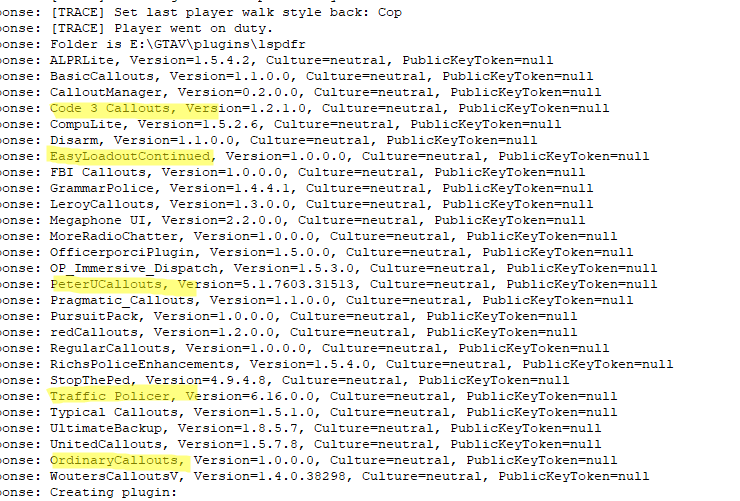
You could start by removing outdated plugins the ones marked here and also move disarm to Plugins as its a RPH script.
-
well you could rename mods to _mods and see if your car is the issue.
-
Hi, can you try launching regualr GTA V once in storymode fully tabout and launch RPH if it loads up lsdpfr and you still face freezing issues send a new log
-
Please attach your RagePluginHook log its a text document found in your main directory. Named RagePluginHook.log
-
Please attach your RagePluginHook log its a text document found in your main directory. Named RagePluginHook.log
-
Its most likely your gameconfig but to be sure can you rename mods to _mods and try again.If it works send a screenshot of where you added the gameconfig you could also try reverting back to 1.5 and see if that helps.
-
You don't need your game to crash to send a log, Its a text document found in your main directory called "RagePluginHook.log"
-
Rename mods to _mods and try again.


