
Veteranfighter
Members
-
Joined
-
Last visited
Files posted by Veteranfighter
-
Dynamic Lightbar System OPEN BETA
1.0.0.0 by Lenge
This plugin allows you to attach lightbars to every vehicle in the game
Hotkeys (These cannot be changed at the moment, next update will include a configuration file):
F6: Open the Lightbar configuration menu
F5: Open the Preset Menu - You can save your preset and share it with others or just save and load it for another session.
E: Turn siren on / off
J: Turn siren silent
At the moment it's not possible to perform pullovers with the vehicles, I'm not sure if I can fix this in the future.
Please report all bugs to me, remember, this is a very early Open Beta Version.
Requirements:
RageNativeUI
OpenIV for the Installation
Custom GameConfig for example: https://www.gta5-mods.com/misc/gta-5-gameconfig-300-cars/download/185426
A little showcase and tutorial of the plugin can be found here:
Notice:
This is a work in progress and also a BETA VERSION.
This version will probably have some small bugs I will fix in the future. This mod is not in it's final state.
This mod is heavily inspired by the amazing FiveM script "Lightbar Menu Script" by Munky. All credits for the lightbar models and the original idea go to him!
- 4,063 Downloads
- 20 Comments
Updated -
AI:Respond Open Beta
by Lenge
Features
Press U while responding to request backup. The requested backup will arrive with you on scene.
Requirements
LSPDFR 0.4.9 or higher RageNativeUI
Installation
Drag the "plugins" folder from the zip to your GTA5 main directory
Suggestions and Support
If you have any questions/suggestions/bugs or other concerns feel free to contact me on my discord:
https://discord.com/invite/4zx2uXCmMe
Reviews and Showcases
Official showcase video:
Enjoy and have fun
- 40,127 Downloads
- 133 Comments
Updated -
GPT Callouts
This callout pack was generated by an AI
How an AI Created an LSPDFR Callout Pack
The world of LSPDFR is always evolving, with new and exciting callouts being added by the community all the time.
But what if an AI could create its own callout pack?
That's exactly what we set out to discover.
To create the callout pack, we used a state-of-the-art language model called GPT-3, developed by OpenAI. We provided the AI with some initial prompts and let it generate the callouts, descriptions, and other necessary details.
The AI-generated LSPDFR callout pack included a variety of different scenarios that officers might encounter on the streets of Los Santos.
The text above was created by Artificial Intelligence.
________________________________________________________________
Included callouts:
Suspicious Person
Speeding vehicle
Dead Person
Car on Fire
Shooter
Fight
Source Code:
https://github.com/Veteranfighter/GPTCallouts/tree/main
Installation:
Although the callouts are quite simple, they're still playable and somewhat enjoyable.
So if you want to test those plugins yourself, download the .zip file and drag both files to:
Your GTA5 Directory/plugins/LSPDFR
If you have any concerns regarding the plugin, feel free to contact me on my Discord Server:
https://discord.gg/4zx2uXCmMe
Disclaimer
Since I only fixed some bugs, all credit for the callouts goes to:
https://openai.com/
Try it yourself:
https://chat.openai.com
I am not associated with OpenAI.
Have fun
🙂
- 5,190 Downloads
- 23 Comments
Updated -
Scrub
by Lenge
Features
Press Left Control + X (configurable) to clean away:
Blood Tire tracks Blood tire tracks Oil
Requirements
LSPDFR 0.4.9 or higher
Installation
Drag the "plugins" folder from the zip to your GTA5 main directory
Suggestions and Support
If you have any questions/suggestions/bugs or other concerns feel free to contact me on my discord:
https://discord.com/invite/4zx2uXCmMe
Reviews and Showcases
Official showcase video:
Have Fun Scrubbing 🙂
- 3,700 Downloads
- 19 Comments
Updated -
Working Fire Extinguisher
by Lenge
Since you can't use the Fire Extinguisher in the base game, I developed this script which makes the fire extinguisher functional.
Features
Use a fire extinguisher to extinguish
Cars on fire Pedestrians on fire Wild fires Oil fires
Requirements
LSPDFR 0.4.9 or higher
Installation
Drag the "plugins" folder from the zip to your GTA5 main directory
How do I use it?
Open the RagePluginHook-Console (default key: F4) Copy this into the command line: GiveWeapon WEAPON_FIREEXTINGUISHER Press Enter Nice! You can now use the extinguisher just like any other weapon
You can also edit lspdfr's inventory.xml and add the WEAPON_FIREEXTINGUISHER to a loadout.
Suggestions and Support
If you have any questions/suggestions/bugs or other concerns feel free to contact me on my discord:
https://discord.com/invite/4zx2uXCmMe
Recommended Mods
Fire extinguisher HUD Icon: https://www.gta5-mods.com/misc/fixed-fire-extinguisher-hud-icon-for-weapon-wheel-v1-51
- 10,006 Downloads
- 10 Comments
Updated -
ImageOverlay
by Lenge
Features:
ImageOverlay allows you to create static overlays which will be displayed on the screen during your LSPD:FR session.
Requirements:
LSPD:FR RagePluginHook
Installation:
1. Extract the .zip file
2. Drag and drop the content of "GTAV" into your GTA5 main directory
3. Remove the template (template.png) under GTAV\plugins\LSPDFR\overlays
Create overlays:
ImageOverlay will display your games resolution on startup:
1. Create a new image by the size of your game resolution, using an image manipulation program like Paint.NET (free), Photoshop or GIMP (free). (Download those on your own risk!)
2. Remove the background using an eraser tool
3. Add content to your image, like text, images or more
4. Save the image to GTAV\plugins\LSPDFR\overlays as a .png or .jpg
Warning: Although ImageOverlay does intentionally detect .png AND .jpg, it is not recommended to use .jpg, since it doesn't really support transparency.
Warning: Your overlay will only be displayed as usual if the overlay image's size is the same as the game resolution.
Source Code:
https://gist.github.com/Veteranfighter/1a1f7836dc556ea47b1e9752b6115a4b
- 193 Downloads
- 4 Comments
Updated -
This is Urban Callouts.
A mission styled callout pack by Veteranfighter.
Current Callouts:
Kidnapping: Prevent the kidnapper from committing a murder (added in 0.0.1) Suspicious Cargo: Drive to the caller's position and inspect the cargo. (added in 0.0.1) Pool Accident: A person fell drunk into a pool and swallowed a lot of water. Save her/him. (added in 0.0.1) Trespassing: A homeless person is sleeping on private property. Handle the situation appropriately. (added in 0.0.2) Stranded Whale: There have been several reports of a beached whale, get rid of it! (added in 1.1.0.0) Active Shooter: Investigate the reported location and stop the threat. (added in 1.1.0.0) Building On Fire: A structure caught fire. Respond to the location, let the fire fighters do their job and catch the arsonist. (added in 1.2.0.0) Plane Emergency: A commercial plane declared an emergency respond and handle the situation. (added in 1.3.0.0) Parking Offence: A civilian reported a wrong parked car, check for a permit. (added in 1.3.0.0) Diamond Casino Heist Act I: Help the N.O.O.S.E. Captain arresting the suspects robbing the casino, (added in 2.0.0.0) This is rather a mission than an actual realistic callout.
Ambient Callouts inspired by Wilderness Callouts:
Speeding Vehicle: A vehicle is driving way too fast. Catch the speeder! (added in 2.0.0.0) Armed Person: A person is walking with a gun in public, approach and handle the situation. (added in 2.0.0.0) BETA NOTICE: Ambient Callouts are in open beta, which means many bugs could potentially occur. Please reach out to me if you experience any issues.
Diamond Casino Heist Act II is cancelled due to a technical problem on my PC.
Support:
For LSPD:FR support join the Unofficial LSPDFR Support Server: https://discord.gg/xsdAXJb
For Urban Callouts support join my discord server: https://discord.gg/4zx2uXCmMe.
Keybindings:
Dialog: Y
End Callout: End
Interact: I
Those are the default keys. You can change them in
UrbanCalloutsConfig.ini
Car Unit name:
In the included .ini file you can modify your unit name, by default it is set to 1_ADAM_13 and can be changed to:
1_ADAM_5 1_ADAM_13 1_DAVID_4 3_LINCOLN_2 4_MERRY_5 7_EDWARD_7 Changing the car unit name will change the dispatch voice lines.
Requirements/Recommended:
LSPD:First Response -> Required: RageNativeUI by alexguirre -> Required: https://github.com/alexguirre/RAGENativeUI/releases/tag/1.8.1 GrammarPolice by Opus49 -> Recommended:
Installation:
Drag n' drop the content of the GTAV folder included in the .zip file in your GTA5 main folder.
Installation tutorial by HighwayTrooper:
Installation tutorial by GamingWithJamesTV:
Installation tutorial by Gamer Benny711:
Make sure to leave a sub on all of those three guys, the make great content.
Bugs:
I expect this callout pack to have a few bugs. If you find them, please report them. Without your reports it will take longer to find the bugs
and fix them.
Updates:
This callout pack will receive at least 1 more content updates including new callouts ambient events and more.
Suggestions:
Please visit my discord for further callout suggestions.
Old Changelogs:
Questions:
If you have any questions regarding to the callout pack, programming, or my person you can ask me on LSPDFR or on my discord.
Check this guy out, he makes some amazing models and liveries:
@PolarHusky99
Contact:
Email: *****@*****.tld
LSPDFR: Veteranfighter
Discord: Lenge#1475
Terms of Usage:
You may not pretend that this mod is yours.
You may not de-compile this plugin without my permission.
You may not upload this mod to any other website.
You may not share any file included in this callout pack.
- 145,414 Downloads
- 105 Comments
Updated -
Traffic Callouts v1.0
Make sure to join my discord server: Join by clicking here
Callouts
1. Broken Car: A person's car is broken and stands on a road.
2. Dead animal on a street: Someone's dog has been ran over, get to the scene, talk to the victim and handle the situation.
3. Heavy vehicle on a dirt road: A heavy vehicle (6 tons+) has been spotted on a dirt road, perform a traffic stop and talk to the driver.
4. Person on a highway: Citizens are reporting a person on a hwy, get to the scene very fast and talk to the suspect.
5. Person refusing to pay for gas: Get to the gas station and talk to the seller and the suspect.
6. Wild animals on a highway: Various wild animals are on a highway and block the traffic, scare them off.
7. Unsecured load: A driver didn't secure his load, pull the suspect over and reprimand him.
... More coming very soon, you can suggest your traffic callout on my discord server in the #suggestions channel, I will try to make all of them.
Installation
Drag and drop the content of 'Installation files' into your GTA V main dictionary Start GTAV Have fun 🙂
Installation tutorial by Matty is Ball
Traffic Callouts gameplay by mackergaming
Found an issue
Report the bug on my discord server.
Requirements
RagePluginHook 1.84 or higher A legal copy of GTA V LSPDFR 0.4.8
Recommendations (not required)
Stop The Ped Any type of scene manager (to manage the traffic) CompuLite or Computer+
Discord server
You can join my discord server here
Features
Press "End" key to force end the callout Press "Y" key to continue the current dialog Many different callouts No FPS drops 7 different callouts Over 65 callout spawnpoints Ini file for changing the keys and the callouts Great dispatching Audios (Not for all callouts done yet)
A special thanks goes out to Vincentsgm, YobB1n, PNWParksFan, Albo1125, alexguirre, Rich who helped me getting used to the API.
Thanks to Mohammed who helped me with some of the positions and the callout ideas.
Thanks to BigOlBatman who helped me with the beta testing.
Changelog
1.0: Open beta
Released Traffic Callouts
- 111,069 Downloads
- 24 Comments
Updated -
Player Position
Version: 1.1.1
Author: Veteranfighter
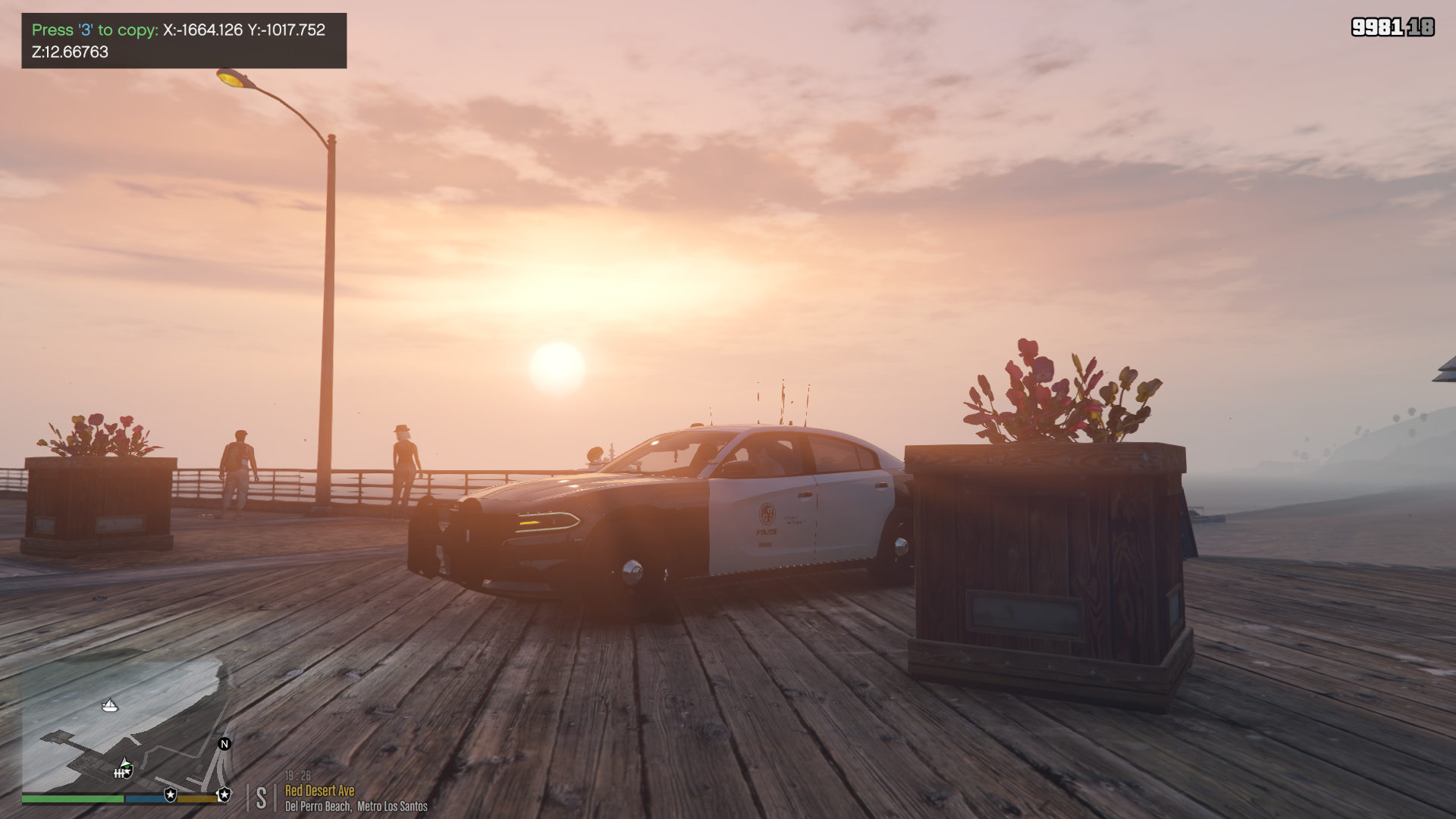
Description: This plugin displays your current character position and allows you to copy it with one click (Format: XYZ). The plugin was made for Rage Plugin Hook.
Player Position will not get any further content updates.
Keys:
Display the position: D2 (the 2 key) Copy the position: D3 (the 3 key)
Installation: Drag and drop the downloaded 'Plugins' folder into your GTAV main directory.
Requirements:
A legal copy of GTA V Rage Plugin Hook Version 1.84.1279.16097 or above
Code: You can find the code in the downloaded 'Code' folder.
Note: You are allowed to edit and share the code as long as you give credit to my name. In case you reupload a new version by PlayerPosition, you must include the code to your download, your edited version needs to be open source.
Never delete any comments in my code.
You can mention yourself in the code in another comment (eg // This class was extended by YourName)
In case you have further questions, bugs or feedback, then send me a message on Discord. Veteranfighter#8043
Or visit my discord channel: https://discord.gg/ArGmM7Sagj
Changelog:
1.0
Player Position was added to LSPD First Response Known issues:
When spamming the copy key (3), the notification will be some how very buggy, I dont know why and cant fix it
Car shown in the screenshot: https://www.lcpdfr.com/downloads/gta5mods/vehiclemodels/28539-l-a-p-d-pack-els/
- 664 Downloads
- 7 Comments
Updated