
etv101
-
Joined
Everything posted by etv101
-
still not got round to it at present
-
many thanks, i will give it a go and get back to you 🙂
-
Hi any can help ? i have dowloaded a british coroners van, i have changed the files to the appropriate name ie SPEEDO.yft etc, does anyone know what location these need to be installed in please?
-
Hi all just a quick question i am currently running Section 136 Callouts script and was wondering if there was another one avaliable with UK style callouts that is compatable (will work in conjunction with) my current setup to expand my callout list and make my games more varied? 🙂 Any help or suggestions will be greatly recieved. Cheers 🙂
-
Can anyone recommend any decent callout scripts and game add-ons that are compatable with the latest version of LSPDFR/Scripthook ?
-
Brillian thank you for your help :)
-
Hi All I currently have 3 modded police vehicles running stably in my game, currently i have the BMW X5 in my police2 slot, is it easy to replace this slot with the Volvo XC90 please ?
-
Hi Folks, certain vehicle mods only compatable with the current ELS version 1.05 ? The reason i ask is because i have modded my game with the latest versions of LSPDFR, SH and ELS and have noticed that were my vehicle mods have worked perfectly in previous versions they no longer do..
-
Hi Forum, wondering if anyone can help, i have followed all the guidlines for installing the game and LSPDFR, SH, ELS and then my vehicle mods, the game loads perfectly and the cars with sirens/lights work also, however there is one issue i am facing, the lightbar "wobbles" on top the car, ie if you can imagine irl the lightbar is on the roof of the vehicle but rocks left to right while vehicle is moving and also a short time after coming to a stop, i belive this has something to do with the Car variations meta.txt file that comes with the vehicle pack i have downloaded, can anyone help me get this file into the correct game location ? your help will be gratefully recieved
-
Heya, thanks for your reply, by "wobble" i mean when you drive the car and then stop the lightbar/aerials keep moving briefly after the car has stoppped almost as if in real life the lightbar is not bolted to the roof of the car lol
-
hi i have done this and not all the cars that i have put into the game using Open IV appear or if they do the lightbars/sirens either wobble on the roof of the cars or dont't work at all... Please can someone tell me where i am going wrong as a lot of the time the mods themselves come with files but no instructions as to where to copy the files to..
-
Hi UnknownBastion I have been caught out again with most recent game update, I have completely reinstalled the game, then lspdfr, scripthook, els then my vehicle mods, but the game just crashes. not quiet sure what is going on?.. sorry to be a pain, i got it working completely before as per your instructions then the game updated and now nothing works 😞
-
-
Hi all i am reinstalling GTA V and LSPDFR, scripthook and els from scratch, is there any required order to install all of these in please ? 🙂
-
-
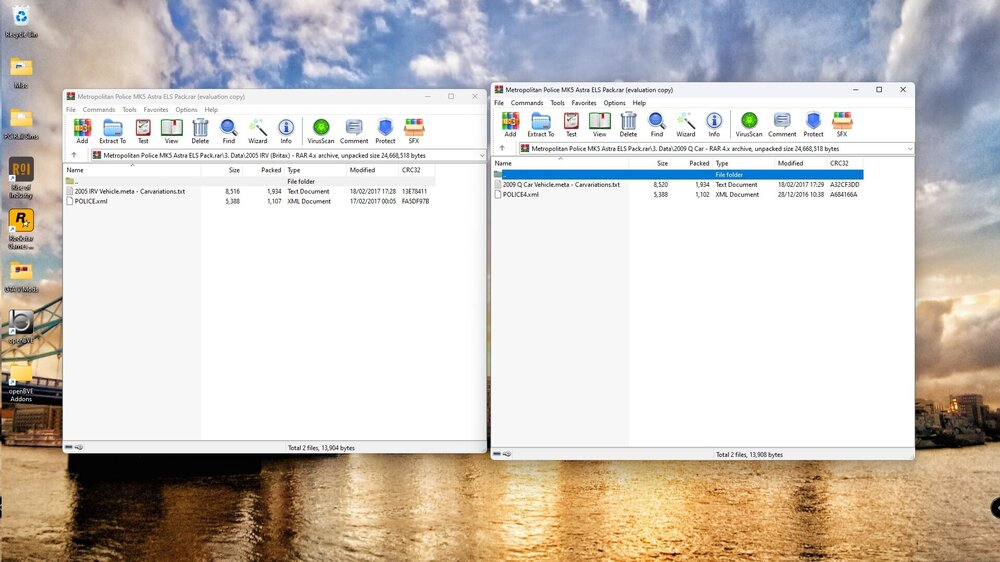
That is brillian thank you, so with the above files that say 2005 IRV Vehicle.meta & 2009 Q Car Vehicle.meta - Carvariations.txt, am i right in thinking they go into the Carvariations.meta file ? 🙂
-
hi there, sorry for the delay getting back to you. as you can see from the screenshot below both the cars that i have installed come with .meta files, i belive that these need to be copied into the game but i am unsure at to where as the download does not contain instructions. your help is very much appreciated :)
-
have i copied the mods rpf files to the above patchday folder as instructed but i also have to insert vehicle.meta files for each one, how do i do this please ?
-
ah ok thank you for getting back to me, i will try and place the files in the above directory, how would i add them to the agency.xml/duty selection please ? sorry i am pretty new to all of this..
-
Hi I have installed them to GTAV/mods/update/x64/dlcpacks/patchday28ng/dlc.rpf/x64/levels/gta5/vehicles.rpf
-
The game loads perfectly through RPH but when i go on duty and go to the police garage the cars i have "installed" are either not there at all or they are but the lightbar wiggles on the roof and they and they sirens can't be activated PS: I have latest scripthook, ELS and LSPDFR installed correctly
-
I have downloaded the cars that i want from here, i have placed them in the relevant folder (latest patchday/vehicles.rpf) using open iv, but they dont work. Please can someone assist me ? Cheers 🙂
-
I have followed your instructions and used OpenIV to put the police.xxx files into the latest patchday folder, which is in my mods folder, only 2 of the copied cars load in the game and the lights dont work and are floating on top of the car, please help ? 🙂
-
My game has suddenly crashed again after running stably for a few months, i notice GTA version is now on 2699 and lspdfr reflects this but what about scripthook and Els, do we need to wait for them to be updated too ?
-
I am placing them in the vehicles.rpf file which is contained in the latest patchday file..