Skip to content
View in the app

A better way to browse. Learn more.

LCPDFR.com

A full-screen app on your home screen with push notifications, badges and more.

To install this app on iOS and iPadOS
  1. Tap the Share icon in Safari
  2. Scroll the menu and tap Add to Home Screen.
  3. Tap Add in the top-right corner.
To install this app on Android
  1. Tap the 3-dot menu (⋮) in the top-right corner of the browser.
  2. Tap Add to Home screen or Install app.
  3. Confirm by tapping Install.

Cledus

Members
  • Joined

  • Last visited

Files posted by Cledus

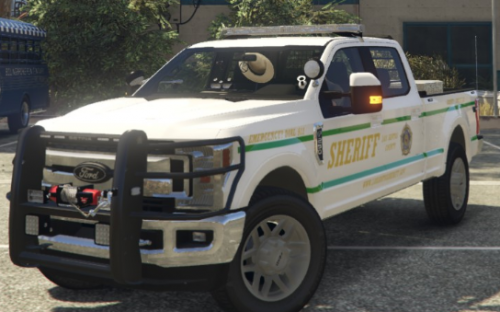
  1. 2019 FORD F-250 LSSD SKIN
    This skin is made for Ripple's 2019 ELS F-250 form the San Andreas State Parks Pack
     
    It has two green stripes running down each side of the truck as well as A large Sheriff Los Santos County lettering scheme and the LSSD seal.
     
    This file includes the .ytd with the skin that you can rename to whatever file you have installed it to, as well as the raw image that you can replace within the .ytd if you prefer.
     
    You MUST  download this file for this skin to even be usable: (Again HUGE thanks to @Ripple for this file)
     
    • 146 Downloads
    Updated

Account

Navigation

Search

Search

Configure browser push notifications

Chrome (Android)
  1. Tap the lock icon next to the address bar.
  2. Tap Permissions → Notifications.
  3. Adjust your preference.
Chrome (Desktop)
  1. Click the padlock icon in the address bar.
  2. Select Site settings.
  3. Find Notifications and adjust your preference.