
LincolnBarnes
Members
-
Joined
-
Last visited
Everything posted by LincolnBarnes
-
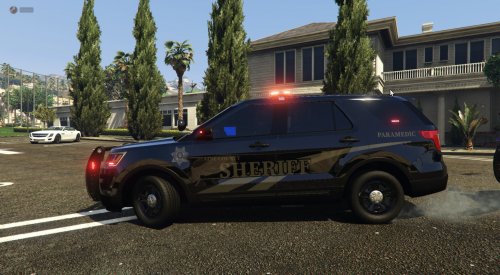 lol ion really care but you copied my stripes from my tahoe, same colours, same text placement.... lmao
 -
so no credits? lol
-
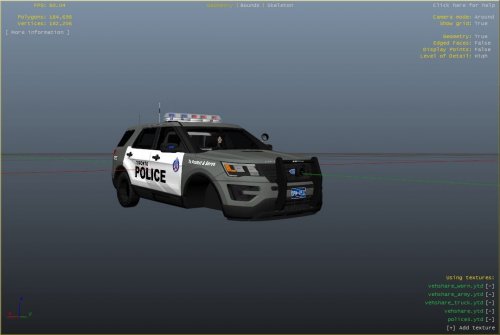 This pack is based off the Toronto Police Services Explorer. Everything should be easy to install, you simply open your .ytd file, look for the livery texture and then simply replace the base livery with the png that was in the file download :). This is my first livery and i'm planning to continue on making liverys. Please respect the amount of time taken and do not re-upload or rip off. Please, feel free to make a donation if you like, any amount is more than appreciated! Thanks Everyone Vehicle used in screenshot
- 1 comment
- 1 review
-
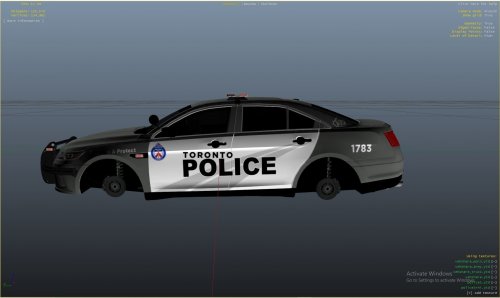 This pack is based off the Toronto Police Services Taurus. Everything should be easy to install, you simply open your .ytd file, look for the livery texture and then simply replace the base livery with the png that was in the file download :). This is my first livery and i'm planning to continue on making liverys. Please respect the amount of time taken and do not re-upload or rip off.
 -
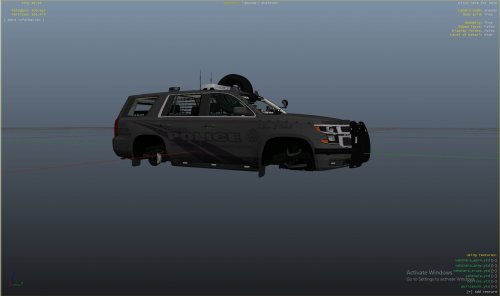 This pack is based off the Toronto Police Services stealth Taurus. I recreated the texture but for a 2020 Tahoe. Everything should be easy to install, you simply open your .ytd file, look for the livery texture and then simply replace the file with the png :). This is my first livery and i'm planning to continue on making livery's. Please respect the amount of time taken and do not re-upload or rip off.