


Shumi
Members
-
Joined
-
Last visited
Everything posted by Shumi
-
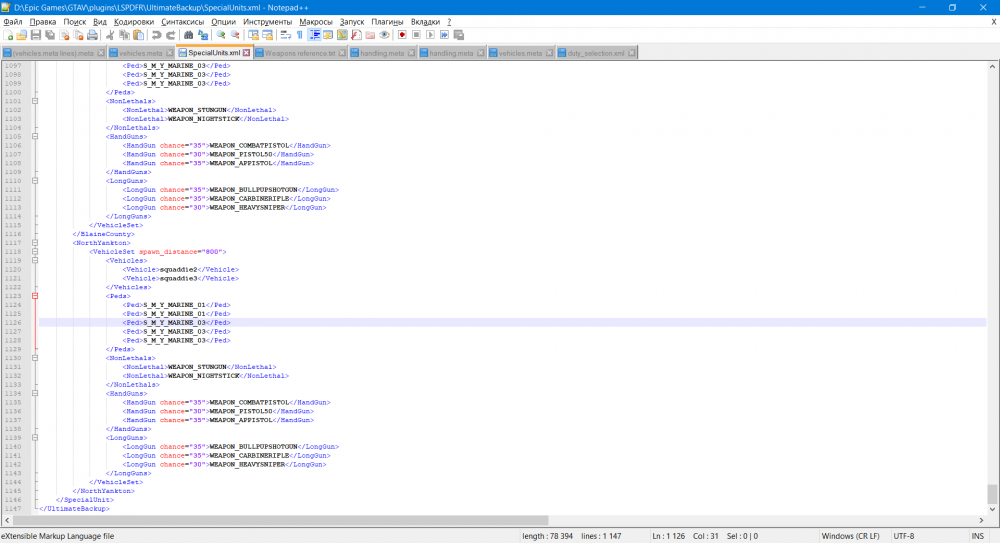
How to add more peds to vehicle? I add lines, but nothing changed Thanks About units. This file located in Ultimate Backup
-
I have solved the problem with fbi2. It was associated with a mistake in the lines of the car in the meta.
-
Ok. I will try later
-
x64s?
-
I used only patchday 21 and 22
-
Not. Should I have copied there? There are problems with him.
-
like on screenshot? Now
.thumb.png.9cdb106e28b687ba0839446b90de6ede.png)
.thumb.png.6b995aa8444927cc416fc35b2a4c862c.png) https://www.gta5-mods.com/vehicles/vapid-interceptor-police-package-add-on-replace-mappedNo result.Ok. I'll write laterhttps://www.gta5-mods.com/vehicles/mammoth-squaddie-add-on https://www.gta5-mods.com/vehicles/vapid-speedo-express-police-transport-add-on https://www.gta5-mods.com/vehicles/police-buffalos-sas994 https://www.gta5-mods.com/vehicles/bravado-buffalo-mega-pack-civilian-and-police-replace-add-on Should I put these models in the folders you mentioned above? Should I copy models to all of the above folders except the latest patchday?
https://www.gta5-mods.com/vehicles/vapid-interceptor-police-package-add-on-replace-mappedNo result.Ok. I'll write laterhttps://www.gta5-mods.com/vehicles/mammoth-squaddie-add-on https://www.gta5-mods.com/vehicles/vapid-speedo-express-police-transport-add-on https://www.gta5-mods.com/vehicles/police-buffalos-sas994 https://www.gta5-mods.com/vehicles/bravado-buffalo-mega-pack-civilian-and-police-replace-add-on Should I put these models in the folders you mentioned above? Should I copy models to all of the above folders except the latest patchday?.thumb.png.1e07c085cec955012843f4570d4c718f.png)
.thumb.png.0d95ac1cc54fc2b3ba51a085bd1f3500.png) SureNo. Only rename of original LSPDFR cars (Police action etc)What do you mean? I already installed my add-on cars for using In which patchday in dlcpacks I need to installed cars for using in duty menu?Yes Can I add venicles to Duty_selection? I tried, but nothing. EUP installed
SureNo. Only rename of original LSPDFR cars (Police action etc)What do you mean? I already installed my add-on cars for using In which patchday in dlcpacks I need to installed cars for using in duty menu?Yes Can I add venicles to Duty_selection? I tried, but nothing. EUP installed.thumb.png.bda40e57e4b479d71ac1d986f006836e.png) Look. In game's menu (Map etc) In the tab "Save" I want to change my save. After this action, the game just crashes on loading screen like without modified gameconfig. It doesn't matter with or without LSPDFRI am unable to load my main save at 70%. Is this the norm when running LSPDFR? I just wanted to change. With saving 1%, nothing can be bought 🙂If I knew what the source of this problem is ... I guess the problem can be solved by dispatch or venicles meta files. By renaming the _mods folder, the problem disappeared. The problem with lags and crashes was solved 🙂 The source of the problem due to which I created the post were outdated modifications. Anyway, thank you so much for your help.Thanks you very much! I tested with _mods folder. Nothing. And further. Can you tell me how to use special forces on the fbi2 shelves? After some modification, they spawn only in the amount of 4 guys in the car. I changed it in the LSPDFR settings. Nothing. In which folder can the commandline be located? I didn't think that at least someone would answer my post. How many created them, no one answered fully. I am very grateful to you
Look. In game's menu (Map etc) In the tab "Save" I want to change my save. After this action, the game just crashes on loading screen like without modified gameconfig. It doesn't matter with or without LSPDFRI am unable to load my main save at 70%. Is this the norm when running LSPDFR? I just wanted to change. With saving 1%, nothing can be bought 🙂If I knew what the source of this problem is ... I guess the problem can be solved by dispatch or venicles meta files. By renaming the _mods folder, the problem disappeared. The problem with lags and crashes was solved 🙂 The source of the problem due to which I created the post were outdated modifications. Anyway, thank you so much for your help.Thanks you very much! I tested with _mods folder. Nothing. And further. Can you tell me how to use special forces on the fbi2 shelves? After some modification, they spawn only in the amount of 4 guys in the car. I changed it in the LSPDFR settings. Nothing. In which folder can the commandline be located? I didn't think that at least someone would answer my post. How many created them, no one answered fully. I am very grateful to you.thumb.png.fa8442163d9f59a3e29eea7c3844e2df.png)
.thumb.png.d27d167285ea65bdf1c5fdc1235c2a73.png) LSPDFR started crashing more often after updating. I cannot reboot (After this action, the game itself crashes for me) I want to decide which plugin I need to remove for the mod to work normally without crashes. UltimateBackup replaces TrafficPolicer in ArrestManager in terms of calls? Should I uninstall Smart Radio? As I understand it, the radio does not work without AM and TP. What EXACT modifications do I need to remove for stable play in LSPDFR? RagePluginHook_23082020_120753.log RagePluginHook_23082020_143407.log
LSPDFR started crashing more often after updating. I cannot reboot (After this action, the game itself crashes for me) I want to decide which plugin I need to remove for the mod to work normally without crashes. UltimateBackup replaces TrafficPolicer in ArrestManager in terms of calls? Should I uninstall Smart Radio? As I understand it, the radio does not work without AM and TP. What EXACT modifications do I need to remove for stable play in LSPDFR? RagePluginHook_23082020_120753.log RagePluginHook_23082020_143407.log.thumb.png.b7f65db78c9b17ee2019fa20d938f195.png)
.thumb.png.da8ea6aed7325cda515ba299af54ef72.png)
.thumb.png.d7fdf700992b3c4f45e148449a4d6a59.png) I think, problem inside in venicles.metaof course I recently renamed it. There were no changes. Note that when Hook V Script was not updated I played without plugins for LSPDFR respectively. There were no crashes. I recently renamed it. There were no changes. Note that when Hook V Script was not updated I played without plugins for LSPDFR respectively. There were no crashes.RagePluginHook_22082020_205012.log With crush and reloading (too crush)
I think, problem inside in venicles.metaof course I recently renamed it. There were no changes. Note that when Hook V Script was not updated I played without plugins for LSPDFR respectively. There were no crashes. I recently renamed it. There were no changes. Note that when Hook V Script was not updated I played without plugins for LSPDFR respectively. There were no crashes.RagePluginHook_22082020_205012.log With crush and reloading (too crush)


.png.4fbcca56342cb8e07b8cef93d188e486.png)
.png.070ec4a1d1fb7d31593d55772ddd5107.png)
.png.582fe8be054de530bba19a4ec6f4354f.png)
.png.0114dc03769300309f604ea1277a8148.png)
.png.bf7bb7c848514e19bd3862454f780169.png)
.png.c8d154bb28ea481351c691ada526b240.png)
.png.d9bdb6c22fb9fb8ccd81428d5a458e94.png)
.png.47e3051ffbcb2000e50805bbd83efab8.png)
.png.faabc55d74570be4cf81c34ed323b1ac.png)
.png.e88a33252318009979b518cc674fd521.png)
.png.8a791854aa88eedc31bcadd6d46758c0.png)