Skip to content
View in the app

A better way to browse. Learn more.

LCPDFR.com

A full-screen app on your home screen with push notifications, badges and more.

To install this app on iOS and iPadOS
  1. Tap the Share icon in Safari
  2. Scroll the menu and tap Add to Home Screen.
  3. Tap Add in the top-right corner.
To install this app on Android
  1. Tap the 3-dot menu (⋮) in the top-right corner of the browser.
  2. Tap Add to Home screen or Install app.
  3. Confirm by tapping Install.

Shadowcreeperzx

Members
  • Joined

  • Last visited

Everything posted by Shadowcreeperzx

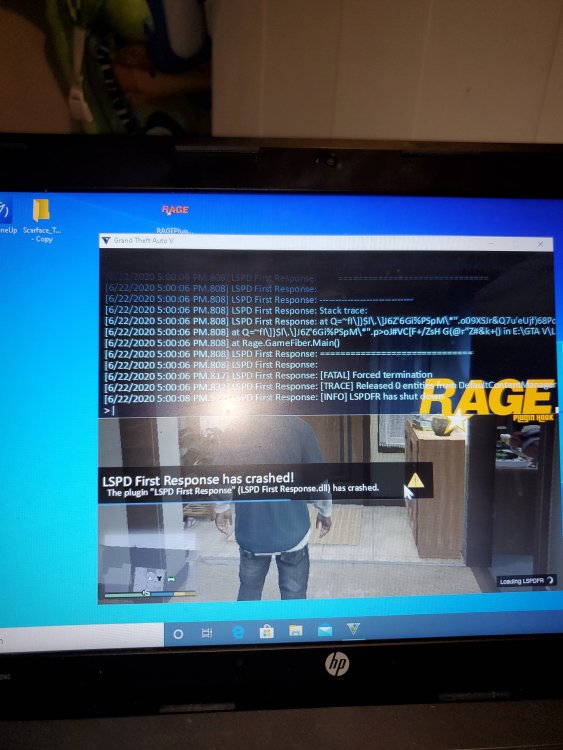
  1. I can not get lspdfr to stop crashing It loads fine until gta first launches then the flashing lights and gunshots loading screen freezes trying to load and one it increases after a few minutes it continues and shows ragehook is loading lspdfr then a minute or two into the loading ragehook story mode it pops up ragepluginhook lspdfr first response has crashed then it loads into the regular story mode I type reloadallplugins and it crashes every time said the plugin:lspdfr first response. Dll has crashed it was working at one point but I had trouble getting it to work then a few hours later it wouldn't work anymore antivirus is off i have the latest lspdfr and ragehook files RagePluginHook_22062020_232620.log
Account

Navigation

Search

Search

Configure browser push notifications

Chrome (Android)
  1. Tap the lock icon next to the address bar.
  2. Tap Permissions → Notifications.
  3. Adjust your preference.
Chrome (Desktop)
  1. Click the padlock icon in the address bar.
  2. Select Site settings.
  3. Find Notifications and adjust your preference.