


Shadowcreeperzx
Members
-
Joined
-
Last visited
Everything posted by Shadowcreeperzx
-
All antivirus off and exception made
-
I'm also having this same logs and can't figure it out also need help it works sometimes after playing randomly for awile always crashed on load saying unhandled reception in main fiber and the file can't be proccesed bc its already being used by another procces Lmk if anyone can help
-
Were do these scripthookv files go??
.thumb.png.bf04002c2c48bdabf89fc191e077b1c1.png)
.thumb.png.7feb410496b69e4ebabd5ca237e2f936.png)
.thumb.png.bd5d5396d20aee9cd0fc9e43bfc13b3e.png)
-
The lspdfr file and rage file is already extracted can I just copy all files and paste in the main directory
.thumb.png.715ac71e989020fbf4ea2b8dac6bd2c1.png)
-
Ok run me through that real quick I have rage latest rage download and lspdfr manual instal files..i just deleted everything in plugins should I upload my directory?
-
Witch one Both files or just sell and were do I move them And I have the sdk folder in 2 different places I think it saying ask.dll is being skipped
.thumb.png.ac58346e32256018a3a26e9c4d9a9d98.png)
-
Also I get no rage screen on loading screen just said loading story with rph at bottom right
-
Here is my new log RagePluginHook_12072020_093619.log
-
I'm having to try to figure this out along with my 9 month old be patient with me guys Also having to send the files to phone so i can upload for you guys Trying to get a new log to upload
-
I had it working last night but only callout that would show up was resisting arrest then it would disappear instantly after the callout was announced..this morning I can't load lspdfr I can't load rage trainer or native trainer.I've tried before it won't let me even open it it's a blank file Tries to make me search online for a program to open withI've tried to load every plugin in my folder and every one of them won't load ..rage isn't letting plugins load or something antivirus is off along with win defender and real time protecting threshold value 60000 forced windowed and forced dx11 tried everything everyone has told me to do ragehook..i wait till I'm in game and tuple load plugin lspd first response.dll Unloaded plugin..initializing input system Unloaded plugin... Initializing game console Unloaded plugin... Initializing form manager Exception mssg. Cannot load type staticfinalizer from assembly ragepluginhook It worked a few days ago for a few minutes then back to the b's And it all of a sudden decided to work out the blue again somehow I just installed rage native trainer and thats all and checked my files run force windowed mode with threshold value of 60000have fixed my issues..here is what I did..I moved lspdfr folder into the plugins folder.. click back..delete lspdfr FOLDER IN GTA DIRECTORY download manual install extract to itself once extracted just copy the lspdfr folder back into THE MAIN GTA5 DIRECTORY ..that's all I did and I've been having issues for ever now finally fixedI have fixed my issues..here is what I did..I moved lspdfr folder into the plugins folder.. click back..delete lspdfr FOLDER IN GTA DIRECTORY download manual install extract to itself once extracted just copy the lspdfr folder back into THE MAIN GTA5 DIRECTORY ..that's all I did and I've been having issues for ever now finally fixedGuys like I've listed before I've made ALL EXCEPTIONS..it is saying unloaded plugin ..error while loading plugin rage pluginhook.dll . Plugin skipped during reloadIm doing it through my phone so it's not letting me share the file format I'm signing in on my laptop give me a minute sais rph is not an accepted file when i try to send
.thumb.png.a294dbd774cf8db44f2f02f71805bffb.png)
.thumb.png.115690aae7a6af631816717b8c5496f6.png) Not sure how to do that I have logs tho If that helps ragelog1.txtAnd also keep having problems with running rph bc it somehow deletes gta5 game files I've had to redownload like twice now I now updated and extracted v1.78.1267.16039 PUBLIC to gta5 directory and replaced the old one But now I have missing game files bc the mod kept crashing and it started crashing the game so I'll have to deal with thatAfter setup you should be able to run rph app from you're gta folder and from there rage should load gta5 for you but on my loading screen it crashes then loads into the game without lspdfr.having issues still haven't figured it out yet thoIt crashes on the load screen been having these problems all antivirus has been disabled I've made exceptions to ragehook gta5 rockstar launcher I've set the threshold to 60000 I've got a clean copy of gta and lspdfr I have no mods installed just lspdfr ragelog1.txtI have made an exception for gta5 rockstar games launcher ragepluginhook gta5 launcher and everything I can think of and it still crashes on startup
Not sure how to do that I have logs tho If that helps ragelog1.txtAnd also keep having problems with running rph bc it somehow deletes gta5 game files I've had to redownload like twice now I now updated and extracted v1.78.1267.16039 PUBLIC to gta5 directory and replaced the old one But now I have missing game files bc the mod kept crashing and it started crashing the game so I'll have to deal with thatAfter setup you should be able to run rph app from you're gta folder and from there rage should load gta5 for you but on my loading screen it crashes then loads into the game without lspdfr.having issues still haven't figured it out yet thoIt crashes on the load screen been having these problems all antivirus has been disabled I've made exceptions to ragehook gta5 rockstar launcher I've set the threshold to 60000 I've got a clean copy of gta and lspdfr I have no mods installed just lspdfr ragelog1.txtI have made an exception for gta5 rockstar games launcher ragepluginhook gta5 launcher and everything I can think of and it still crashes on startup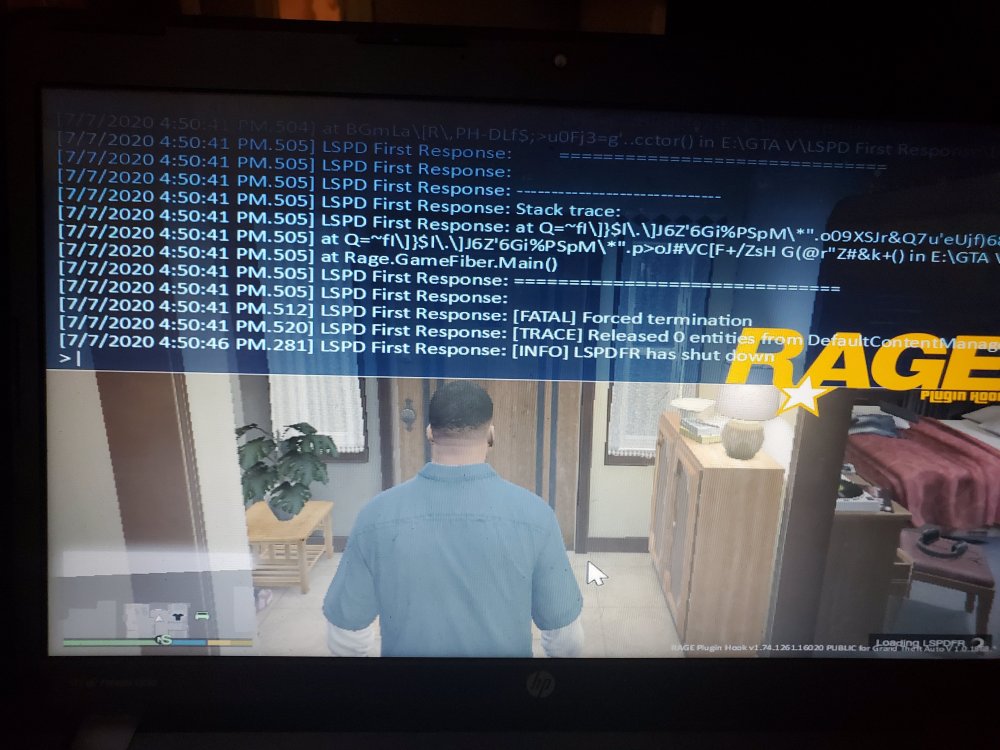 I have windows defender off real time protection off anti malware off I started with a fresh copy of gta and downloaded lspdfr manual zip extracted in my gta common folder ..I waited until I installed lspdfr to even start the fresh gta for 1st time still crashes. I'm going to upload my new logs for the fresh copy of lspdfr/gta5/rph RagePluginHook_07072020_194016.log
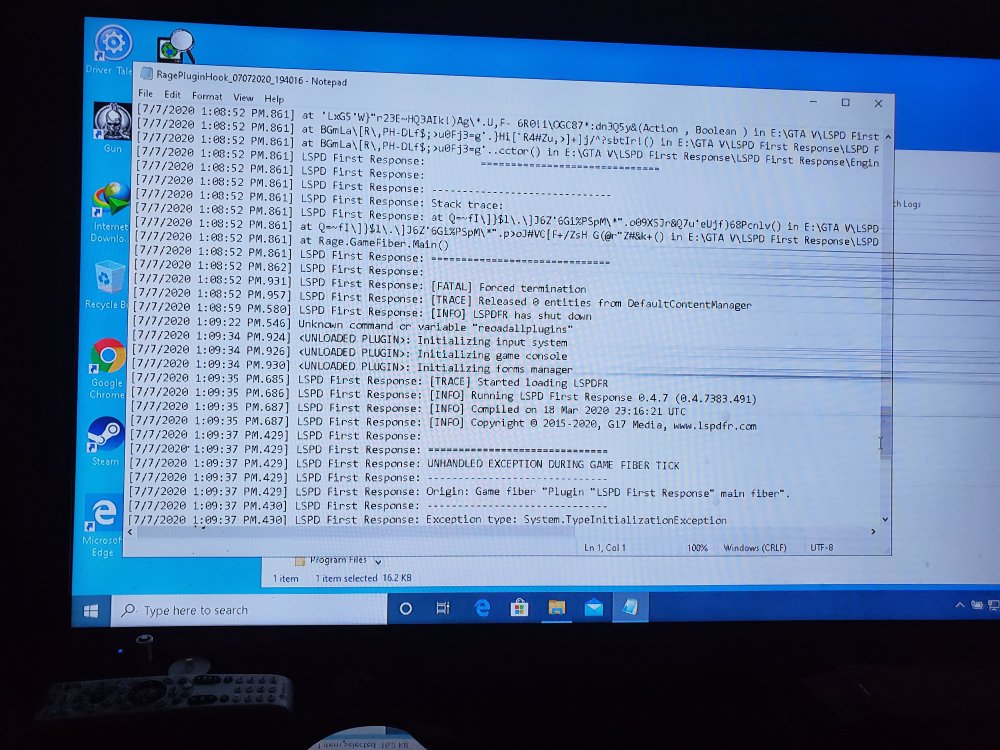 I e already terned off everything and made an exception as mentioned
.png.c587e47161e715597eb2ba0c33599bd4.png)
.png.0373b54e6314f196d52ef6255a3077a9.png)
.png.83f285cdae828016880fc9f07a55a607.png)
.png.e9cc9dc61bc7484294ebb3d29a4b3eee.png)
.png.5c10595e5d14b906f852bd19f1bb2929.png)
.png.02aa00babd82628c7a20faa4d3ccad7c.png)
.png.d11c39dd8bdf8ab44de2a74f5ae5656e.png)
.png.d3a51ac5c63745310e00ae017344bf37.png)
.png.334b6114170f3886c4b4a94711d6b3c7.png)
.png.762e9964b5a27d9a1f7cbdb6bd23e621.png)

