
TrooperWilson05
Members
-
Joined
-
Last visited
Everything posted by TrooperWilson05
-
Hello, Eggogamer Does it give you a log file, RPH, or an LSPDFR log file? If not, I suggest checking your anti-virus settings if you use Windows Defender, Microsoft Windows pre-installed anti-virus. I have in the past had to turn off the Controlled Folder Access option and add Grand Theft Auto V folder to the exclusion list. If you use any other anti-virus application(s). In that case, I recommend disabling it and using Windows Defender and doing the steps above, or adding the Grand Theft Auto V folder to your exclusion list. If it still is stuck, try verifying game files. If all else fails, I recommend you uninstall Grand Theft Auto V and re-install Grand Theft Auto V. I hope this helps! Best Regards, Trooper Wilson
-
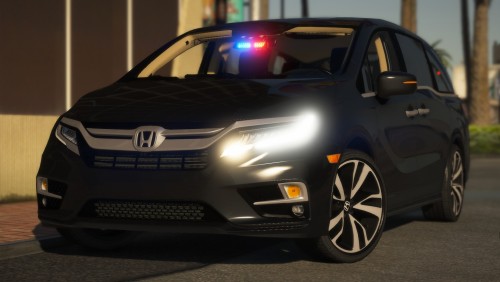 You're cruising down the road, doing 64 in a 55, going with the flow of traffic, right? All of a sudden, a minivan speeds up right behind you, breathing down your neck! Odd, but nothing of great interest. Then, the unthinkable happens. IT LIGHTS YOUR SKINNY ASS UP WITH RED AND BLUE LIGHTS! hehe
- 9 comments
- 5 reviews