Adams Development
Members
-
Joined
-
Last visited
Everything posted by Adams Development
-
-
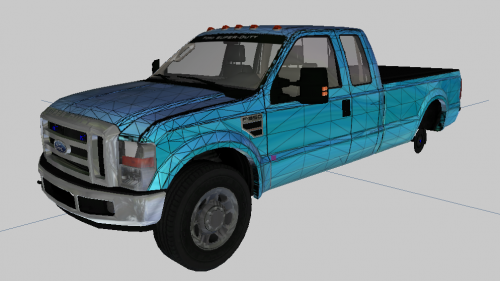 Ok. I will remove file. This was made so someone can use this and make it better. This was never meant to be complete as I dont know how to fix those things. I am still learning z mod. File will be deleted in a few hours once I get off work. Had a few message me and ask for it to stay up so I will keep it up. Just now to people downloading there is alot of stuff to still fix.
-
Ya you where listed on credits in the f350 brush truck model so I just brought that over.
-
Hmm was not able to find it on lcpdfr maybe he removed it or took it down
-
all good i completely understand where u are coming from. I uploaded outside shots and no interior shots and most of the stuff I did was interior while Hyena#8615 redid the bed of the truck. So would be hard to notice what was changed
-
Removed all the fire stuff that was on the model and and also the whole trunk bed was redone and a top cover was put on top. New seats and fixed holes. So did more than just fix holes. also fixed windows and fixed collisions as well. I am just learning zmod and how to do stuff in it so i am pretty happy with how I did for my first time. We all have to start somewhere. @Luckyx49
-
🙂 That is true. I just was learning how to fix holes and such in a car. Ya I agree the chrome texture is bad but this just just done as a starting point for people if they want to add or remove stuff they are free to do so. Did not notice that. lol. I appreciate the feedback!
-
This is my first model I have ever really done alot to. I have not seen any F350's on lcpdfr or any site and wanted to get a decent model out there so devs can use it and expand on the base. If you guys fix anything or do any upgrades to it please let me now. Would love to see some improvements on this as I am still learning how to do things in zmod. Good luck and have fun with this base. It is definitely not the best model but it is something for others to expand on. Please give credit to everyone in credits when using the model Adams Development Discord: https://discord.gg/WDZxBke
-
 Hello. At the moment I dont know how to template a vehicle am still trying to learn but if I learn I will definitely make a template for this vehicle
-
hmm. Works on my test server. Ill try it on another server to see if it works
-
I am unsure how to install for singleplayer but for fivem I made it drag and drop
-
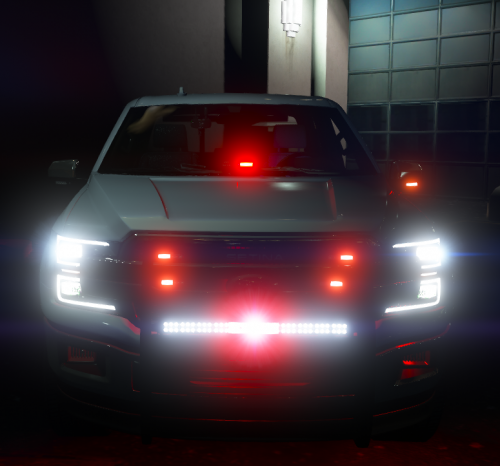
2018 Ford F150 Fire POV All of The Lights Can Be Taken Off with Ease By Use Of Extras. No Template is Unmarked Only https://discord.gg/WDZxBke Extras Extra 1: Ram Bar Extra 2: Ions on Ram Bar Extra 3: Dash Light Extra 4: Ions In Grill Extra 5: LED Bar Mounted to Ram Bar Extra 6: Side Runners Extra 7: Back Runner Extra 8: TA Bar In Back Window Extra 9: None Extra 10: None Extra 11: Driver Side Mirror Ion Extra 12: Passenger Side Mirror Ion This was my first car I did. Any suggestions and tips always welcome. Adam
-
 Thanks man! I do as well.
-
 I only do non els. That is what FiveM usually uses.
-
I dont know how to make els cars sorry.
-
Ya this base model is pretty darn bad but is free and was custom requested to use a impala and this is only free base i know of.
-
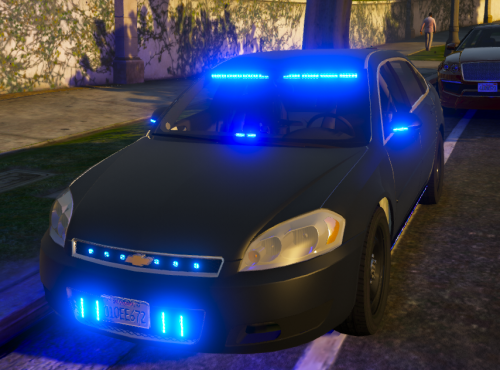
2016 Chevy Impala All of The Lights Can Be Taken Off with Ease By Use Of Extras. This is fully templated with unmarked Option. https://discord.gg/WDZxBke Extras Extra 1: Whelen Ion's Next To License Plate Extra 2: Code 3 Hide a Blast Lights In Grill Extra 3: Dashlight Extra 4: Fenix Fusion Inner Lightbar Extra 5: Driver Side Runner Extra 6: Passenger Side Runner Extra 7: Whelen Innner Edge RST Extra 8: Partition Extra 9: Laptop and Console Extra 10: None Extra 11: Driver Side Mirror Ion Extra 12: Passenger Side Mirror Ion Lighting Blue Blue NO LIVERY INCLUDED BUT COMES WITH TEMPLATE This was my second vehicle I have done. Happy Holidays, Adam
-
lol Great to hear! Ya just did these for a free release car pack. There is a 18 Charger but no 14 or 10. In the future I may add some more liverys to the pack
-
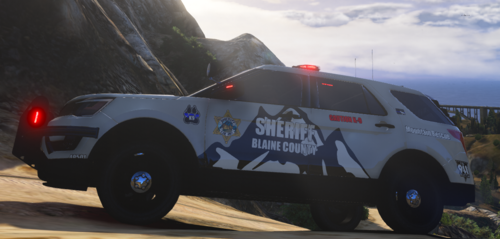 My Discord EarthLlamma#1481 https://discord.gg/WDZxBke This was a pack I did about 4 Months ago and decided to release it for others to enjoy! Installation : Drag and drop the files to your vehicles YTD file Comes with 19Tahoe 16Explorer This was made for
-
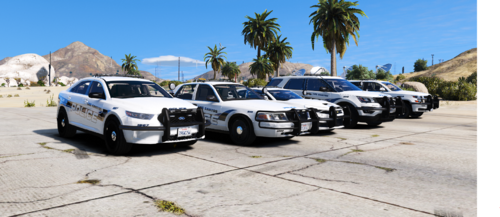
My Discord EarthLlamma#1481 https://discord.gg/WDZxBke This was a pack I did about 4 Months ago and decided to release it for others to enjoy! Installation : Drag and drop the files to your vehicles YTD file Comes with 19Tahoe 11CVPI 18Charger 16Explorer 16Taurus This was made for
-
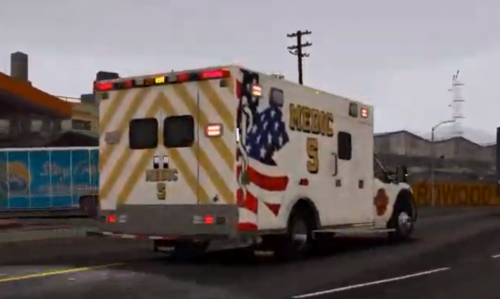 I have decided to make the SAFD-Medic 5 Public release due to Harry™ posting a almost exact copy to the livery I did. Enjoy the livery. Any questions or comments please send them to me via discord @ My Discord EarthLlamma#1481 https://discord.gg/WDZxBke Keep In Mind I Just Did the Livery NOT the Ambulance Credit: For Vehicles CandiMods NRP#3070 The Ambulance is a free release on gta5 mods without the livery I designed to match the rest of the SAFD fleet. https://www.gta5-mods.com/vehicles/2017-ford-f450-superduty-single-cab-ambulance
-
-