


RyanB509
Members
-
Joined
-
Last visited
Everything posted by RyanB509
-
Thanks for the update.
-
My game has been crashing while loading. After a lot of uninstalling and reinstalling mods 1 by 1 I have narrowed it down to the Superfix included with my vehicle pack That is the only vehicle pack I have installed. And the only .meta file I have updated was for the superfix. Idk if I am doing it wrong because I couldn't find instructions with the download. I went to mods/update/update.rpf/common/data/levels/gta5/vehicles.meta and replaced the entries in there for each vehicle from the download. Any ideas on what I am doing wrong?
-
So this is a bit odd. I don't know that is is a compulite issue specifically but its where I notice this. My interactions such as clicking on the buttons isn;t matching up right. I have to click well to the right of the item I want to click on. The vertical alignment is good but horizontally it's off. For example when looking at a ped if I click on Create Arrest it crates a ticket, but if I move my mouse over to the right of create arrest far enough then I can click it. Same with the charges menu, ect. Not sure if its related to me using an ultra-wide monitor (@1440p). Any suggestions on a fix?
-
 I like the concept but I feel like the implementation isn't that great, not sure if its limitations with GTA or what, but I am getting 1 shot killed by a body shot while wearing armor. A bit over the top to be honest. I wish it come with customizable damage multipliers and that took in to account the type of weapon you were shot with, rifles would do more damage than a hand gun, where you were shot (if that's even possible) and if you have armor on or not.
- 633 comments
- 58 reviews
-
Ya I advent gotten anywhere with my topic on this either. Best guess is it's got to be openIV bug.
-
At this point, I have to be doing something wrong. My game hard crashes while loading when I install a DLC pack. I tired a different DLC pack just to rule out it being an issue with that DLC. Same result. DLC packs installed with .oiv files like EUP work just fine, but something goes wrong when I manually install one and I don't know why. I drop the folder with the DLC pack 'dlc.rpf' file to mods\update\x64\dlcpacks. For example I take (https://www.lcpdfr.com/downloads/gta5mods/vehiclemodels/32277-16-lapd-ford-police-interceptor-utility/) and copy the dlc.rpf to mods\update\x64\dlcpacks\16lapdfpiu\dlc.rpf Then I update mods\update\update.rpf\common\data\dlclist.xml But of course I have the same problem with any other manually installed DLC pack too. The dlclist.xml file before (working): The dlclist.xml file after (not working): Of course editing the dlclist.xml to remove the added line makes my game work again. I attached my RPH log from when the pack was installed and the game crashed but I don't see anything particularly helpful in it myself. RagePluginHook.log
-
.thumb.png.04a1687a445e54a18a959b7926b87d7b.png) I noticed for some reason the lightbar on the Tahoe is heavily tinted on the Default "None" window tint option. You have to manually switch the tint to stock to make it correct. Not too big of a deal for my own but I don;t really like the AIs spawning with this, is there a way to fix this? I don't know if that's a problem with a config of mine somewhere or what would cause this.
I noticed for some reason the lightbar on the Tahoe is heavily tinted on the Default "None" window tint option. You have to manually switch the tint to stock to make it correct. Not too big of a deal for my own but I don;t really like the AIs spawning with this, is there a way to fix this? I don't know if that's a problem with a config of mine somewhere or what would cause this.- 217 comments
- 38 reviews
-
Game hard crashes during loading. Unsure as to what would be causing this. Any suggestions appreciated. Thanks. RagePluginHook.log
-
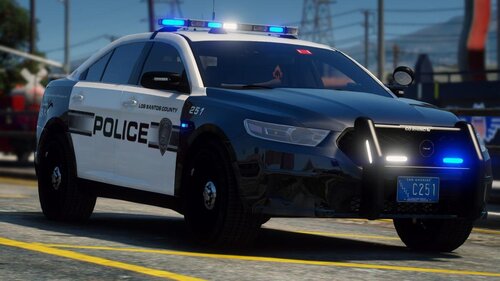 Looks nice, the only thing I would change to to make it say "Sheriff" instead of "Police"
- 37 comments
- 11 reviews
-
Since updating LSPDFR to the latest version it now crashes when loading. The RPH logs shows this: The full RPH log is attached for additional context. Any ideas on how to fix this? RagePluginHook.log
-
 If you have a trainer installed you can change both the primary and secondary colors to be the same. Unfortunately that does nothing to fixed AI spawned ones. And I'm not sure if there is a way to make the unmarked version use only the primary color. Another option would be to use a solid color texture instead of a transparent one.
- 276 comments
- 46 reviews
-
From what I have been able to find it seems I named it correctly. From what I can tell its a problem with my carvariations.meta file, problem is I don't know what needs to change. I did add the "FLAG_HAS_LIVERY" flag to my vehicles.meta file. I used the sample carvariations.meta from the Modding DLC pack for this car but my prolem is the same. Here is the carvariations.meta file: <Item> <modelName>fbi2</modelName> <colors> <Item> <indices content="char_array"> 134 134 156 156 </indices> <liveries> <Item value="true" /> <Item value="false" /> <Item value="false" /> <Item value="false" /> <Item value="false" /> <Item value="false" /> <Item value="false" /> <Item value="false" /> </liveries> </Item> <Item> <indices content="char_array"> 134 134 156 156 </indices> <liveries> <Item value="false" /> <Item value="true" /> <Item value="false" /> <Item value="false" /> <Item value="false" /> <Item value="false" /> <Item value="false" /> <Item value="false" /> </liveries> </Item> <Item> <indices content="char_array"> 134 134 156 156 </indices> <liveries> <Item value="false" /> <Item value="false" /> <Item value="false" /> <Item value="false" /> <Item value="true" /> <Item value="false" /> <Item value="false" /> <Item value="false" /> </liveries> </Item> <Item> <indices content="char_array"> 134 134 156 156 </indices> <liveries> <Item value="false" /> <Item value="false" /> <Item value="true" /> <Item value="false" /> <Item value="false" /> <Item value="false" /> <Item value="false" /> <Item value="false" /> </liveries> </Item> <Item> <indices content="char_array"> 134 134 156 156 </indices> <liveries> <Item value="false" /> <Item value="false" /> <Item value="false" /> <Item value="true" /> <Item value="false" /> <Item value="false" /> <Item value="false" /> <Item value="false" /> </liveries> </Item> </colors> <kits> <Item>157_massacaro2_modkit</Item> </kits> <windowsWithExposedEdges /> <plateProbabilities> <Probabilities /> </plateProbabilities> <lightSettings value="1" /> <sirenSettings value="1" /> </Item>
-
Thanks for the advice. Having problems getting it installed but I got a thread open over on the forums so hopefully someone can tell me what I am doing wrong. Also, I did notice a small issue with the 19 Tahoe, lightbar version (unsure if its also true of the slicktop) but the front plate is hidden behind the pushbar. It looks like it should be higher up on the bumper. Here's a screenshot, sorry it looks so bad, I used Steam to take the screenshot but while I play on a widescreen it seems steam squares off the screenshot squishing the image horizontally.
- 276 comments
- 46 reviews
-
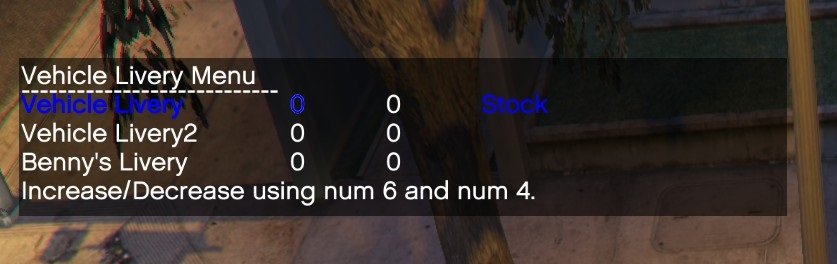
How do I add a new livery to a car? Every tutorial I have found assumes you are replacing an existing texture. I am not. I have a slicktop police car with a regular police livery. I have created a transparent png to install as a second livery to make an unmarked unit. In the ytd file the skin is named "TahoePPV_sign_1" so I imported my png as "TahoePPV_sign_2" thinking the game would automatically recognize it as a second livery to choose from. That doesn't work I only ever get the marked skin when spawning in and my trainer menu won't let me change livery. All 3 items in the livery menu can only be 0 0 Stock.
-
I really like this pack. Just wondering though are there by chance some unmarked liveries I can install along side the marked ones on the slick-top models? So I can have either a marked slick-top or an unmarked unit.
- 276 comments
- 46 reviews

.thumb.png.04a1687a445e54a18a959b7926b87d7b.png)

