


.png.c28608256f504b7efb67bf11954d90d1.png)

Lewiej1 Development
Members
-
Joined
-
Last visited
Everything posted by Lewiej1 Development
-
 That discord link takes me to no channels, i cannot see the server 😞
 -
.thumb.png.9a2e188a7b949fbd2e09d397671c1bf6.png) TEMPLATE:
TEMPLATE: -
2018 Dodge Charger - All Wheel Drive - Whelen Lighting Extra_1 - Whelen Legacy Lightbar Extra_2 - Setina Pushbar With Whelen Dominator Lighting Extra 3 - Whelen Inner Edge RST
-
 Yes, Just find the gun name and change it in the script.
 -
No, this isn't for FivePD all it does is allow you to do /onduty [department] that just gives you the Ped, loadout, and car.
-
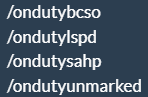
This is a simple script that allows you to do: /ondutylspd /ondutysahp /ondutybcso /ondutyunmarked /offduty After entering one of those commands, It will change your Ped, Give you a Police loadout, Then spawn you inside of your cop car ready for patrol. _________________________________________________________________________________________________________________________________________________________ DO NOT CLAIM THIS AS YOUR OWN. Please Ask For Permission To Re-post this file / upgrade it.


.thumb.png.9a2e188a7b949fbd2e09d397671c1bf6.png)
