n0nplayable
Members
-
Joined
-
Last visited
Everything posted by n0nplayable
-
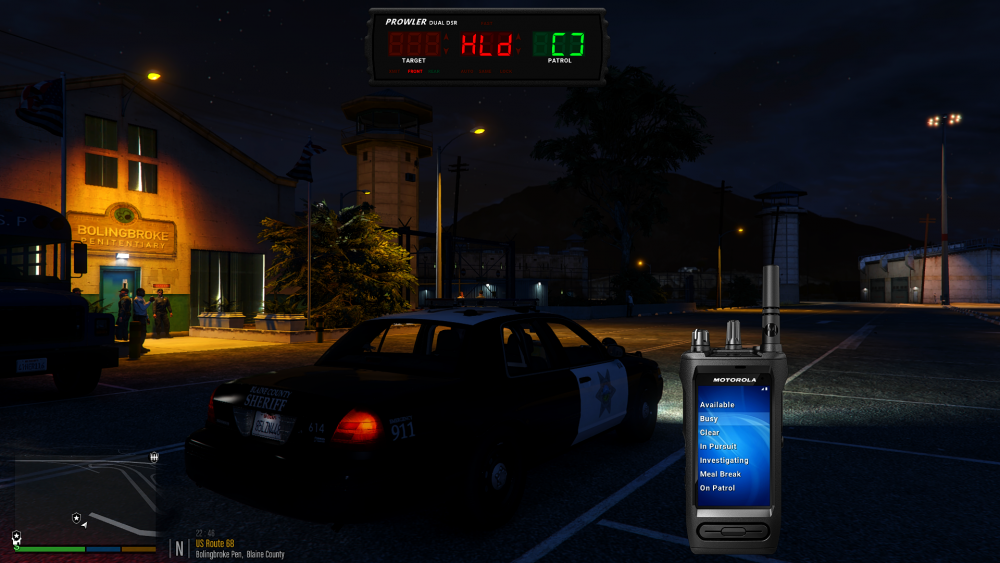
Hi, Finally, i can play comfortably and smooth. Below you can find the plugins i used. Also please pay attention to keybind. With these plugins, almost every callouts are nice and relaxing. Of course if you want, maybe you can add some "callouts" but this is enough for me. GTAV REDUX ReShade Preset "Dark & Realistic) VEHICLES Only two single vehicle i'm using with DLS. ELS is so buggy and keeps getting crash. GRAMMAR POLICE No need to use "Toggle" and "Settings" after "first personal set". Just RADIO key is enough. Toggle: F3 Settings: F2 Radio: Q PROWLER RADAR Power/Settings: 5 Xmit/Antenna: 6 MovSta/SameOpp: 7 FastLock: 8 StrLock: 9 AutoLock: 0 PLAYER LOCATION DISPLAY COMPULITE Open: E(hold) Tablet: F12 Give Citation: LCTRL +PageUp STOP THE PED Toggle: E Context: G Search: F3 Gunpoint Pursuit: T Quick Grab: LCTRL +T Tackle Sprint ULTIMATE BACKUP No need to use "Toggle" key. GrammarPolice operates all of these command on radio interface ALPR LITE Toggle: CTRL + S And these settings, so close to reality. Doesn't always blip, provides comfortable patrol. ALPRHitProbability=15 RegistrationIssueProbability=25 InsuranceIssueProbability=25 StolenVehicleProbability=10 OwnerWantedProbability=15 OwnerLicenseIssueProbability=25 NoRegistrationWeight=25 ExpiredRegistrationWeight=75 NoInsuranceWeight=20 ExpiredInsuranceWeight=80 NoLicenseWeight=20 ExpiredLicenseWeight=50 SuspendedLicenseWeight=30 EnableFrontLeftCamera=yes EnableFrontRightCamera=yes EnableRearLeftCamera=no EnableRearRightCamera=no ATTEMPTED CRIME CALLOUTS Talk: Y Support (Ambulance, Taxi etc.): UpDownLeftRight SIMPLE CALLOUTS