
GT500FIVEH
Members
-
Joined
-
Last visited
Everything posted by GT500FIVEH
-
Ok, I did some digging, and I am pretty sure I found the culprit. For some reason, dsound.dll was in my game folder, and I'm pretty sure it was interfering with ScriptHookV, so I disabled it, and it seems to be working for now. I'm certain it was the dsound.dll interfering with dinput8.dll. Now just gotta wait for ScriptHookV to update to the latest version. As of now, I'm pretty sure it's working. Thank you for giving me suggestions to figure out this dilemma. I really do appreciate your time and assistance!
-
As far as I'm aware, I haven't messed with anything that wasn't in the Mods folder. I did do a Steam Verify, and Steam didn't see anything wrong with it. Worst-case scenario, might have to reinstall the whole game. But if I find anything out before I do a complete reinstall, I'll let you know.
-
Yes, it still crashes without RPH, does the same thing when it crashes, just no "game crashed" window.
-
My GTA is crashing as soon as I launch and get to the splash screen on the Rockstar Games Logo. I seriously have no clue what could be causing this. The game was working fine, but when I went on duty, the LSPDFR plugin force-terminated it due to a freezing error. Now I'm just stuck on the Rockstar Games logo, then the game audio stutters and crashes. I have disabled the Mods folder, the Scripts Folder, run the game without the RAGE Plugin Hook, and reinstalled the Rockstar Games Launcher, but no luck. I've also tried to remove my settings.xml in my Documents folder. My PC Specs in case they are important: AMD Ryzen 5 3600 6-Core Processor 16.0 GB Ram NVIDIA GeForce RTX 3050 Windows 11 Pro Latest Version I also should mention that I did have an Internet outage, but I don't see how that could be resulting in the game crashing. I've attached some logs I thought would be helpful. If there is anything else, please let me know. I would like to have my game working again. Thanks! ScriptHookV.log RagePluginHook.log OpenIV.log asiloader.log RagePluginHook_17032026_083029.log
-
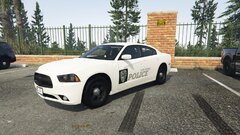
From the album: New Athens, Illinois Police Cars
-
Skins I created of my local town's police cars that are currently in service, they are not 1 to 1 but they did turn out pretty decent.
-
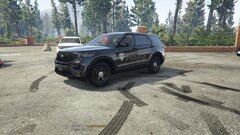
From the album: New Athens, Illinois Police Cars
-
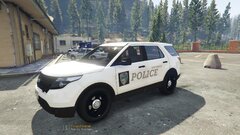
From the album: New Athens, Illinois Police Cars
-
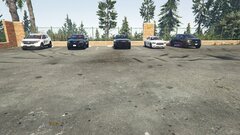
From the album: New Athens, Illinois Police Cars
-
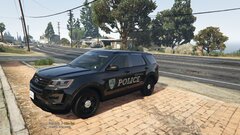
From the album: New Athens, Illinois Police Cars
-
Yep, had to reinstall windows
-
Hello LSPDFR Users! So yesterday I hopped on LSPDFR and before I loaded all my plugins, I couldn't hear my ELS Clicks from my vehicle. I tried to load into the game, went on duty, and tried using my grammar police and dispatch, No Sound. I don't know what happened, I have reinstalled the whole game, and Nothing. I need some assistance with this, This isn't very pleasant, and I would like my audio back. Thanks! GT500FIVEH