Skip to content
View in the app

A better way to browse. Learn more.

LCPDFR.com

A full-screen app on your home screen with push notifications, badges and more.

To install this app on iOS and iPadOS
  1. Tap the Share icon in Safari
  2. Scroll the menu and tap Add to Home Screen.
  3. Tap Add in the top-right corner.
To install this app on Android
  1. Tap the 3-dot menu (⋮) in the top-right corner of the browser.
  2. Tap Add to Home screen or Install app.
  3. Confirm by tapping Install.

ariX

Members
  • Joined

  • Last visited

Everything posted by ariX

  1. In the main mod post there used to be an automatic setup file but it looks as if it no longer is there
  2. The title is self explanatory, LSPDFR keeps crashing and freezing and has pretty much usual lag. I have a GeForce GTX 650 as a graphics card.
  3. and here's a screenshot of my plugins folder
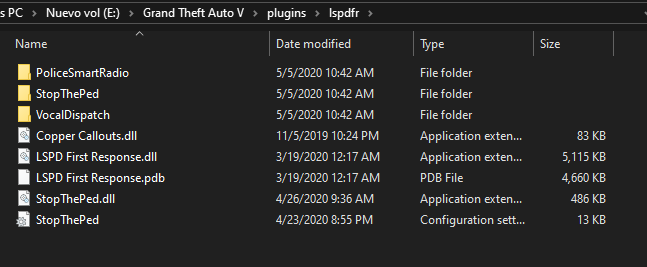
  4. So basically I try to launch LSPDFR with additional plugins and it doesn't want to load at all. It doesn't give me any error message. I usually start the game through "RAGEPluginHook", open the console, and type "ReloadAllPlugins" and proceed as usual. (Going on duty) But now when I type "ReloadAllPlugins" the command log stays there and there are no more changes or logs.

Account

Navigation

Search

Search

Configure browser push notifications

Chrome (Android)
  1. Tap the lock icon next to the address bar.
  2. Tap Permissions → Notifications.
  3. Adjust your preference.
Chrome (Desktop)
  1. Click the padlock icon in the address bar.
  2. Select Site settings.
  3. Find Notifications and adjust your preference.