
xCurlyFry
Members
-
Joined
-
Last visited
Everything posted by xCurlyFry
-
 XML File is broken causing ELS to not work, So I Have Fixed The File (NOTE: I Didn't Change Anything Important Such As "Description", All i did was fix the code so ELS will work again). I also changed ActivationType to "Auto" so Pressing J automatically goes to LSTG3, then Pressing J again disables all lights. To Change it Back to default (Pressing J 3 Times), change Line 6 to: <LstgActivationType>manual</LstgActivationType> <?xml version="1.0" encoding="utf-8"?> <!-- ELS VEHICLE CONFIGURATION FILE --> <vcfroot Description="LAPD Vic by t0y" > <!-- INTERFACE --> <INTERFACE> <LstgActivationType>auto</LstgActivationType> <DefaultSirenMode>standby</DefaultSirenMode> <InfoPanelHeaderColor>grey</InfoPanelHeaderColor> <InfoPanelButtonLightColor>orange</InfoPanelButtonLightColor> </INTERFACE> <!-- EXTRAS OVERRIDE AND ENV LIGHTING--> <EOVERRIDE> <Extra01 IsElsControlled="true" AllowEnvLight="true" Color="blue" OffsetX="-0.70" OffsetY="-0.20" OffsetZ="0.50" /> <Extra02 IsElsControlled="true" AllowEnvLight="true" Color="blue" OffsetX="0.25" OffsetY="-0.20" OffsetZ="0.50" /> <Extra03 IsElsControlled="true" AllowEnvLight="true" Color="blue" OffsetX="-0.25" OffsetY="-0.20" OffsetZ="0.50" /> <Extra04 IsElsControlled="true" AllowEnvLight="true" Color="blue" OffsetX="0.70" OffsetY="-0.20" OffsetZ="0.50" /> <Extra05 IsElsControlled="true" AllowEnvLight="true" Color="blue" OffsetX="-0.25" OffsetY="0.20" OffsetZ="0.50" /> <Extra06 IsElsControlled="true" AllowEnvLight="true" Color="blue" OffsetX="0.25" OffsetY="0.20" OffsetZ="0.50" /> <Extra07 IsElsControlled="true" AllowEnvLight="true" Color="amber" OffsetX="-0.40" OffsetY="-0.80" OffsetZ="0.50" /> <Extra08 IsElsControlled="true" AllowEnvLight="true" Color="amber" OffsetX="0.00" OffsetY="-0.80" OffsetZ="0.50" /> <Extra09 IsElsControlled="true" AllowEnvLight="true" Color="amber" OffsetX="0.40" OffsetY="-0.80" OffsetZ="0.50" /> <Extra10 IsElsControlled="false" /> <Extra11 IsElsControlled="true" /> <Extra12 IsElsControlled="false" /> </EOVERRIDE> <!-- MISC --> <MISC> <VehicleIsSlicktop>false</VehicleIsSlicktop> <ArrowboardType>off</ArrowboardType> <UseSteadyBurnLights>false</UseSteadyBurnLights> <DfltSirenLtsActivateAtLstg>3</DfltSirenLtsActivateAtLstg> <Takedowns AllowUse="true" Mirrored="true" /> <SceneLights AllowUse="false" IlluminateSidesOnly="false" /> </MISC> <!-- CRUISE --> <CRUISE> <DisableAtLstg3>true</DisableAtLstg3> <UseExtras Extra1="true" Extra2="false" Extra3="false" Extra4="true" /> </CRUISE> <!-- AUX CORONAS --> <ACORONAS> <Headlights DfltPattern="3" ColorL="white" ColorR="white" /> <TailLights DfltPattern="22" ColorL="red" ColorR="red" /> <IndicatorsF DfltPattern="0" ColorL="blue" ColorR="red" /> <IndicatorsB DfltPattern="0" ColorL="red" ColorR="red" /> <ReverseLights DfltPattern="22" ColorL="white" ColorR="white" /> </ACORONAS> <!-- SOUNDS --> <SOUNDS> <MainHorn InterruptsSiren="true" AudioString="SIRENS_AIRHORN" /> <ManTone1 AllowUse="true" AudioString="VEHICLES_HORNS_SIREN_1" /> <ManTone2 AllowUse="true" AudioString="VEHICLES_HORNS_SIREN_2" /> <SrnTone1 AllowUse="true" AudioString="VEHICLES_HORNS_SIREN_1" /> <SrnTone2 AllowUse="true" AudioString="VEHICLES_HORNS_SIREN_2" /> <SrnTone3 AllowUse="true" AudioString="VEHICLES_HORNS_POLICE_WARNING" /> <SrnTone4 AllowUse="true" AudioString="VEHICLES_HORNS_AMBULANCE_WARNING" /> <AuxSiren AllowUse="false" AudioString="VEHICLES_HORNS_SIREN_1" /> <PanicMde AllowUse="false" AudioString="VEHICLES_HORNS_POLICE_WARNING" /> </SOUNDS> <!-- WRNL --> <WRNL LightingFormat="leds" > <PresetPatterns> <Lstg3 Enabled="true" Pattern="11" /> </PresetPatterns> <ForcedPatterns> <MainHorn Enabled="false" Pattern="0" /> <SrnTone1 Enabled="false" Pattern="0" /> <SrnTone2 Enabled="false" Pattern="0" /> <SrnTone3 Enabled="false" Pattern="0" /> <SrnTone4 Enabled="false" Pattern="0" /> <PanicMde Enabled="false" Pattern="0" /> <OutOfVeh Enabled="false" Pattern="0" /> </ForcedPatterns> <ScanPatternCustomPool Enabled="false" Sequential="true" > <Pattern>0</Pattern> <Pattern>0</Pattern> <Pattern>0</Pattern> </ScanPatternCustomPool> </WRNL> <!-- PRML --> <PRML LightingFormat="leds" ExtrasActiveAtLstg2="1and4" > <PresetPatterns> <Lstg2 Enabled="true" Pattern="115" /> <Lstg3 Enabled="true" Pattern="115" /> </PresetPatterns> <ForcedPatterns> <MainHorn Enabled="true" Pattern="140" /> <SrnTone1 Enabled="true" Pattern="115" /> <SrnTone2 Enabled="true" Pattern="18" /> <SrnTone3 Enabled="false" Pattern="0" /> <SrnTone4 Enabled="false" Pattern="0" /> <PanicMde Enabled="false" Pattern="0" /> <OutOfVeh Enabled="true" Pattern="119" /> </ForcedPatterns> <ScanPatternCustomPool Enabled="false" Sequential="true"> <Pattern>0</Pattern> <Pattern>0</Pattern> <Pattern>0</Pattern> </ScanPatternCustomPool> </PRML> <!-- SECL --> <SECL LightingFormat="traf" DisableAtLstg3="true" > <PresetPatterns> <Lstg1 Enabled="true" Pattern="26" /> <Lstg2 Enabled="true" Pattern="26" /> <Lstg3 Enabled="true" Pattern="26" /> </PresetPatterns> <ForcedPatterns> <MainHorn Enabled="false" Pattern="0" /> <SrnTone1 Enabled="false" Pattern="0" /> <SrnTone2 Enabled="false" Pattern="0" /> <SrnTone3 Enabled="false" Pattern="0" /> <SrnTone4 Enabled="false" Pattern="0" /> <PanicMde Enabled="false" Pattern="0" /> <OutOfVeh Enabled="false" Pattern="0" /> </ForcedPatterns> <ScanPatternCustomPool Enabled="false" Sequential="true" > <Pattern>0</Pattern> <Pattern>0</Pattern> <Pattern>0</Pattern> </ScanPatternCustomPool> </SECL> </vcfroot>
- 175 comments
- 24 reviews
-
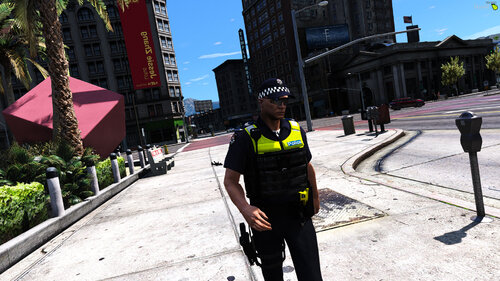 Fantastic uniforms and it makes it better since it's an EUP addon. Installation instructions aren't exactly all user friendly making it easy to get confused or install into the wrong place (speaking from my first install). The Only major disapointment about this pack is the fact the Vest is no longer provided and you were forced to go to the dev's Discord to get it before it was removed. From there, you were made to pay $50AUD just to download the file which is a complete joke... I'm here for a honest review, and that's why I'm giving it 3/5 stars. If the vest was free and was provided in the pack still, then it would be a 5 star without a doubt.
- 31 comments
- 1 review