


Ramirez
Members
-
Joined
-
Last visited
Everything posted by Ramirez
-
Just a suggestion. Make the front wheels the same size as the rear wheels. It'll look a lot more realistic that way. Other than that great job!
- 29 comments
- 11 reviews
-
-
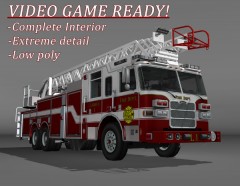 Actually the guy that made it didn't make it for them. It was actually a request made by myself for an ArmA 2 Mod. He put it on turbosquid afterwards. Thats how they got it, they payed $300 for it (thats what the original price was.)
 -
BEGIN *SIGNED* LCPD First Response Issue Report Diagnostics Tool Version: 0.4.3 Operating system: Windows7 HomePremium (6.1.0.0 Build: 7600) Service Pack: System RAM (GB): 7.99 CPU cores: 8 NET Framework 4.0 installed: True Visual C++ 2010 Redistributable installed: True GTA IV - Installed: True GTA IV - Install folder: C:\Program Files (x86)\Rockstar Games\Grand Theft Auto IV GTA IV - Version: 1, 0, 7, 0 GTA IV - Asi loader installed: True GTA IV - Asi loader: DSOUND GTA IV - Asi loader valid: True GTA IV - C++ ScriptHook installed: True GTA IV - C++ ScriptHook valid: True GTA IV - C++ ScriptHook version: 0, 5, 1, 0 GTA IV - ScriptHookDotNet installed: True GTA IV - ScriptHookDotNet valid: True End of *SIGNED* LCPD First Response Issue Report Digital signature: Za5bk/ADLDHBbAnJexz0jA== But the game still wont start up even if ran as administrator
-
I cant move channels and there is 1 admin and hes not answering me
-
can you get on your teamspeak? Im on there, it will be much easier
-
That was quick haha And i did both and now my GTA wont even start up
-
Installation component 'dsoundASI' error'd! at System.IO.__Error.WinIOError(Int32 errorCode, String maybeFullPath) at System.IO.FileStream.Init(String path, FileMode mode, FileAccess access, Int32 rights, Boolean useRights, FileShare share, Int32 bufferSize, FileOptions options, SECURITY_ATTRIBUTES secAttrs, String msgPath, Boolean bFromProxy, Boolean useLongPath) at System.IO.FileStream..ctor(String path, FileMode mode, FileAccess access, FileShare share) at System.IO.File.WriteAllBytes(String path, Byte[] bytes) at eval_2.LCPDFR-eval_0.eval_LCPDFR-0(String A_0, String A_1, Boolean A_2) at eval_2.LCPDFR-eval_0.eval_LCPDFR-3(String A_0, String A_1)
